
Participant
January 21, 2021
Answered

Search specific published links

  • January 21, 2021
  • 1 reply
  • 532 views

A couple of months ago, I supplied an XD prototype link to a colleague, but the password I supplied along with the link now doesn't seem to work. Is there any way to search my published links for the specific url so I can go into the file and update the password/re-supply the link?
    This topic has been closed for replies.
    Correct answer HARSHIKA_VERMA

    Hi Clairee,


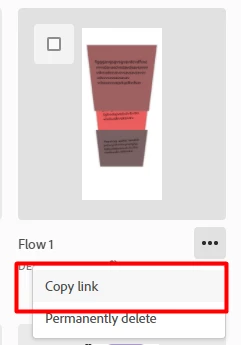
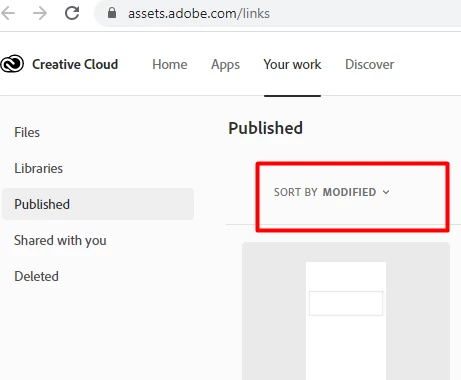
    I am not sure if there is a way to search by link instead of the file name. I will check with the team. However, If you open the link shared above by Rishabh. It will show up all your files and when you click on the 3 dots. You will see the "Copy Link" option. Once you copy the link, you will get the URL of your file, and then you can match the URL with the link you are trying to search. I know it's a bit tedious task. One more thing you can try, if you have recently modified or made updates to the file you are searching then you can also filter that out using the option shown below-


    Hope it helps.


    Thanks, 

    Harshika

    1 reply

    Rishabh_Tiwari
    Community Manager
    Community Manager
    January 21, 2021

    Hi Claire,


    Thanks for reaching out. You can search the link by file name here: https://assets.adobe.com/links


    Let us know if this helps or if you need any further assistance.


    Regards

    Rishabh

    Participant
    January 27, 2021

    That's the problem though - I know the link, but not the file name. Is there any way to reverse the search?

    HARSHIKA_VERMA
    Community Manager
    HARSHIKA_VERMACommunity ManagerCorrect answer
    Community Manager
    January 27, 2021

    Hi Clairee,


    I am not sure if there is a way to search by link instead of the file name. I will check with the team. However, If you open the link shared above by Rishabh. It will show up all your files and when you click on the 3 dots. You will see the "Copy Link" option. Once you copy the link, you will get the URL of your file, and then you can match the URL with the link you are trying to search. I know it's a bit tedious task. One more thing you can try, if you have recently modified or made updates to the file you are searching then you can also filter that out using the option shown below-


    Hope it helps.


    Thanks, 

    Harshika