


- Home
- Adobe XD
- Discussions
- Re: Stacks not working in Preview mode
- Re: Stacks not working in Preview mode
Stacks not working in Preview mode

Copy link to clipboard
Copied
I'm not sure if this is a limitation of stacks, but they don't seem to be responsive in preview mode.
In Design, I have come 'card' components which have been grouped into a Stack. The components have a default state (expanded), and also a minimised (collapsed) state. Toggling between the two states in Design mode works fine.
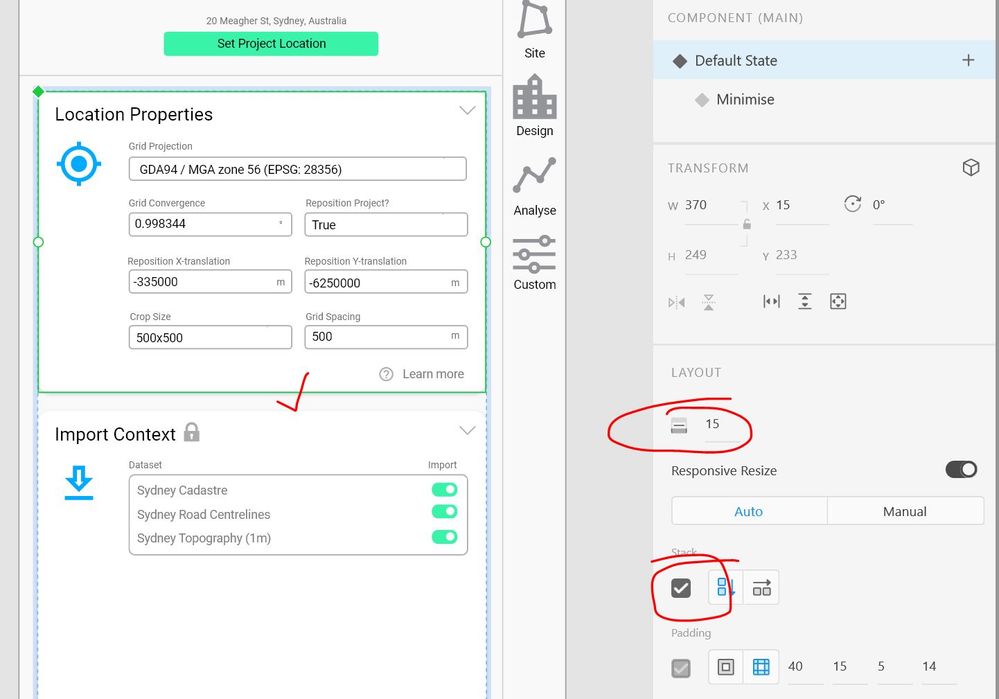

But in preview mode, they aren't responsive.

Any ideas on how to fix this?


 16
Replies
16
16
Replies
16


Copy link to clipboard
Copied
Hi Paul,
Thank you for reaching out, Stacks is more of a design mode property than prototyping. If you wish to create such a dropdown impression, you would have to create it by adjusting components states.
Here are some limitations which you should consider to have a better understanding (https://helpx.adobe.com/xd/user-guide.html/xd/help/create-dynamic-designs-with-stacks.ug.html).
Thanks,
Atul_Saini
Copy link to clipboard
Copied
Hi Atul
So Stacks are not meant to function in Prototype? Can you elaborate on what you mean by "create it by adjusting components states"?
I have already created different states as shown in the image. What I can't get to work is for components to move based on the trigger of another component, i.e. when one component switches to the 'minimise' state, the components below move up. How can I achieve this without having endless canvases will all possible combinations?
Copy link to clipboard
Copied
Please excuse how the design looks, Paul. Let me know if the 1st example on the prototype is what you're expecting here https://xd.adobe.com/view/f8bc4d3d-910a-4203-88e9-b7c188bdec0f-adef/
1st one is attained by using nested components and states and the second one is the same behavior as you are experiencing.
Perhaps, it would be great if you could submit your feedback here (https://adobexd.uservoice.com/forums/353007-adobe-xd-feature-requests).
Thanks,
Atul_Saini
Copy link to clipboard
Copied
Thanks but the link you sent says page not found
Copy link to clipboard
Copied
Please take the parenthesis off. It should work.
Copy link to clipboard
Copied
Have you changed the link? Becuase now when I look at it, it is completely different. And there are no interactions at all???
Copy link to clipboard
Copied
Hi Paul, I might have updated the link accidentally, please check it again and let me know if this sort of setup works for you.
https://xd.adobe.com/view/eef408a8-de63-42a8-8170-467455a20928-bba7/

Copy link to clipboard
Copied
" i may have updated the link accidently" lol this sums up XD nicely, even the dev support can't keep of track of its internal workings.

Copy link to clipboard
Copied
Having the same problem. This needs to be fixed in XD or the stacking/nesting functionality kind of looses it's meaning. Would be great for menus, accordions and as in the example above.
Copy link to clipboard
Copied
Its been several months now and this feature still hasn't been implemented. Any idea when this will be fixed?

Copy link to clipboard
Copied
Hi Paul,
Sorry for the delay. As of now, we don't have any official word by when this would be available, however, I'll share your feedback with the Engineering team. To add voice to the feature, please upvote this request: https://adobexd.uservoice.com/forums/353007-adobe-xd-feature-requests/suggestions/40762615-stacks-sh...
Regards
Rishabh

Copy link to clipboard
Copied
Pretty stupid that stacks only works for design. If I have collapsible sections I have to create components for each state. USELESS


Copy link to clipboard
Copied
Wouldn't say stacks are completely useless, but it's annoying that we can't use them in prototyping. Problem is the prototypes in Xd are pretty much static animated images rendered according to what we set up in design. There are no dynamic relationships between them, like in the program.

Copy link to clipboard
Copied
Well, it is useless so to say. Having to create components just to move the stacks in preview mode is lame. It's really sad that XD's real features updates are slower than a snail... oh wait! slower than a sloth. I am strongly thinking of switching to a better alternative! I am tired to making useless artboards and components, just to show a small change in the same screen. In summary, Prototyping in Adobe XD is pretty lame and at this rate, I wonder if XD would ever become a go-to tool for prototyping.

Copy link to clipboard
Copied
yeah from the sound of it they wont even look to implement this feature.

Copy link to clipboard
Copied
My thoughts exactly!


Get ready! An upgraded Adobe Community experience is coming in January.
Learn more
 AdChoices