
Participant
February 11, 2021
Question

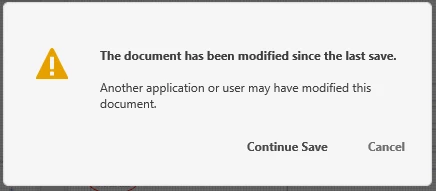
The document has been modified since the last save. - when saving anywhere
  • February 11, 2021
  • 2 replies
  • 907 views

Started getting this message recently for any save of an existing document, even when I know that it isn't possible that the document has been changed.  This is happening on Windows.  I haven't checked on my MacBook yet.  Save works, so more of an annoyance at this point.  Seems to be the type of error that would be related to syncing cloud based storage.

Incidentally, it would be great if Adobe didn't seem to assume that users would prefer to store in their cloud service over a private cloud or local storage.  Many companies (including mine) have policies against storing their data in a 3rd party network or cloud.  There can be many reasons for this including customer requirements, i.e. defense contractors.

    This topic has been closed for replies.

    2 replies

    andrewb39087563
    Known Participant
    February 15, 2021

    I'm getting the same probelm but what makes it worse XD keeps saving "copy (n)" files to the cloud, and then I have to "hunt" through all of the copies to find my latest work.

    ADOBE - How do we switch off cloud saving?   

    Defence contractors do not share their files with other users or cloud products.

    Participating Frequently
    May 12, 2021

    I have the same problem. 

    Participant
    February 11, 2021

    Replying to my own post as I couldn't find an edit option... My comment about Adobe assuming users would prefer storing in their cloud is based on the fact that this is the default behavior and I can't find an option for changing the default behavior.

    If I create a new document it almost immediately trys to save to the adobe cloud, even if I haven't tried to save the document yet.  I'm not an XD expert though, so if I'm missing a way to change the default behavior, I'm open to learn something. 🙂

    Participating Frequently
    May 11, 2021

     I love the cloud but I can't use cloud features either currently.  I've been assuming i'm getting that modified since last save issue because my network has a slightly different date/time from my machine or something.     Agreed 100% on the assumed default of cloud being something you should be able to turn off.