mate909
Participant
October 15, 2018
Answered

two menu bars: first disappears, second fixed

  • October 15, 2018
  • 3 replies
  • 1846 views

Hi,

I have two menu bars. The first one is fixed, the second menu bar scrolls over it. Facebook has the same scolling what I want to do, for which I attached a couple of pictures.

Sorry for my english.

Picture1: No scrolling. Both top menu bars can be seen.

Picture 2: Scrolling. Only one menu bar (second menu bar) can be seen.

How can I do that in Andobe XD?

Thank you

    This topic has been closed for replies.
    Correct answer Dan Rodney

    Hi

    I have tried out the new feature "Auto Animation", but it still not work.

    The picture shows the example what I want. "Status bar" and "Bar 1" should be fixed, which I can do. But now I have some problems.

    "Bar 2" should scroll over "Bar 1" and when "Bar 2" reaches "Status bar", it should be fixed too. The "Content" scrolls through "Bar 2" & "Status bar".

    Left picture shows the beginning (No scrolling). Right picture shows the result (after scrolling).
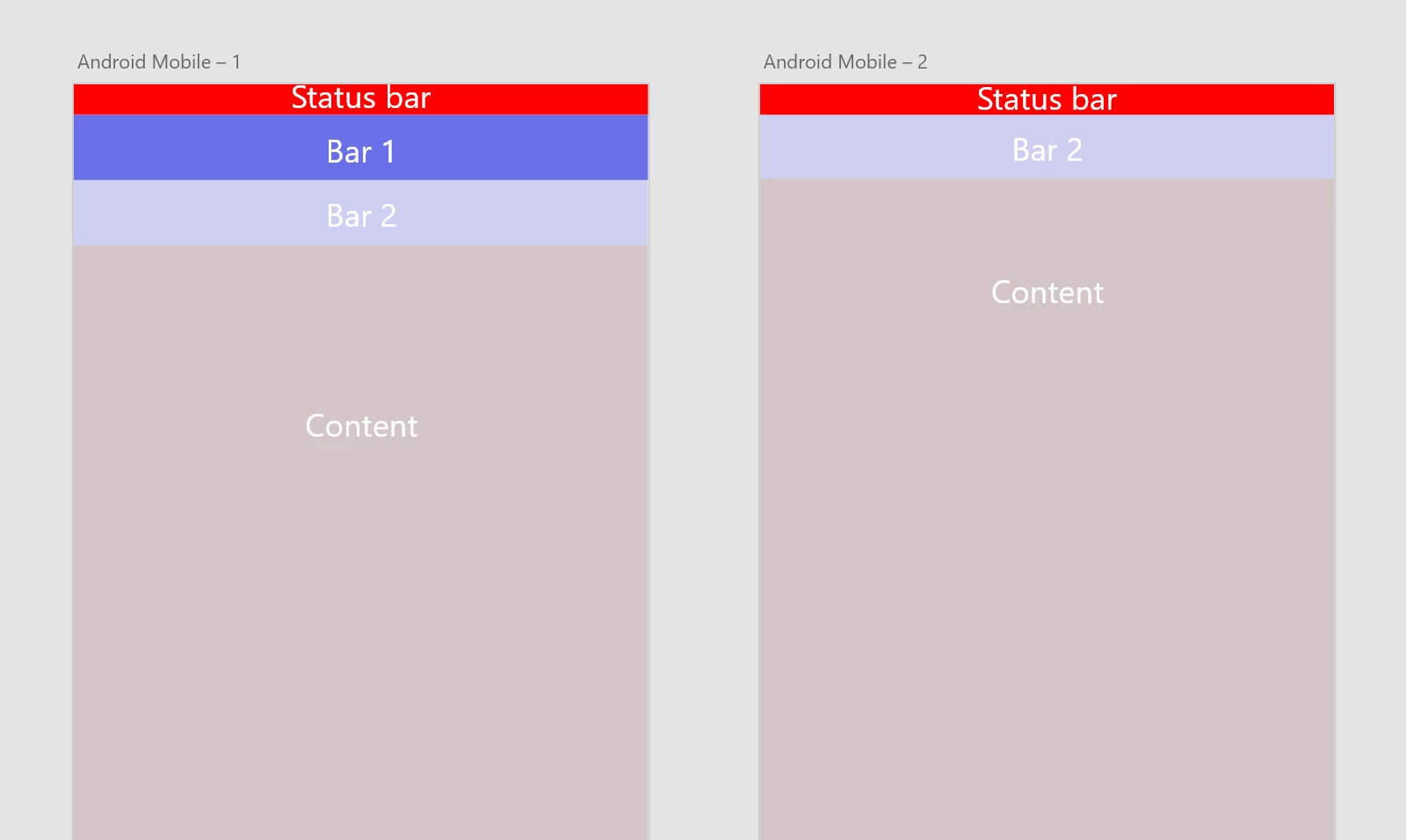
    Maybe someone can help me and explain me "Auto Animation"? It would be awesome, if I can implement these fixed App bars to my project.

    Thank you


    This is not currently possible in XD. Elements are either fixed, or scroll. They cannot start scrolling and then become fixed at a certain point.

    You should head over to https://adobexd.uservoice.com/ and see if a feature request like that has been made and upvote it, or create a new feature request.

    3 replies

    Fabiiiapi
    Participant
    August 20, 2020

    Hi,

    What about now? Any idea on how to create multiple sticky elements on a prototype to test on users ?
    Something like this : https://www.w3schools.com/howto/howto_css_sticky_element.asp

    Harshika Verma
    Community Manager
    Community Manager
    August 20, 2020

    Hi there,


    Thank you for reaching out. If I heard you right, you are looking for this functionality: https://adobexd.uservoice.com/forums/353007-adobe-xd-feature-requests/suggestions/34603798-fixed-sticky-after-scrolling


    If so, please submit your feedback and upvote the request to add your voice.


    Hope it helps.


    Thanks,

    Harshika

    Dan Rodney
    Community Expert
    Community Expert
    October 28, 2018

    Several people have suggested Auto Animate. That will not work if you want to make an interactive prototype to test on users. But Auto Animate could work if all you need to do is make a "video" showing developers how the scrolling and snapping behavior will work. In that case you should try Auto Animate.

    — Adobe Certified Expert & Instructor at Noble Desktop | Web Developer, Designer, InDesign Scriptor
    Atul_Saini
    Legend
    October 16, 2018

    Hi Mate909,

    Thanks for using Adobe XD and sharing the screenshots. Could you please check this prototype: - Adobe XD CC and check if this is any closer to your expectation? If yes, you can create it using Auto-Animations.

    Thanks,

    Atul_Saini

    mate909
    mate909Author
    Participant
    October 16, 2018

    Hi Atul_Saini,

    Yes, this could be workable. Thank you very much.

    mate909
    mate909Author
    Participant
    October 17, 2018

    Hi

    I have tried out the new feature "Auto Animation", but it still not work.

    The picture shows the example what I want. "Status bar" and "Bar 1" should be fixed, which I can do. But now I have some problems.

    "Bar 2" should scroll over "Bar 1" and when "Bar 2" reaches "Status bar", it should be fixed too. The "Content" scrolls through "Bar 2" & "Status bar".

    Left picture shows the beginning (No scrolling). Right picture shows the result (after scrolling).

    Maybe someone can help me and explain me "Auto Animation"? It would be awesome, if I can implement these fixed App bars to my project.

    Thank you