
Mexath3
Participant
February 7, 2020
Answered

Unable to enter text in Adobe Xd (bug)

  • February 7, 2020
  • 43 replies
  • 36853 views

Periodicity does not select the text and does not enter it where it is needed, but enters it in a random place, for example, in the "size" field. This bug is the entire existence of the program. I have a midday version. New PC, Last win update 10. I'm so angry that I’m ready to stop using the program. In order for the text to be correctly entered again, you have to restart the program, and this is a long time, and so every couple of minutes - it is impossible to work! Sometimes you can select text in the name of the object and selection in the layout will again become possible, but then this also stops working - the text is not highlighted and not entered. This application is for interface designers, and it does not even allow you to write plain text - horror.
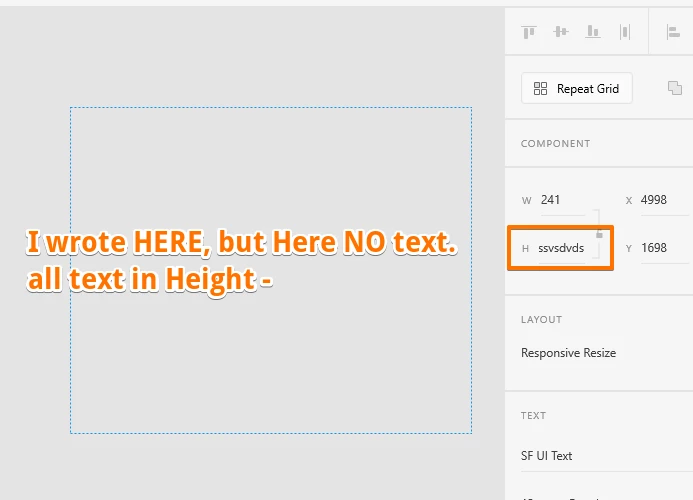
 

{Renamed By MOD}

This topic has been closed for replies.
Correct answer Derya5C29

Hi, here is a solution found on another forum regarding this issue : launch c:\Windows\System32\ctfmon.exe on Run or the explorer or the windows bar. Or you can find this fisher ctfmon.exe et launch it, it will solve the problem. 

This issue is due to severeal language pluged on the computor. Hope it will help

43 replies

richardp512
Participating Frequently
August 26, 2020

If it helps, I've recorded some of the text focus/text entry issues happening in XD.


It's a daily occurence - sometimes every few seconds, other times it's fine for hours. I suppose it might depend on what I'm doing in the file. If I'm editing lots of text elements, then it stands to reason I would see it more frequently. Regardless, Alt-Tabbing out of XD and back seems to rectify it. Sometimes, I need to Alt-Tab out and back a few times.


It seems like there are two types of issue:

1. I cannot edit any text element. The text will not enter edit mode at all. Sometimes, text entered at this point appears within a text input in the properties panel. The property varies. Possibly depending on what I was using.

2. I get stuck in text editing mode for an element, and cannot deselect the element, or select another element. This is what I've captured on video.

In both instances, XD's UI (specifically the properties panel) can have issues with multiple properties appearing as if they have focus at the same time.


- Can you advise how I share with you the video without making it public? I've uploaded it to Adobe Cloud and added a comment explaining what's going on.


- I have run the Log Collector tool and uploaded the result.
File: AdobeLogs_20200825_014035_947-win.zip


- This can happen on any XD document. Most of my files are Cloud documents. Some though are local. Both are affected.


- It doesn't appear to be linked to a specific font. I primarily use the Source Sans Pro family, Tekton Pro from Adobe Typekit/Adobe Fonts and Font Awesome 5 Pro. It's happened on all.


I'm running 64-Bit Windows 10 Pro (2004 currently), with XD 32.0.22.11, Creative Cloud Sync 4.3.51.3. Both are automatically updated as new versions arrive. The issue has been present for months on every version of XD for some time. It happened on my previous Windows 10 PC too. The machine is a Lenovo P53s laptop with an i7 processor and 48GB RAM.

JPRM
Known Participant
August 30, 2020

+1, Exactly this.

Participant
August 25, 2020

I the same issue is hapening in adobe xd version 32.0.22.11 in windows 10,

please help

HARSHIKA_VERMA
Community Manager
Community Manager
August 25, 2020

Hi Vishnu, 


Sorry to hear you are unable to enter text in Adobe XD. Could you please share the above asked information so that I can log a bug for the issue so that our engineering team can investigate on it?


I will try my best to help.


Thanks,

Harshika

richardp512
Participating Frequently
August 25, 2020

Moved to the main thread, in case responses don't trigger notifications.

Participant
July 7, 2020

Hi everyone. I have just realized that switching tabs with alt + tab a couple times temporarily solves this issue. I know Adobe should provide a cleaner solution but I tried to reach them in many ways and had no response from their side regarding to this, so it's the best we can do for now. At least by doing the alt + tab thing I don't waste several minutes waiting for the software to get back to normal anymore.. Hope you find this useful. Cheers


F

Participant
August 19, 2020

Thank you! I have the same problem. If there's not a fix soon I am going to have to switch to another prototyping tool.

HARSHIKA_VERMA
Community Manager
Community Manager
August 19, 2020

Hi Zachary,


We apologize for the bad experience. We would need details to investigate on the issue-


  • The OS and XD version of your machine.
  • Could you please record a video of the problem?
  • Is it happening with all the files or with a specific file?
  • Is it happening with every font?
  • How often to do you see this issue?
  • Is it happening with a specific text box or with randomly?


We would really appreciate if you can share the information so that we can escalate it to the team.


We will try our best to help.


Thanks,

Harshika

Mitch_sc
Participant
July 6, 2020

This is an issue I have as well and it is infuriating because the software is literally fighting me, it feels like it is behaving defiantly.


I usually like your products. This is tough to swallow as an unaddressed bug.

JPRM
Known Participant
July 5, 2020

I have the same issue and it DRIVES ME TO THE EDGE.


Can Adobe stop adding random features please and fix the bugs that been tormenting their users for years (literally) now? Thank you.

Participating Frequently
July 5, 2020

You will get a response from Adobe within a few days with something like: Sorry to hear that you are having trouble while editing text for so long. And then they redirect to the support team that doesn't do anything, the issue probably will never be resolved, because Adobe... They don't give a sh*t about their customers, only about money

Participant
June 6, 2020

Hello, I'm having the exact same problem as the other users. I cannot enter text in about 50% of the times I try to. The text ends up in the font size input or sometimes it simply doesn't show up. I would really appreciate if the support team can help me find a solution because it's very frustrating to work like this. 


Thank you


Felipe

Participant
June 24, 2020

I confirm having the same behaviour as described by the other users. It's been like that for a couple of the last updates. Currently at version 30.1.12.4 on Windows 10. Language is Portuguese Brazilian.

Participating Frequently
July 5, 2020

For what I've seen and tested the bug seems to be in XD only for Windows users (as usual), using it for almost 3 years now and had this issue since 2 years +-

Known Participant
May 26, 2020

I've answered similar question in latest update topic:

"The bug exists from about...6 months. Sometimes, user is unable to edit any text (also in inputs). In my case (windows 10) alt+tab to switch to other app, then alt+tab to switch it back helps. Try it next time :)"


By other app I mean totally other app, not other XD window.

Hope it will help you.

WillBrepohl
Participant
June 4, 2020

I have the same issue with all my instances of XD running in Windows. My workaroud is to ALT+TAB quickly out of the program and then ALT+TAB back again.

Participant
May 19, 2021

When I use this, help to fix my issue, thank you.

Participant
May 22, 2020

 I have been having this exact issue on 3 separate machines with multiple .xd files for the past 6 months or so... I have noticed that with every update the issue appears more frequently than before... This is really frustrating and nowhere did I see any information from Adobe that they are working on fixing this issue. Apparently many users around the world have bene having this same problem. This has seriously impacted my workflow and I am actually considering moving to another design & prototyping tool just because of the problem. In order to work, I now have to close and reopen my projects constantly if I am doing any text edits. Even after 2 or 3 text edits the issue appears and I have to close the project.

HARSHIKA_VERMA
Community Manager
Community Manager
May 26, 2020

Hi there,


Sorry to hear that you are having trouble while editing text for so long. For immediate assistance, you can get in touch with our support team using this link: https://helpx.adobe.com/in/contact.html so that team can remote into your system and investigate the root cause.


Hope it helps.


Thanks,

Harshika

Participating Frequently
May 26, 2020

Hi,


This messages are total nonsense, maybe test it yourselfs? We've given you enough information to figure it out, it's going on since over a year, there are a lot of reports on this.... Please just fix it instead of replying to everyone with the same useless message over and over again.... The cause you can find out yourselfs while testing on Windows, if that sh*t doesn't happen then you won't find out..

Participant
May 11, 2020

I am having the exact same problem on multiple different machines. It's very frustrating since the only way to fix this is to quit the program. It seems to be caused by double clicking text to edit the most as well. I seen this bug since January and I'm surprised its still going on. Will there be a fix for this? When a project gets bigger it seems to happen more often. I tried: Differet files, different computer, different adobe user. It happens on all of these.

Rishabh_Tiwari
Legend
May 11, 2020

Hi Monika,


Sorry to hear about the trouble. We will need to test this so please help me with a few more details:


  1. The version of Adobe XD and the Operating System.
  2. Does this happen with cloud docs or local docs or both?
  3. Will it be possible for you to share a small video of the workflow and what exactly happens at your end? If yes, please add it to cloud storage and share the link.
  4. Will it be possible for you to share a sample file on which this has happened? If yes, please add the file to cloud storage and share the link.
  5. Please collect your system logs and share them with us. For more information on how to do that you can refer to this article: https://helpx.adobe.com/creative-cloud/kb/cc-log-collector.html


After collecting these pieces of information, we will try to reproduce this on our end and if required will log a bug so that we can come up with a fix.


Regards

Rishabh

Participant
April 28, 2020

Hi,

I am facing the same problem, I can't edit any text. When I want to, the soft bring the focus to a random text attribute.
Is there is any progress on this problem ?


Thanks

Rishabh_Tiwari
Legend
April 28, 2020

Hi Idris,


Sorry to hear about the trouble. Could you please share a few more details like:


  1. The version of Adobe XD and the Operating System.
  2. Does this happen on a specific file?
  3. If you have Windows OS, please check if the Graphics card driver is up to date as per the manufacturer's website.
  4. This may happen because of a corrupt text box. Have you tried this on a new file?


Regards

Rishabh