
February 5, 2018
Answered

Where is Creative Cloud installed?

  • February 5, 2018
  • 2 replies
  • 898 views

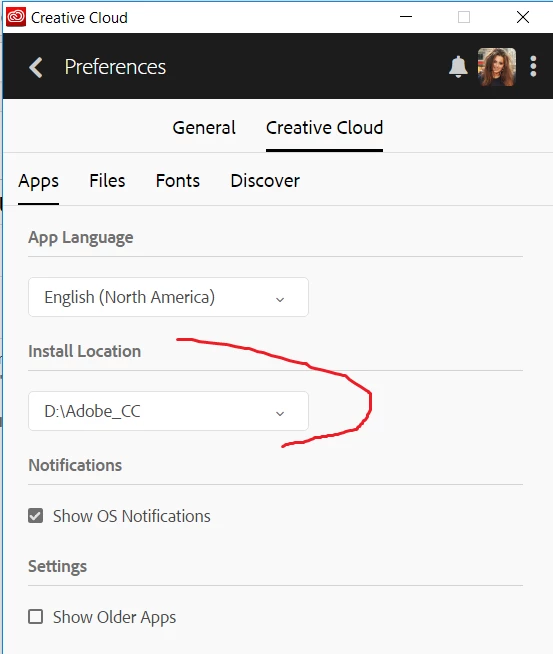
I'm trying to install Creative Cloud on my computer. I have chopped up the computer's drive into 250GB drives so the computer can be scanned for viruses nightly and actually complete. Unfortunately, I selected "change" in the CC App installer and installed Adobe XD but when I looked at the finished installation the folder wasn't used at all.

1. Why do you give this option if nothing actually gets installed here?

2. Can you tell me where I can find a guide of the options to install CC?

Below is a screenshot:
    This topic has been closed for replies.
    Correct answer kglad

    adobe xd is still in beta and it's a uwp* app so it probably must be installed on your os drive.

    *What's a Universal Windows Platform (UWP) app? - UWP app developer | Microsoft Docs

    [moved from Creative Cloud Download & Install to Adobe XD CC]

    2 replies

    February 21, 2018

    I'm learning how this community works. I'll do a better job of marking help, like, etc. in the future.

    kglad
    Community Expert
    kgladCommunity ExpertCorrect answer
    Community Expert
    February 5, 2018

    adobe xd is still in beta and it's a uwp* app so it probably must be installed on your os drive.

    *What's a Universal Windows Platform (UWP) app? - UWP app developer | Microsoft Docs

    [moved from Creative Cloud Download & Install to Adobe XD CC]

    February 5, 2018

    So the other apps will install on other drives? Just the XD must stay on OS drive, right? I stopped the installation of the other apps because I couldn't see XD on the D drive. Thanks.

    kglad
    Community Expert
    Community Expert
    February 5, 2018

    most other apps will install off the os (onto a non-networked) drive. but even for those programs, some files will be still be installed on the os drive.