
Participant
May 4, 2021
Question

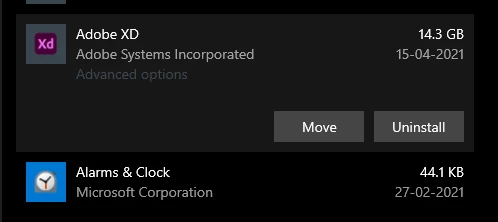
Why is my adobe XD taking 14.3 Gb of space in my harddisk ?

  • May 4, 2021
  • 1 reply
  • 1037 views

Hi there , My adobe XD is taking a huge chuck of space from my harddisk or C drive in my PC.
Why is that ? I always save documents on cloud. 

I'm using windows 10 latest version
Adobe XD latest version : 39.0.12.12 with CC sync 4.11.0.12

Please help me 
    This topic has been closed for replies.

    1 reply

    Martin Marek
    Known Participant
    May 5, 2021

    Same for me, XD apparently produces lot of rubbish on the drive. The workaround is to go to Advanced options and click Reset, the space will be released then.

    hellosreeAuthor
    Participant
    May 6, 2021

    Hi there, I can't find advanced options in XD , You mean on Creative cloud app ? 
    Will the reset will reset my apps also ? I have so many plugins installed , i don't want to reinstall 

    Spas K.
    Community Expert
    Community Expert
    May 6, 2021

    This is in App Settings (Right-click Adobe Xd > App Settings). 
    Edit: Resetting it will remove your plugins (thanks Martin)


    The space taken is mostly thumbnails and cached artboards. You can also try to manually delete the folder with the thumbnails, which takes most of that space. I've discussed it with another user in this thread. This will not remove your plugins.