Samuel 3s3s3
Inspiring
May 25, 2018
Answered

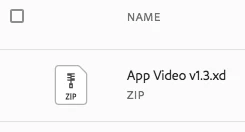
.xd File on Creative Cloud show as ZIP

  • May 25, 2018
  • 3 replies
  • 5498 views

(Photo 1) .xd show as ZIP

This happen today, I have totally no idea how this happen.

I have been try re-upload the file lot of time, still same.

Also the XD app on my iPhone can't detect this file on the "XD Documents" section.

The old file can be open on mobile as well. (photo 2)

Pls help me.

(Photo 2) It still work 2 days ago.

System :

iMac MOS 10.12.6(16G29)

XD 8.1.22.2

This topic has been closed for replies.
Correct answer Preran

Can you try the following

- Copy the file to a local folder on your computer

- Open it in Adobe XD

- Save it under a different folder in CC

- Sync the folder

Thanks,

Preran

3 replies

Participant
August 6, 2018

SOLUTION

Copy .xd files into your local computer creative cloud folder which is created when you install creative cloud application.

PROBLEM

If you try to upload files in creative cloud files in browser online. It will not work as they have some issue converting the files into as zip.

Give a try!!!

Participant
May 26, 2018

Can i ask how to solve the same problem in Window??

Preran
Community Manager
PreranCommunity ManagerCorrect answer
Community Manager
May 25, 2018

Can you try the following

- Copy the file to a local folder on your computer

- Open it in Adobe XD

- Save it under a different folder in CC

- Sync the folder

Thanks,

Preran

Samuel 3s3s3
Inspiring
May 25, 2018

it work now ! thank you !

Preran
Community Manager
Community Manager
May 25, 2018

Awesome! Thank you for letting us know.