

KatieH UX
Participant
November 25, 2020
Question

XD : Unable to Update Library through update button in XD

  • November 25, 2020
  • 17 replies
  • 8484 views

I am unable to update my library using the UPDATE action in XD. The update button is there - as well as the banner, but when I click "UPDATE"  nothing is happening. I am unable to figure out what is the cause - file size, server issue? Any suggestions?
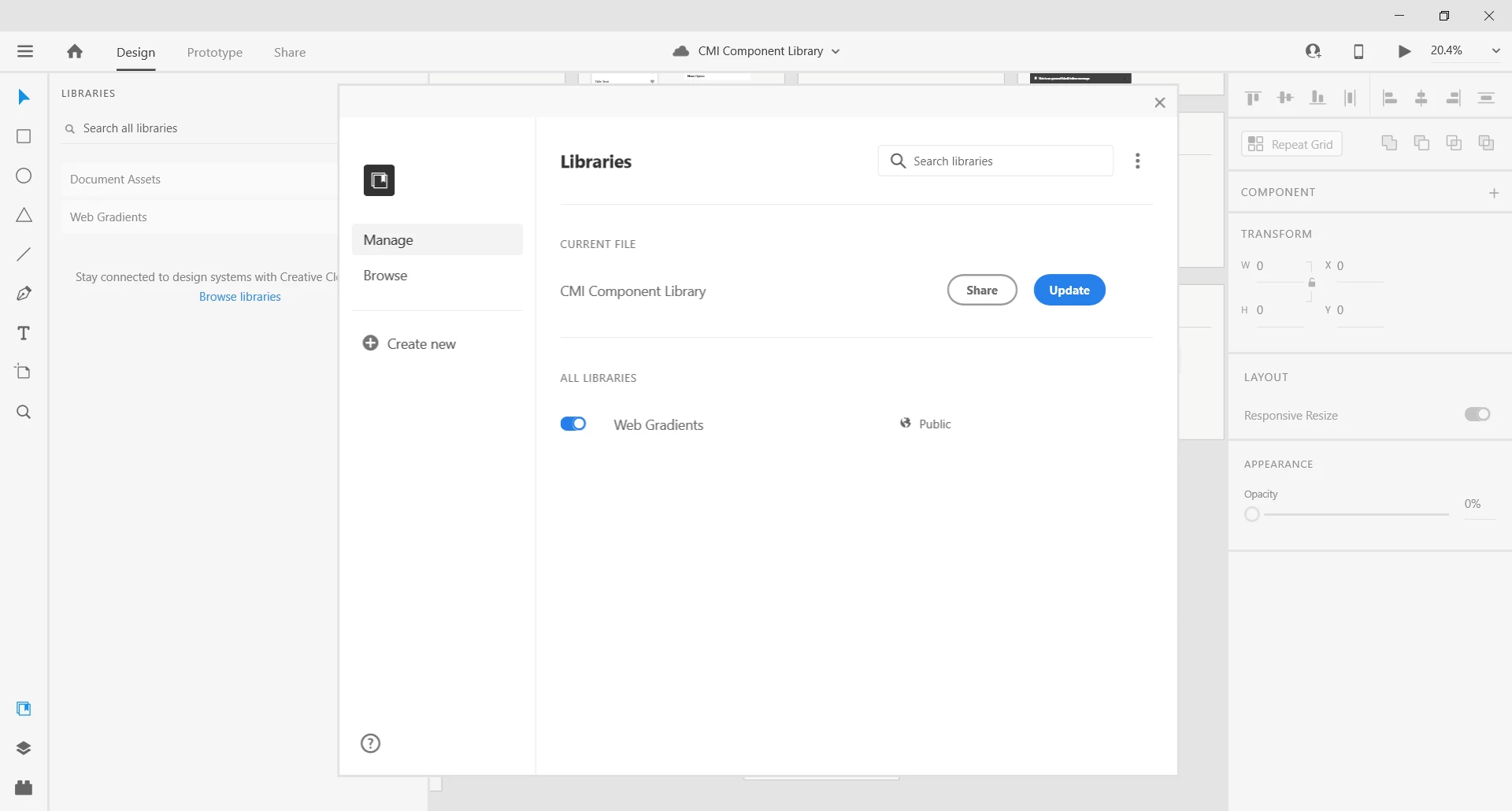


{Title renamed by MOD}

This topic has been closed for replies.

17 replies

Participant
May 5, 2021

This doesn't work. But it sure does sound like it from the way it's advertised! This software belongs back in non-production ready beta.

Participant
May 6, 2021

Last post was in haste, I'll be more specific:


- User UX: The Manage Libraries is hidden in a menu, and when the library file been updated, the inheriting document does not indicate the library has been updated, and futhermore, will indicate that "Libraries are up to date" when in fact they are not. 

- Changing something in a library file does not always count as a change, and therefore there are no changers to be pushed (at least the button is not displayed and instead it says "✅ Up to date". For example: If you update a text box to scale Auto Height from Auto Width or Fixed Size, it does not consider this an update to components, and will not show a button to publish the changes. This will hide the overflow text from a review. 


Since libraries do not function in these instances, the whole system not worth using, especially when XD is telling the user that everything is up to date when it's not. This makes this unreliable software, and thus not acceptable for production level work. 

Participant
April 12, 2021

I also cannot update one of the existing libraries, even if I make changes to the master components in this XD file, the blue notification bar "Update your published library. Update Now" doesn't show up, but this library has already been published and is showing in the Libraries panel. 


I tried to sign out and restart the Mac, but still not working. I'm on MacOS v10.15.4 and v38.1.12.2 of XD.

Participant
March 12, 2021

I'am still experiencing this issue, tried all of the recommended steps, but none of them resulted in any improvement. Currently I'm unable to publish or update any of the libraries, working on win10, newest XD version (37.1.32).


Participant
December 19, 2020

Hey everyone, I could solve this on my end. I solved all missing font issues and linked components and finally could update my Library. I hope this can help others (since the sign-out and reset advice from Adobe was very poor).


Driek
Participant
December 20, 2020

My issue is still there, I am using a master document which only contains master componenten. I have no missing font nore any other components from another library (by definition). This is the base Design System Document. 


Still it just asks to update, after clicking the update button a snackbar appears (blue bar at the bottom) asking me to again update, and so on and so on :-(. 


This is bad, it doesnt asspire confidence and if such issue continue to occure i can imagine people will be running to other tools such as Skecth, Figma, Invision or whatever.... 


Adobe XD please advise 


Av_Will
Participant
December 22, 2020

I can also attest to the exact same behavior Driek described above.


My base style guide document exhibits the behavior he has descibed. It's an intinite loop that never results in an error but also never results in a successful 'update'

Av_Will
Participant
December 19, 2020

BUMP. This issue is still very much alive and well in v35.3.12.2


The recommended solution does not fix the problem. Nor does doing a complete clean install of CC/Xd.

Participating Frequently
February 22, 2022

Still an issue! Now late Feb 2022. Paying money for this friggin software that doesnt work properly.

Known Participant
February 22, 2022

As scary as it seems (I know, because I recently went through this myself), the best answer to this issue is to move from Adobe to Figma. My team has been on Figma now since late October and everyday* I find new reasons to be grateful that we switched and sorry we didn't do it sooner; before establishing so large a library of assets in XD. 


Figma was built on cloud technology so there are zero issues with library access, sharing or collaboration.  To my way of thinking, every aspect of how XD works with "the cloud" is either severely flawed or completely wrong. For almost 2 years I have spent more time coming up with workarounds or fixing libraries that were broken by a recent update than I have spent actually creating viable designs.  


Beyond the obvious collaborative superiority, Figma is simply a better design solution in every way. My only sorrow in the whole transition is that there is no longer a free version of XD. For the sake of reference, we are obliged to continue paying Adobe subscription fees until we can move over/recreate remaining assets and projects that are still relevant. 


* - I say "everyday" with absolutely no hyperbole. It might almost be more accurate to say that everytime I use Figma for more than 30 minutes, I find something new about it that is better than the XD equivalent. Without exception, there isn't a single design or component structure, technique or pattern that I can't recreate in Figma better and faster. 

Participant
November 30, 2020

Same issue here. I work with two published libraries, but only one can be updated. When I try to update the other one, by clicking on the Update button, I get just a glimpse of the progress bar at the top and a persistent blue toast message at the bottom. I cannot update the library. Please help!

HARSHIKA_VERMA
Community Manager
Community Manager
November 25, 2020

Hi Katie,


Sorry to hear you are unable to update the published library in XD. Could you please try to sign out of XD, Creative Cloud, reastart the machine and then sign back in? I am able to publish the library fine at my end. Please also make sure you're on XD 35.1 version.


Let us know if that helps.


Thanks,

Harshika

KatieH UX
KatieH UXAuthor
Participant
November 25, 2020

I quit all Adobe products, exited CC, and rebooted my PC. I still am unable to update the library. It looks like it's publishing but then it returns me to the UPDATE screen and any new components are not on the library. I am on Windows 10 and v53.1.12 of XD.