
Exit
  • Global community
    • Language:
      • Deutsch
      • English
      • Español
      • Français
      • Português
  • 日本語コミュニティ
  • 한국 커뮤니티
0

Adobe XD design looking different on another computer

New Here ,
May 12, 2021 May 12, 2021

Hey guys, wondering if anyone else had the same issue... 


I shared a cloud file (originally created by me) with. my colleagues but they are seeing a messy design compared to what I see on my own screen:
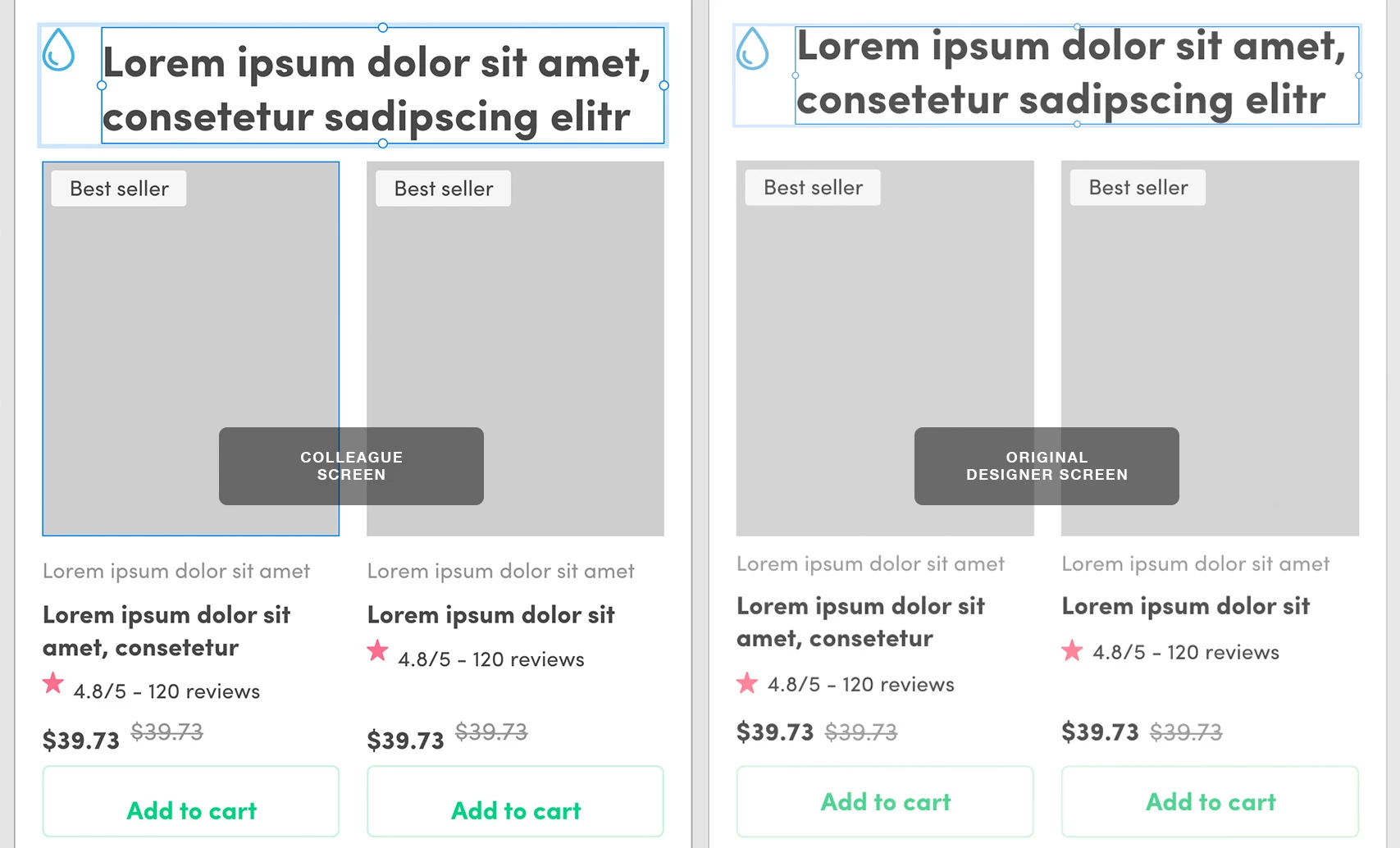
adobeXD_comparison.jpg


As you guys can see, the design is broken in a few places on the left screen (main title bounding box is different and misalignment on prices, reviews line and call-to-action button. I have a hunch that this issue is being caused by the fonts (either cloud or local, not sure how those 2 cohabitate), but we checked them on both computers and they are all the same.

Anyone has had the same issue or any ideas of what could be happening? As Head of UI for the company I work for this is obviously not ideal. I am hoping it's a user error rather than issues with Adobe XD, but honestly at this point, I am seriously considering moving the whole company to Figma.

Thanks in advance for any hints or ideas guys!

J.

TOPICS
Product performance
2.1K
Translate
Report
Community guidelines
Be kind and respectful, give credit to the original source of content, and search for duplicates before posting. Learn more
community guidelines
Community Expert ,
May 12, 2021 May 12, 2021

Hi Jaime C,
Does this problem occur with all fonts present within the project? Are all team members using the same software version?

Translate
Report
Community guidelines
Be kind and respectful, give credit to the original source of content, and search for duplicates before posting. Learn more
community guidelines
New Here ,
May 12, 2021 May 12, 2021

Hey thanks for youor reply!


Yeah it seems to be. We only have one font in this file (Sofia Pro) and all it's variants, which it seems are all being affected to some degree.


Yes, we all updated to the latest version of XD.

Also tried turning off the Adobe font but it messed up the design even more 😕

Translate
Report
Community guidelines
Be kind and respectful, give credit to the original source of content, and search for duplicates before posting. Learn more
community guidelines
Community Expert ,
May 12, 2021 May 12, 2021

Hi Jaime C,
thank you for answering. Does this problem also occur with other files?

Translate
Report
Community guidelines
Be kind and respectful, give credit to the original source of content, and search for duplicates before posting. Learn more
community guidelines
New Here ,
May 12, 2021 May 12, 2021

Yeah... It has happened before when a colleague shared her file with me and it rendered broken on my side 😕

Translate
Report
Community guidelines
Be kind and respectful, give credit to the original source of content, and search for duplicates before posting. Learn more
community guidelines
Community Expert ,
Apr 21, 2022 Apr 21, 2022

Hi Jaime C,

are you and your colleague using the same version of Adobe XD?

Translate
Report
Community guidelines
Be kind and respectful, give credit to the original source of content, and search for duplicates before posting. Learn more
community guidelines
Community Expert ,
May 31, 2022 May 31, 2022

Hi Jaime C,

is there any news? Do you still need help?

Translate
Report
Community guidelines
Be kind and respectful, give credit to the original source of content, and search for duplicates before posting. Learn more
community guidelines
New Here ,
Apr 18, 2022 Apr 18, 2022

I am having this same issue. Did you every figure out a way to fix this?

Translate
Report
Community guidelines
Be kind and respectful, give credit to the original source of content, and search for duplicates before posting. Learn more
community guidelines
New Here ,
Jun 24, 2022 Jun 24, 2022

Having the same issue for the first time now too. XD versions are identical between another person and myself, so are font files. They see the correct version of the the file, but I see inccorrect styles on some desing elements, for example, letter spacing, positions, etc. I tried uninstalling XD (with erasing settings and plugins), but it didn't.  When they publish a link, the web view even sees the correct styles. Any thoughts?

Translate
Report
Community guidelines
Be kind and respectful, give credit to the original source of content, and search for duplicates before posting. Learn more
community guidelines
New Here ,
Jun 24, 2022 Jun 24, 2022

We were able to fix the issue. For anyone that cares here are some more details incase it can help.


TL;DR

For the person having issues, sign out of your creative cloud account, then sign back in. I literally signed out of my account, then signed into the other person's account who was NOT having issues wiht the file, then I signed back into my account, which seemed to fix things. 


Details

  • The desinger could see the correct version of the XD file, which was stored in Dropbox.
  • When the developer opened the file, most things were accurate, but some things were off. A couple character styles had incorrect line-heights, spacing of elements inside components were jumbled, stuff like that.
  • Both desinger and developer had the most recent version of XD and Creative Cloud, the same fonts from Google installed via Mac's font book app, and the same computer OS.
    • Mac OS = Monteray 12.3.1
    • Abode XD = can't copy and paste it here becasue XD won't allow you to copy past the about app info go figure...
  • We tried uninstalling XD completely, re-saving the file in Dropbox with another name, changing the charcater styles before resaving, removing XD plugins, etc, but nothing worked. 
  • What did work was signing out of XD as descried above.  
Translate
Report
Community guidelines
Be kind and respectful, give credit to the original source of content, and search for duplicates before posting. Learn more
community guidelines
Adobe Employee ,
Jun 28, 2022 Jun 28, 2022

Hi @ItsMarioSouza ,


Thanks for reaching out and sharing the solution, I am sure it will surely help other community members. This may happen if the version of XD are different on the computers, so keeping XD up to date by following the steps shared here is one of the troubleshooting steps. Feel free to reach out if you need any further assistance.


Regards

Rishabh


Regards

Rishabh

Translate
Report
Community guidelines
Be kind and respectful, give credit to the original source of content, and search for duplicates before posting. Learn more
community guidelines
New Here ,
Sep 14, 2022 Sep 14, 2022

Hi @Rishabh_Tiwari 

I am facing the same issue as mentioned above and the given solution has not worked for me. My team and I are using the same version of XD as well. Please suggest some solution for the same.


Thanks.

Translate
Report
Community guidelines
Be kind and respectful, give credit to the original source of content, and search for duplicates before posting. Learn more
community guidelines
Community Beginner ,
Sep 15, 2022 Sep 15, 2022
LATEST

Same problem here ver. 54.1.12.1, if another person on the team (who has the same fonts, version, windows updates...) opens the file it unconfigures all metrics

Translate
Report
Community guidelines
Be kind and respectful, give credit to the original source of content, and search for duplicates before posting. Learn more
community guidelines