


Participating Frequently
August 28, 2020
Question

adobe XD with wacom tablet , no moving with spacebar-hand tool /use windows ink cause crash down

  • August 28, 2020
  • 3 replies
  • 4576 views

my Spec
- adobe XD (latest version)
- window 10 user (lastest update)
- Wacom tablet Intuos 4 (latest driver - WacomTablet_6.3.40-2)
- graphic driver (GeForce 1060)


Let me explain my condition more.

with the Wacom tablet pen, the screen doesn't move when I press the spacebar (shortcut - pan). but the mouse pointer turns to 'hand' icon with Space bar shortcut, but no moving at all.

but it works with a mouse!but I should use a tablet pen,,

really want to fix this problem.
otherwise, I cannot keep my membership.


and I found one reason. but there is a bigger problem. 
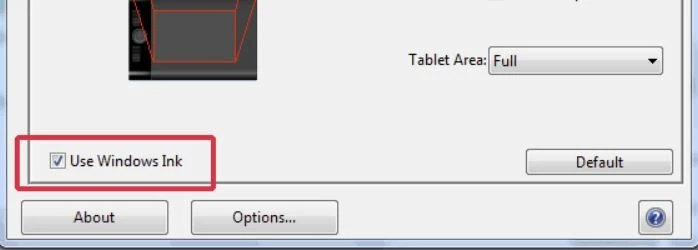
 

I think this issue is connected with 'Use windows ink' which is in the tablet driver setting.


when I uncheck the 'Use windows ink',

I can use the pan shortcut with a tablet pen,

but the problem is that XD crashes down when I use a 'zoom '. 

when I try to zoom the screen,  it freezes. 


so with the tablet pen


> Check 'Use windows ink'

pan X(not moving)       zoom O


> Uncheck 'Use windows ink'

pan O     zoom X (program down)


Does anybody have a similar problem? 


    This topic has been closed for replies.

    3 replies

    Participant
    August 15, 2021

    uncheck the 'Use windows ink - worked for me, thanks!

    maranalmeida
    Participant
    September 10, 2021

    worked for me too! thaaanks

    Participant
    January 28, 2021

    This is a quick fix that works for me:
    Go into your Wacom Tablet Properties
    - select Pen
    - On the pen button settings set the lower part of the pen button (the one closest to the pen nib) set it to Modifier Alt
    - Now test in XD with Space and Drag
    - If it doesnt work go back into the button setting and change it to Alt and Space
    - Now test it in XD

    - Now go back and change it to Alt only - it should now work again. 

    For some reason changing the modifier a few times clears the bug - but it does come back - which is annoying!

    HARSHIKA_VERMA
    Community Manager
    Community Manager
    January 28, 2021

    Thanks for sharing the solution that worked for you, Luffwoto. I would also suggest making sure if the graphic card drivers are up to date for Wacom. 


    Thanks,

    Harshika


    Rishabh_Tiwari
    Community Manager
    Community Manager
    August 28, 2020

    Hi there,


    Sorry to hear about the trouble. We can surely test this on our end for that could you please system logs by following the steps shared here: https://helpx.adobe.com/creative-cloud/kb/cc-log-collector.html


    We'd also need the exact version of the XD, OS, and Wacom Tablet. Can you also try resetting preferences for the Wacom tablet and let us know if that helps?


    Regards

    Rishabh

    jodavbsAuthor
    Participating Frequently
    August 29, 2020

    window10 home - 64bit

    wacom tablet driver
    - 6.3.40-2

    adoeb XD version - 32.0.22

    intel core i7-3700HQ


    yes, I reset preferences for Wacom tablet, and it does not work. 


    and I saved ZXP file by following your instruction.

    But How do I upload ZXP file?

    cause I cannot click the 'Upload' text. It is not activated.