

ole-fredrik-lie
Participant
March 11, 2020
Answered

[Crash/Load]-Error 2144 when trying to open a cloud document in Adobe XD.

  • March 11, 2020
  • 8 replies
  • 4014 views

When trying to open a spesific cloud document in Adobe XD. 


Reproduction steps:


1) Open the cloud document in the latest version of Adobe XD on Mac


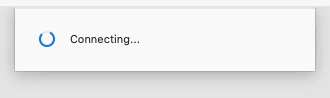
2) A dialog appears: Connecting (stays for 10-15 seconds)
 

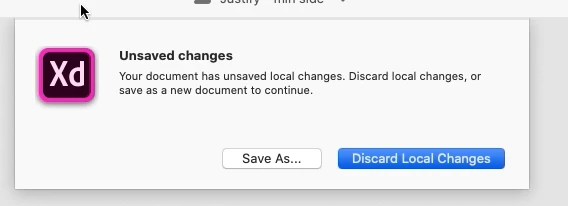
3) A new dialog appears: Unsaved changes - Your document has unsaved changes ... Save as or Discard Local Changes. Select "Discard Local Changes".
 

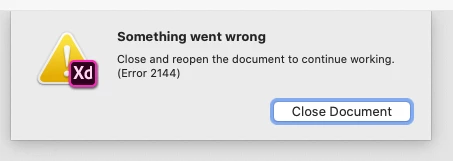
4) A new dialog appears: Something went wrong. Close and reopen the document to continue working. (Error 2144). Close document.
 

5) Press the "Close document" button and try again. The same thing happens.


Questions: 

Is there a known workaround for this issue? Anything I can to do wipe the unsaved changes and restore the cloud document to a working state? I tried saving the document as a new cloud document. There are two major issues with this: 


1) The version history from the original cloud document is gone

2) All the invited members are gone


(We have coediting (beta) enabled for this document.)


System info:
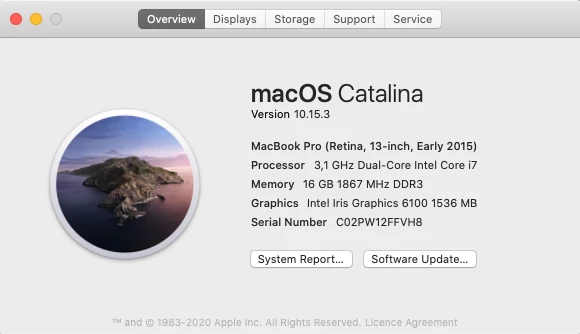
 

<The Title was renamed by moderator>

This topic has been closed for replies.
Correct answer Harshika Verma

I second that, this is an unacceptable response. There must be a hotfix for this issue. AGAIN, this is a showstopper bug. ESCALATE.


Hi All.


The issue got fixed in XD 29 version. Please let us know if you are still experiencing issues while opening the cloud document.


Thanks,

Harshika

8 replies

Participant
May 1, 2020

Yikes, have just set up a UI kit for use on all wireframe documents for myself and team using XD and had a saving problem this morning which directed me to 'Discard Local Changes' etc. Found a work around but concerning to say the least. 

Harshika Verma
Community Manager
Community Manager
May 5, 2020

I am sorry you ran into the trouble. You can share your workaround solution that helped you so that the others can try the workaround and see if it helps them.


Thanks,

Harshika

AliciaWheatley
Inspiring
April 8, 2020

I am now having the same error. This is a design that I have been working on for weeks, with iterative changes and history with the client. And now this show stopper????? The crash is so bad, that Adobe does not event ask me share the crash report. 

I am willing to share the Design file that is cuasing the crash. We have tested trying to open the file on a few different machines and accounts. Same result.

Harshika Verma
Community Manager
Community Manager
April 8, 2020

I am sorry to hear you ran into trouble. The issue is still under investigation. Would you mind confirming if it's a shared document? I would also suggest getting in touch with our support team using this link: https://helpx.adobe.com/in/contact.html so that you can get the real time assistance on the issue.


Hope it helps.


Thanks,

Harshika


AliciaWheatley
Inspiring
April 8, 2020

Yes, a cloud shared document. 

figma
Participant
March 13, 2020

I have the exact same problem… it is so annoying.


You can switch to another computer. Then you can work on your document again.

Does anyone know, where the local changes are saved? I would like to delete them, so this "unsaved changes" dialog disappears and I can work on my file again.

But Adobe doesn't even have a guide on this simple issue…

Harshika Verma
Community Manager
Community Manager
March 18, 2020

Hi there,


We understand it could be frustrating for you. The team is aware of the issue and has logged a bug for the issue. You may definitely see the improvements in the future of realeases of XD.


We will update you as soon as we get any updates from the team. We are sorry for the inconvenience.


Thanks,

Harshika


cesarcam
Participating Frequently
March 12, 2020

My boss and I are also experiencing this same issue with files that were share with us. She's on a PC and I'm on a Mac. This is terrible!

- Cesar Caminero - cesarcaminero.pro
Harshika Verma
Community Manager
Community Manager
March 12, 2020

Hi All,


We are sorry for the trouble. The team is aware of the issue and is working on it to fix it. You may see the improvements in the future releases of XD.


We are sorry for the inconvenience.


Thanks,

Harshika

ole-fredrik-lie
Participant
March 12, 2020

Hi Harshika, 


I'm afraid I don't understand what you mean by "You may see the improvements in the future releases of XD."

Can you please be more specific? Will there be a hotfix for this issue as soon as it's resolved? Or do we have to wait for a possible fix some time in the future?

Participant
March 11, 2020

Same issue here, first time seeing this error today. Was able to eventually open one of the files by restarting XD, but the other one with the same error refuses to work. Stop breaking these files with every update Adobe!

Harshika Verma
Community Manager
Community Manager
March 11, 2020

Hi All,


We are sorry to hear you are experiencing issues opening cloud documents in Adobe XD. We would need a few more details like-


We will try our best to help.


Thanks,

Harshika

ole-fredrik-lie
Participant
March 12, 2020

Hi Harshika, 


Thanks for your reply. 


Yes I can confirm that I have tried all the steps as mentioned here:  https://helpx.adobe.com/in/creative-cloud/kb/cc-log-collector.html


I found that after deleting the file and restoring it, the files is no longer shared with any members of my team. That's a bummer. It still doesn't work. Same error. 


I have successfully generated and uploaded log files using the log collector tool. 


The following file has been uploaded on Adobe LogCollector Portal:

File: AdobeLogs_20200312_092547_576-mac.zip


I will download the file that I have issues with opening as a cloud document, and send you the link to that file on a DM. 


Thankfully, this file does only contain a few sketches and mockups, so it's no disaster if we're unable to recover. I have a backup (without an intact version history, though). However, if the same issue had happened to our main design systems file which is being linked to from all our cloud documents, it would have been a disaster for our workflow. So I would appreciate if we could get to the core of the problem and make sure it doesn't happen again.


Here is the screenshot that you requested. 


Cheers,

Ole Fredrik


March 11, 2020

J'ai la même erreur depuis 1h30. Je suis sous Windows 10.

Participant
March 11, 2020

I have the exact same issue but on Windows 10

Participant
March 11, 2020

Same error on MAC.