Participant
July 12, 2018
Answered

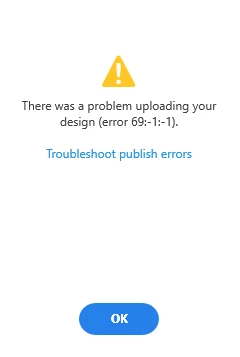
error 69: -1: -1 when uploading design

  • July 12, 2018
  • 7 replies
  • 3448 views

Hi,

Sorry to say I'm trying to upload from China, a tricky place to do so, i know.

I'm on shadowsocks, so visiting google.com and youtube is not a problem, but this is bugging me.
Chris

This topic has been closed for replies.
Correct answer gilbertorjj

Prezado, aqui no Brasil tive um problema igual o seu relacionado ao erro 69, isso acontece devido uma configuração de segurança que a Adobe XD puxa do I.E com relação ao TLS. Resolvi o problema marcando o checkbox Usar TLS1.1 e Usar TLS1.2.

----------------------------------------------------------------------------------------------------------------------------------------------------------------------------------

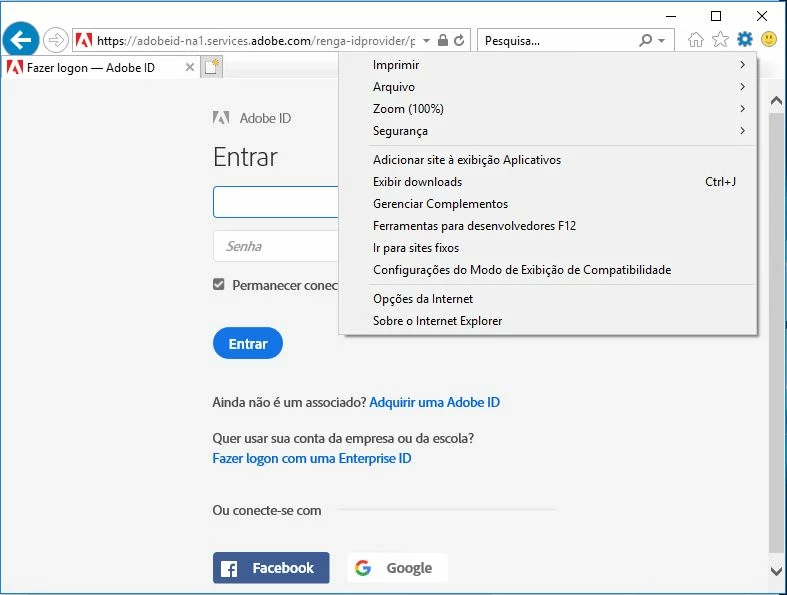
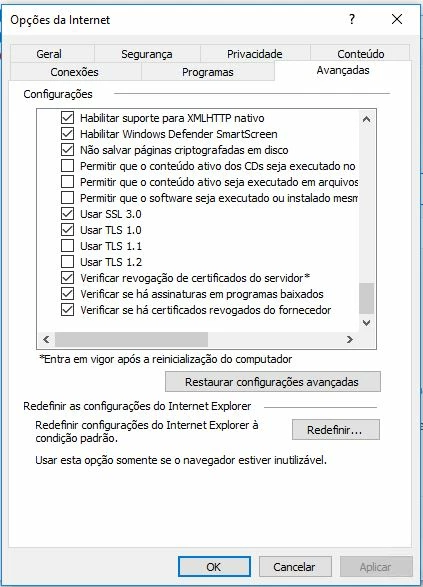
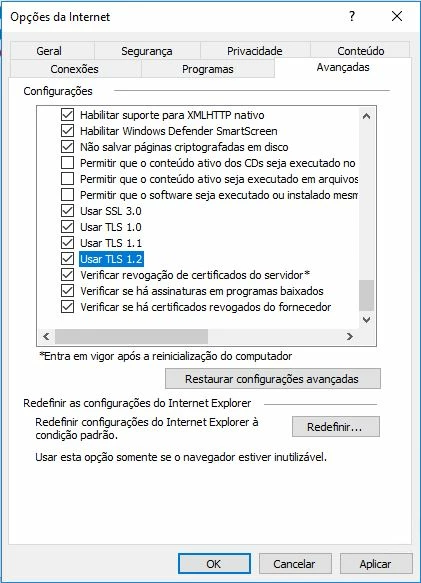
Caro, aqui no Brasil eu tive um problema como o seu relacionado ao erro 69, isso acontece devido a uma configuração de segurança que o Adobe XD puxa do IE em relação ao TLS. Eu resolvi o problema marcando a caixa de seleção Usar TLS1.1 e Usar TLS1.2.

1- Abre o Interne Explorer clique na chave de configuração. (Open Internet Explorer click on the configuration key.)
2- Vai na aba avançadas. (Go to the advanced tab)
3- Selecione Usar TLS 1.1 e TLS 1.2 clique em OK. (Select Use TLS 1.1 and TLS 1.2. Click OK)
7 replies

gilbertorjj
gilbertorjjCorrect answer
Participant
July 19, 2018

Prezado, aqui no Brasil tive um problema igual o seu relacionado ao erro 69, isso acontece devido uma configuração de segurança que a Adobe XD puxa do I.E com relação ao TLS. Resolvi o problema marcando o checkbox Usar TLS1.1 e Usar TLS1.2.

----------------------------------------------------------------------------------------------------------------------------------------------------------------------------------

Caro, aqui no Brasil eu tive um problema como o seu relacionado ao erro 69, isso acontece devido a uma configuração de segurança que o Adobe XD puxa do IE em relação ao TLS. Eu resolvi o problema marcando a caixa de seleção Usar TLS1.1 e Usar TLS1.2.

1- Abre o Interne Explorer clique na chave de configuração. (Open Internet Explorer click on the configuration key.)

2- Vai na aba avançadas. (Go to the advanced tab)

3- Selecione Usar TLS 1.1 e TLS 1.2 clique em OK. (Select Use TLS 1.1 and TLS 1.2. Click OK)

仓鼠小布
Participant
July 23, 2018

Thank

Atul_Saini
Legend
July 12, 2018

Hi Ashrimpmonk,

Thanks for using Adobe XD, As per the screenshot, Error 69:-1:-1 means that XD was unable to communicate with one of the Adobe's Creative Cloud server.

This request has already been raised here: - Error Uploading Design (Error 69) – Adobe XD Feedback : Feature Requests & Bugs. Please upvote it and try the steps mentioned by Jacob. I would also request you to share the results in the comments sections on that bug.

Feel free to update this discussion in case you need further assistance.

Thanks,

Atul_Saini

Participant
July 13, 2018

Thank you for your reply.

i read the post you gave me.

When i click the 3 urls in that post, https://cc-api-cp.adobe.io returns 404, the other 2 shows "RedHawk annotations server 1.9.104". which means i can access 2 of them right?  I'm using  a proxy in China, port server 443. I can visit google and youtube. but upload design doesn't work.

Chris

Atul_Saini
Legend
July 17, 2018

Thanks for sharing the results, I would request you to share more details in the comments on that bug itself. I would also like to know if you have purchased an Adobe Creative Cloud subscription or you are using the starter plan for Adobe XD.