
thoughtc74048564
Participant
June 9, 2021
Answered

Error while opening cloud doc "r.states is not iterable"

  • June 9, 2021
  • 10 replies
  • 4364 views

After updating to 41.0.12 some of my files, cloud or local, throw this error "r.states is not iterable"
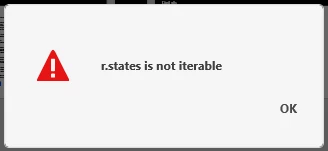


{Renamed By MOD}


This results in the file not opening. This happens whether it's a cloud document or a local document, and rolling back to a previous version of the same document still throws the error. I'm now locked out of some of my documents

This topic has been closed for replies.
Correct answer Rishabh_Tiwari

Please give dates for future release as very important files need to be accessed.

Atleast we can plan accordingly!


Hi there,


We're so sorry to hear about the trouble. Please update XD to the latest version which is 41.1 and let us know if you are still experiencing the issue.


Regards

Rishabh

10 replies

tyronproductions
Participant
June 28, 2021

What's the update on this bug? It's been 3 weeks!

HARSHIKA_VERMA
Community Manager
Community Manager
June 28, 2021

Hi there,


Thank you for your patience. The team was able to find the root cause of the issue and they are working on it. You'll definitely see the improvements in the future releases of XD.


We really appreciate your patience.


Thanks,

Harshika

Participant
June 30, 2021

Please give dates for future release as very important files need to be accessed.

Atleast we can plan accordingly!

Participant
June 21, 2021

Same problem here !!

error: "r.states is not iterable"

How come i'm being locked out of my work completely - and this issue not fixed two weeks later? 😕😕 


We work with hard deadlines already - and now this? for two weeks? 😕😕

Is there any way to download the file somehow and try to reopen it with older Adobe XD version on another computer?


Participant
June 21, 2021

this issue is really frustrating. Cant find any blog to even fix it.

How am i suppose to address this issue?


HARSHIKA_VERMA
Community Manager
Community Manager
June 22, 2021

Hi there,


We are sorry for the frustration and thanks for reporting the issue. The team is already aware of the issue and is working on it to fix it. You'll definitely see improvements in the future releases of XD.


We will also update the discussion as soon as it is fixed. 


Hope it helps.


Thanks,

Harshika

GaryTwine
Participant
June 23, 2021

Improvements in future release? Are you serious? The program is completely broken and is preventing access to 'all' XD files. Future releases isn't good enough. Severity Level 1 - Bug patch release 24-48 hours should be the correct response.

stefanf95757781
Known Participant
June 21, 2021

Oh dear Adobe XD Team - I cannot open any of my cloud files and get the same error: "r.states is not iterable"
How is such a severe bug - users being locked out of their work completely - not fixed two weeks later? 😞


KatieH UX
Participant
June 11, 2021

Same issue here with a couple core files for our UX team. Do you have an ETA on the bug fix?

GaryTwine
Participant
June 12, 2021

And... same issue with me. I can't even download an earlier version of XD. The download fails 100% of the time.

June 11, 2021

Exactly the same problem here 😞
The same error message with same version of Adobe xd..

June 11, 2021

This happened while I was working. I was doing state changes + using the new feature "toggle state" and the application froze. I had to close it and when I reopened it showed this error..

Diego Ramos UX
Participant
June 10, 2021

After updating to 41.0.12 one my project, show me this while opening cloud doc "r.states is not iterable"


UX/UI Designer
Rishabh_Tiwari
Community Manager
Community Manager
June 10, 2021

Hi there,


We're so sorry to hear about the trouble. We have logged a bug for the issue, please share system logs by following the steps shared here https://helpx.adobe.com/creative-cloud/kb/cc-log-collector.html 


Could you also confirm if this is happening with every file or some specific file? If it's happening with a specific file, please share system logs and Adobe XD file by adding to a shared location like Google Drive or DropBox and share the link through DM.


Regards

Rishabh

Diego Ramos UX
Participant
June 10, 2021

Thanks! For now in two files...

UX/UI Designer
Rishabh_Tiwari
Community Manager
Community Manager
June 10, 2021

Hi there,


Thank you for your patience. We have logged a bug and the team is actively working on the fix. I'll update this discussion as soon as I hear from the team.


Regards

Rishabh

Participant
June 17, 2021

Do you have an ETA on the bug fix?

Rishabh_Tiwari
Community Manager
Community Manager
June 9, 2021

Hi there,


Sorry to hear about the trouble. Please collect the system logs https://helpx.adobe.com/creative-cloud/kb/cc-log-collector.html and if possible please share a sample XD file. You can add the log file and Xd file to a shared location like Google Drive or DropBox and share the link through DM by clicking on my name.


Regards

Rishabh

Participant
June 23, 2021

Please help asap.I am also facing the same issue mentioned above.Tried everything but not able to open.Very important file for our organization.


Participant
June 9, 2021

После обновления, невозможно открыть общий документ библиотеки. Из 3 пользователей этого файла, немогут войти устройства на OS Windows. Пользователь на Mac OS может открывать файлы и работать в нем. 
Выходит следущая ошибка 


{Renamed By MOD}

Rishabh_Tiwari
Community Manager
Community Manager
June 9, 2021

Hi there,


Sorry to hear about the trouble. Please ensure that all the collaborators are on the latest version of XD which is 41.0 and let us know if that solves the issue or if you need any further assistance.


Regards

Rishabh