


Participant
Sep 27, 2018 6:57 AM UTC
Answered

Formating Paragraph Line Spacing in Area Text

I'm magazine creative director for 20 years and now I'm venturing into UI/UX waters.

Since I am used to InDesign and its way of controlling and formatting, Adobe XD creates some problems for me.

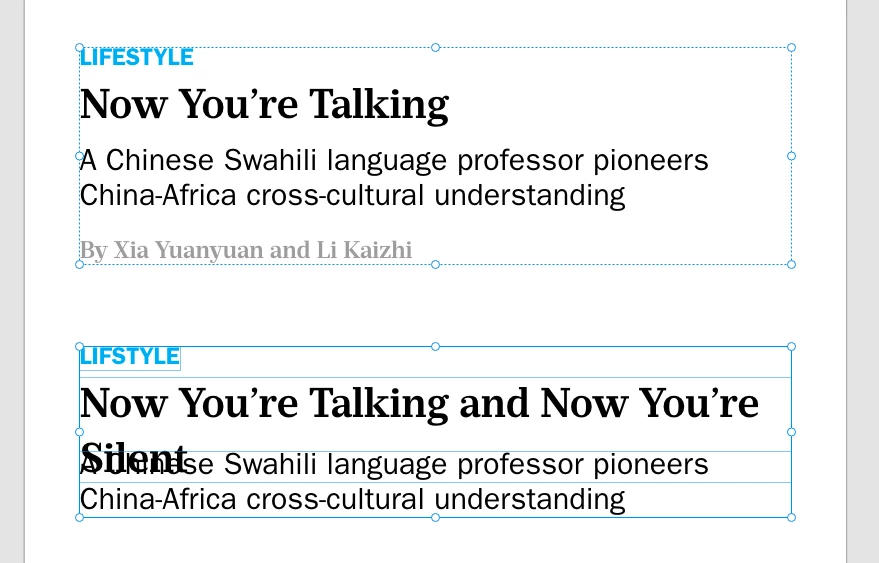
In the pictured example, I have a Text area. Each text paragraph is formatted in its own style.  Running head at the top, headline, subhead, and author. Each with its own formatting. Unfortunately, XD does not allow separate Line spacing formatting for each paragraph.

In the bottom part of the picture, I can achieve it by separating each paragraph into its own Point or Area text. Then I can format Line Spacing for each paragraph.

But this creates a problem. What if a headline is 2 or 3 lines long.

In the first example, if all of the paragraphs are in the same Area, longer headlines will push down the text below.

In the bottom part, if the headline is too long it will overlap the part below.

For me proper typography and formatting are essential.

How to achieve text elements to be separately formatted (Line spacing) while remaining in one text area?

Because keeping all these texts in one text area seems a much better solution, especially because it is easier to control the distances between paragraphs.

thank you
Dan Rodney
Dan RodneyCorrect answer
Community Expert
Oct 8, 2018 3:43 AM UTC

As Chris said, this is an area that XD (and other UX apps like Sketch) still needs to improve on. XD focuses on one style per text box, but I'd love to see proper styling support for paragraph styles and multiple style per box. Please upvote/create feature requests on the website Chris linked to!

Adobe Certified Expert & Instructor at Noble Desktop | Web Developer, Designer, InDesign Scriptor

6 replies

Kenneth Kawamoto
Community Expert
Community Expert
Feb 1, 2022 1:27 PM UTC

The second example is a classic use-case for stacks: https://helpx.adobe.com/xd/help/create-dynamic-designs-with-stacks.html

while it won't negate the need for multiple formatting in a paragraph, it solves the overlapping problem.

Translate
Participant
Feb 1, 2022 12:53 PM UTC

Francamente, el manejo de estilo de párrafo y fuentes en XD es DEPLORABLE. Muy, muy malo. 


Translate
Dan Rodney
Community Expert
Dan RodneyCommunity ExpertCorrect answer
Community Expert
Oct 8, 2018 3:43 AM UTC

As Chris said, this is an area that XD (and other UX apps like Sketch) still needs to improve on. XD focuses on one style per text box, but I'd love to see proper styling support for paragraph styles and multiple style per box. Please upvote/create feature requests on the website Chris linked to!

Translate
Adobe Certified Expert & Instructor at Noble Desktop | Web Developer, Designer, InDesign Scriptor
mgover77
Participating Frequently
Jan 5, 2019 7:22 PM UTC

I don't understand why we need to beg Adobe for such basic features as this. XD is such a disappointment.

Translate
Chris W. Griffith
Community Expert
Community Expert
Oct 4, 2018 7:55 PM UTC

Text formatting is another area that is in need of more improvement. You can add your request to the User Voice site: Adobe XD Feedback : Feature Requests & Bugs about this. I did not go searching for this request, but I would suspect it is in there.

Translate
