
Participant
March 3, 2021
Question

Scaling Proportionately in XD

  • March 3, 2021
  • 1 reply
  • 2550 views

Howdy, Adobe XD Community! 


I'm working in XD and would like to scale a component proportionately. Is this possible? I can't figure it out. The corner radius remains live, as does the text. Example below. Also, I'm happy to simply be directed to other threads if you know of any, I just didn't have any luck searching, perhaps due to not exactly knowing what to search. 

Running 37.1.32 on  Big Sur 11.2.1

Thanks in advance. 
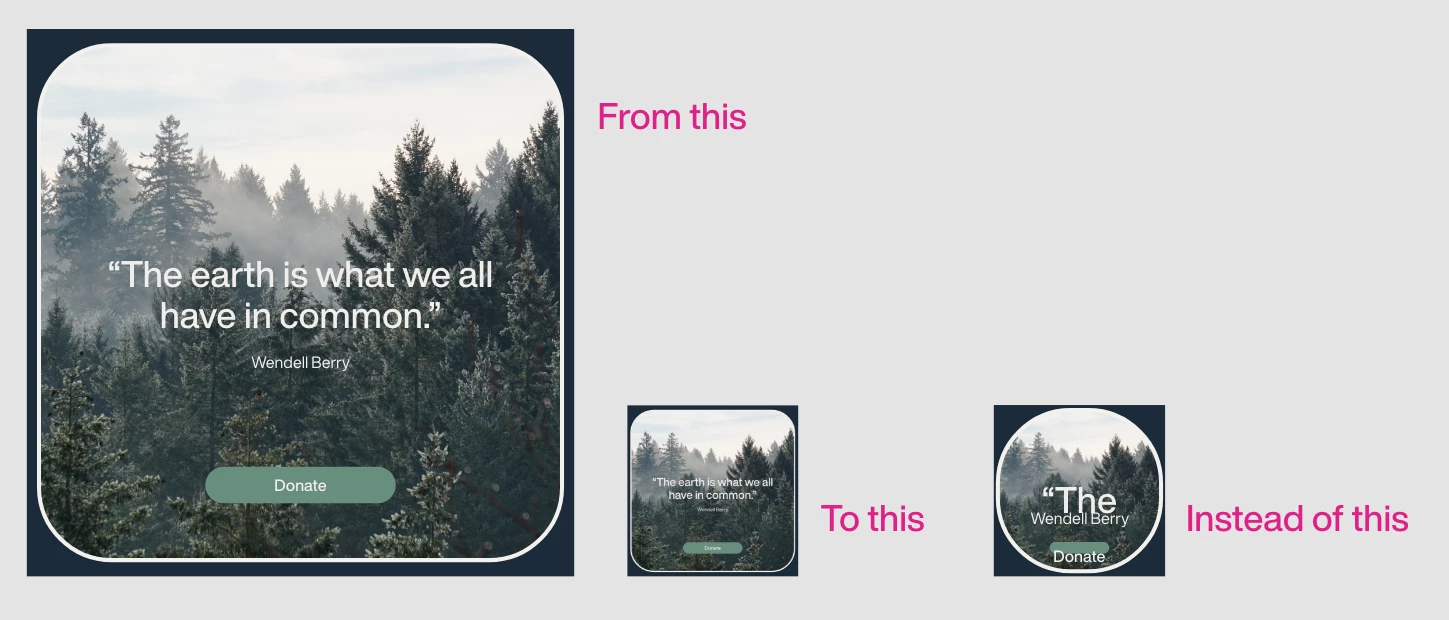
 

This topic has been closed for replies.

1 reply

Community Manager
March 4, 2021

Hello kenneth,


While resizing make sure Shift key is pressed ( it will lock the aspect ratio between width and height ) and responsive resize of component should be off for better result.

I hope it would be helpful.


Regards,

Anita Subedi

Participant
March 4, 2021

Thanks, @Ansubedi03.

I do hold the Shift key for locking the aspect ratio. While this does make sure my proportions are locked, it doesn't do anything for the corner radii or the text size.  

Turning off Responsive Resize did not change anything for me. 

Known Participant
March 9, 2021

Hi Kenneth,


In addition to what our experts suggested, I would also request you to please submit your feedback on our XD UserVoice page and upvote the request to add your voice.


Thanks,

Harshika


Hey, 


Can we please not mark this as the correct answer? I don't see how referring me to upvote a scaling tool (which I've done) is a correct answer to my questions.