

Serhii Hubernachuk
Inspiring
November 13, 2020
Answered

Unable to open the cloud document "Error: Something went wrong – 2163"

  • November 13, 2020
  • 4 replies
  • 1706 views

After the latest update, I have issues with several of my documents (I see I'm not alone here at the forum with this). How to fix this?


Foreseeing the same questions from support:
1. I have the latest XD, auto-update is turned on (34.4.12.3)
2. Two of these errors are with cloud documents.
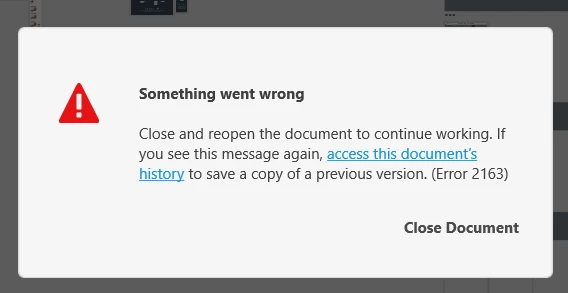
 

 <The Title was renamed by moderator>

This topic has been closed for replies.
Correct answer user waiting co-editing

Hi there,


Sorry to hear you are having trouble with XD. Would you mind trying the steps mentioned in this article: https://helpx.adobe.com/pl/xd/user-guide.html/pl/xd/kb/fix-issues-with-xd-cloud-documents.ug.html?


Let us know if that helps.


Thanks,

Harshika


Quitting the CC process and restarting CC and opening the cloud document in XD solved the problem.
Thanks Harshika!

4 replies

Participant
January 28, 2021

As others have pointed out, Co-editing XD files is an infuriating process. Even working on different screens in the same XD file causes conflicts. I just got this error 2163 on the latest XD release on an apple M1. Issue is, it was the document with shared components that other XD files were using. So if I restore the file and rename it to a new document, I lose the links from documents with components to the original file. 

Participant
January 28, 2021

Come to find out, I think the v 36.2.32 release that auto installed this morning is probably what caused my document error 2163...please Adobe help fix my document or linked components!

HARSHIKA_VERMA
Community Manager
Community Manager
January 28, 2021

Hi there,


Sorry to hear you are having trouble with XD. Would you mind trying the steps mentioned in this article: https://helpx.adobe.com/pl/xd/user-guide.html/pl/xd/kb/fix-issues-with-xd-cloud-documents.ug.html?


Let us know if that helps.


Thanks,

Harshika

RaikenUX
Participating Frequently
January 4, 2021

The Problem still exists and is more than annoying. Hope the next bigger update will fix it 😕😕

Participant
November 19, 2020

Hi, Serhii – In the past week or so my team and I have begun seeing this error upon opening design files. We have tried the troubleshooting steps suggested on the linked page below with no success, but discovered today that any file with Coediting turned on creates this problem. If you turn that feature off, perhaps you will not see the error. Our steps:

  • Access the document's version history through the hyperlink in that error message
  • Open a recent version
  • "Save As" a new file name
  • Share with someone on your team (co-editing should be off by default)


You will have to re-establish any share URLs using the new file and of course lose any work captured in the most recent version, but hopefully you'll be able to access the document.


Coediting will be a beautiful feature when it works properly, we've used it enough to love the potential, but right now it's just causing crashes in complex work files.

HARSHIKA_VERMA
Community Manager
Community Manager
November 17, 2020

Hi there,


Sorry for the delay in response. Would you mind trying the steps suggested in this article: https://helpx.adobe.com/xd/user-guide.html/xd/kb/fix-issues-with-xd-cloud-documents.ug.html?


Let us know if that helps.


Thanks,

Harshika