Participant
December 4, 2018
Question

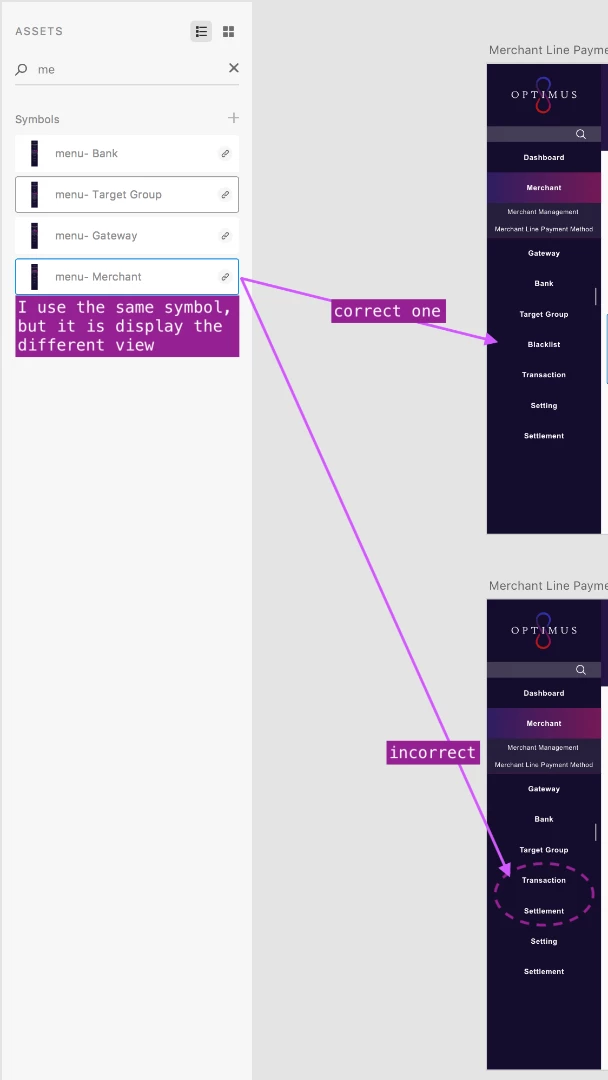
Symbols not getting updated

  • December 4, 2018
  • 3 replies
  • 714 views
  1. can not connect to report the bug page.
  2. please fix the problem below, thank you.

    This topic has been closed for replies.

    3 replies

    Joely10623436
    Community Expert
    Community Expert
    December 4, 2018

    1. can not connect to report the bug page.

    Adobe XD Feedback : Feature Requests & Bugs

    Please Try this link...

    2. please fix the problem below, thank you.

    Why should this be a Bug? This is a User/Community forum, not Adobe Support Page ;-)

    Participant
    December 5, 2018

    Hi

    1. Thanks for providing the link, but I still can not enter the website... the website display “Forbidden”, maybe the website is not allowed in my country?
    2. why do I think this is a bug? Because this happens many times, sometimes I close the app then open again, then it will go back normal, just this time it does not work. But maybe I should change the title ha
    3. Yes, I know this a user community forum, it is just because I can't enter the feedback web, that's why I am here to get the help. And here also have Adobe staff, so that if they see it may help it.
    Preran
    Legend
    December 5, 2018

    Did you try updating the symbol as suggested in the first two posts? Did that work for you?

    Thanks,

    Preran

    greggod
    Participant
    December 4, 2018

    Ahh i've encountered this.

    So you need to update your symbol.

    Right click on the symbol on the page that is most correct and click 'Push Overrides' - that will send the update across to the other symbols.

    Please let the forum know if this works, to help others.

    Thanks,
    G

    elhosary89
    Inspiring
    December 4, 2018

    1- Try to delete incorrect one

    2- select the correct one and (Make Symbol from selection (cmd+K)
    3- try to use it again whatever you want
