
Link in Zwischenablage kopieren
Kopiert
Hi,
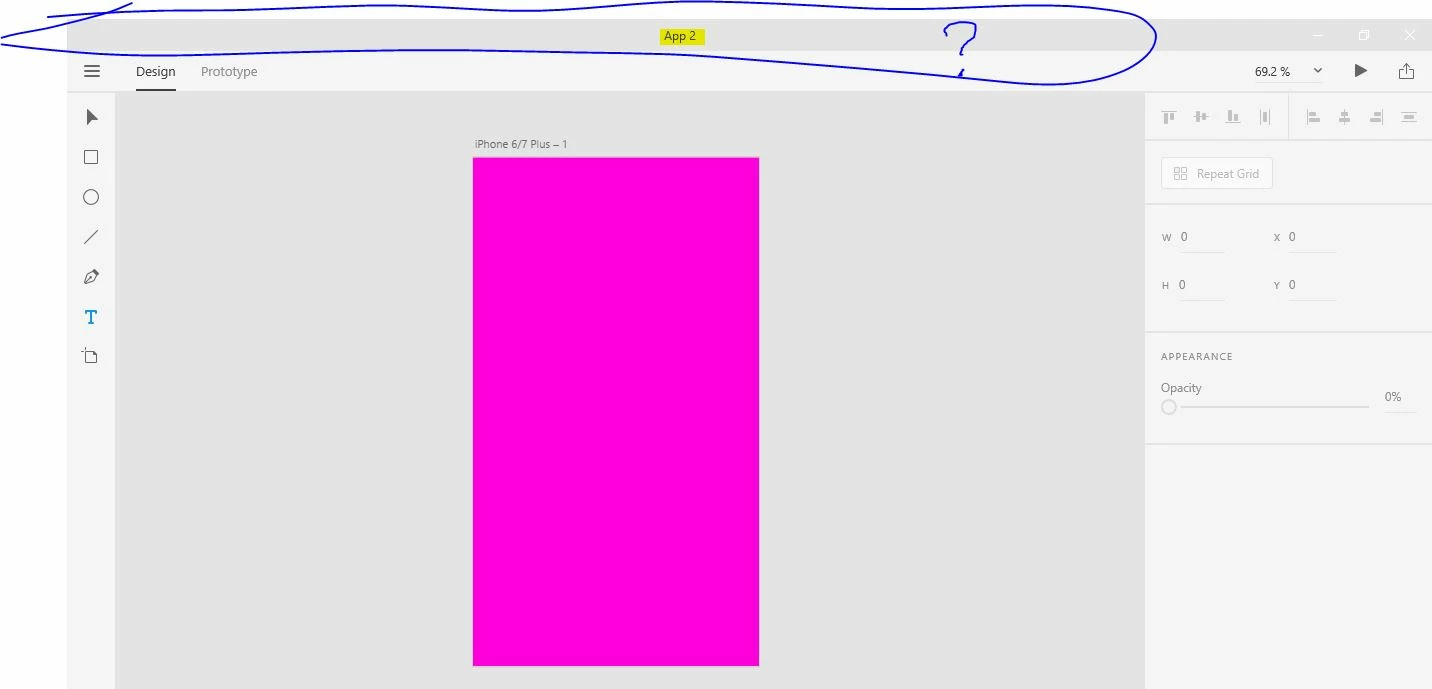
I recently became very interested in Adobe Xd and I just discovered this problem. Mine does not have the bar at the top of the page with the File, Edit, Object View, etc.... This is annoying and is very hard to work without. It is also hard to work with tutorials on projects. I noticed this in a youtube video on how to do something. Here is a screenshot from my computer:
Here is a screen capture fro youtube:
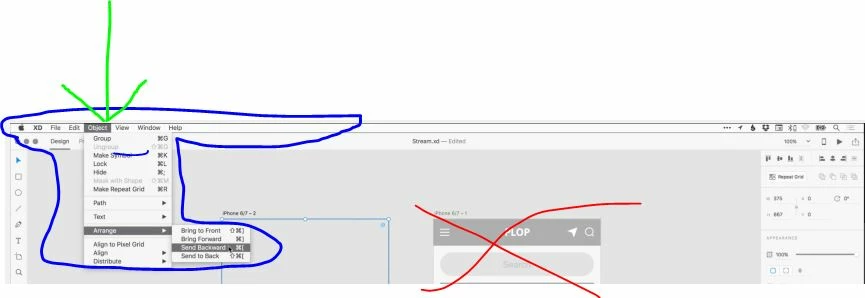
I don't know if this has to do with it being in Beta stage or windows vs. mac, but this is highly annoying.
Thanks,
H.
<The Title was renamed by moderator>
Link in Zwischenablage kopieren
Kopiert
I agree this is terrible. It's just a no brainer function. It's so simple. They wasted more effort in doing a different menu than just doing similar to Apple's. I'm gonna have to try to switch to other programs.
Link in Zwischenablage kopieren
Kopiert
Should be able to Add menu bar as option for those who like using it.
Link in Zwischenablage kopieren
Kopiert
A toolbar would be so much more helpful. I am trying to create an inner shadow through masks. I would create a mask through "object-mask with shape". Without a toolbar this is effectively impossible. Forums posts say all functionality can be found through context menus. Okay.. well that does not help me. I have no option to create a mask, and no way to access it as this is the ONLY adobe software without a toolbar.
Design is communication and benefits from consistency. Id rather that consistency be with adobe programs than Microsoft programs.
Link in Zwischenablage kopieren
Kopiert
Woaaahh. It's nearly the end of 2020 and still no simple toolbar for Windows? This is crazy.
Link in Zwischenablage kopieren
Kopiert
I found it depressing, either.
Link in Zwischenablage kopieren
Kopiert
What program is everyone switching to? I've used Adobe for over 20 years (!) and just decided to teach myself xD but given that I'm running windows, the lack of a menu toolbar seems like a waste of time. Just going thru tutorials and I'm already so frustrated. Can't imagine trying to complete a project.
Link in Zwischenablage kopieren
Kopiert
Hi there,
Sorry to hear about the trouble. In the Windows version of XD, we have the hamburger menu from where you can access other options. For more information, please refer to this article: https://community.adobe.com/t5/adobe-xd/xd-top-menu-missing-windows/m-p/10795237#M20334
Regards
Rishabh
Link in Zwischenablage kopieren
Kopiert
I would NEVER let MS dectate where UI design is headed!
Link in Zwischenablage kopieren
Kopiert
dictate* I couldn't find a way to edit my post. Maybe the more link, but it doesn't show anything.
Link in Zwischenablage kopieren
Kopiert
But most of the things still not in the hamburger, like option view and others too. So how we(Windows users ) get rid of these problems?
Link in Zwischenablage kopieren
Kopiert
[abuse removed by moderator]
Link in Zwischenablage kopieren
Kopiert
Link in Zwischenablage kopieren
Kopiert
That doesn't really help, unfortunately. The hamburger menu has a lot of options but it looks like a disturbing number of functions are missing from the Windows hamburger menu. I can't figure out how to do a lot of simple tasks that are quite easy on Mac 😞
These are not even the same products and I don't feel like this should be a live product if this many options are missing.
Link in Zwischenablage kopieren
Kopiert
using XD in Windows. The top bar is missing, so how do I edit objects, masks, and so? It seems XD is made only for MAC users. Right click won´t show any of those options
Frustrated!
Link in Zwischenablage kopieren
Kopiert
Win version of Adobe XD do not use top bar you need to click "hamburger icon" on the left top to activate menu. Also right clicking object activate context menu from where you can use commands
Link in Zwischenablage kopieren
Kopiert
how do I edit objects, create masks from that menu? The hamburger menu is useless for that
Link in Zwischenablage kopieren
Kopiert
You need to select object in layers or find command after right clicking and open contextual menu for that object. Also you can use the properties panel.
Link in Zwischenablage kopieren
Kopiert
Thanks 🙂
Link in Zwischenablage kopieren
Kopiert
oh yeah and how to you edit / release a mask once created? LMAO!!!!!!!!!!!!!!!!!!!!!!!dont shill for this crap
Link in Zwischenablage kopieren
Kopiert
Hello,
I am trying to find the toolbar File, Edit, Object as you can see in this foto is missing. I am working on the computer Not a Tablet.
I appreciate your help.
Hadas.
Link in Zwischenablage kopieren
Kopiert
Hi Hadas,
Thanks for reaching out. The top menu bar is only available on macOS, on Windows Operating System we have Hamburger Menu on the left-hand side top corner. For more information, you can refer to this similar discussion: https://community.adobe.com/t5/adobe-xd/xd-top-menu-missing-windows/m-p/10795237?page=1#M20334
Regards
Rishabh
Link in Zwischenablage kopieren
Kopiert
Thank you very much for your help.
Link in Zwischenablage kopieren
Kopiert
Hi,
I downloaded the app Adobe XD on my Windows laptop. Now I am running into a problem. When I am working in the app I can't see the menu bar where you can find the option as file, edit, object, etc. Because of this I don't have access to many options while working in Adobe XD. What can I do to fix this?
{Renamed By MOD}
Link in Zwischenablage kopieren
Kopiert
Hi there,
Thanks for reaching out. The Windows version of XD doesn't have the top menu, instead, it has a hamburger menu on the top left corner. For more information, please refer to these similar discussions:
https://community.adobe.com/t5/adobe-xd/xd-top-menu-missing-windows/m-p/10795237#M20334
Feel free to reach out if you need any further assistance.
Regards
Rishabh
Link in Zwischenablage kopieren
Kopiert
Thank you for your help! This will help
Weitere Inspirationen, Events und Ressourcen finden Sie in der neuen Adobe Community
Jetzt ansehen