

Damon Edwards
Inspiring
October 10, 2013
Question

ApplicationUpdater UI auto update failing Error# 16824

  • October 10, 2013
  • 3 replies
  • 2584 views

We have an internal AIR app, there were some small changes made yesterday so the version number was increased and the application was packaged and uploaded to the server with an updated config XML on the server to match the new version number. Nothing out of the ordinary, and no frameworks were changed. When you launch the old version of the app you get the prompt to update, cool, you click Download Now and get the following
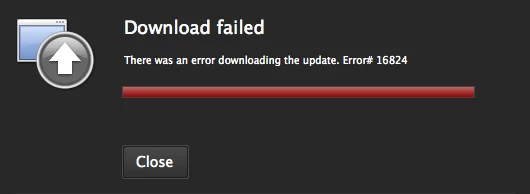
If you point your browser to the URL in the update config xml on the server it downloads the AIR file, then you double click it and it replaces the old version successfully. So it just doesn't work via the ApplicationUpdater UI. It works manually. Why?

OS X and Windows - same outcome

Flash CC 13.0.1.808 running on OS X 10.8.5

AIR 3.6 for Desktop

App descriptor

<?xml version="1.0" encoding="utf-8" standalone="yes"?>

<application xmlns="http://ns.adobe.com/air/application/3.6">

    <id>com.eworksmedia.xmpp.chat</id>

    <versionNumber>1.0.2</versionNumber>

    <filename>e-works media, inc. chat</filename>

    <description>EWM Internal XMPP Chat Client</description>

    <name>e-works media, inc. chat</name>

    <copyright>e-works media, inc.</copyright>

    <initialWindow>

        <content>chat.swf</content>

        <systemChrome>standard</systemChrome>

        <transparent>false</transparent>

        <visible>true</visible>

        <fullScreen>false</fullScreen>

        <autoOrients>false</autoOrients>

        <aspectRatio>portrait</aspectRatio>

        <renderMode>auto</renderMode>

        <maximizable>true</maximizable>

        <minimizable>true</minimizable>

        <resizable>true</resizable>

        <minSize>190 265</minSize>

    </initialWindow>

    <customUpdateUI>false</customUpdateUI>

    <allowBrowserInvocation>false</allowBrowserInvocation>

    <icon>

        <image16x16>icons/16.png</image16x16>

        <image32x32>icons/32.png</image32x32>

        <image48x48>icons/48.png</image48x48>

        <image128x128>icons/128.png</image128x128>

    </icon>

    <supportedProfiles>desktop extendedDesktop</supportedProfiles>

</application>

Packaged with Application

<configuration xmlns="http://ns.adobe.com/air/framework/update/configuration/1.0">

          <url>http://chat.e-worksmedia.com/air/ewm-chat-updater.xml</url>

          <delay>1</delay>

          <defaultUI>

                    <dialog name="checkForUpdate" visible="false" />

                    <dialog name="downloadUpdate" visible="true" />

                    <dialog name="downloadProgress" visible="true" />

                    <dialog name="installUpdate" visible="true" />

                    <dialog name="fileUpdate" visible="true" />

                    <dialog name="unexpectedError" visible="true" />

          </defaultUI>

</configuration>

On server

<update xmlns="http://ns.adobe.com/air/framework/update/description/2.5">

          <versionNumber>1.0.2</versionNumber>

          <url>http://chat.e-worksmedia.com/air/ewm-chat.air</url>

          <description>Resize and reflow fix</description>

</update>

The applicationupdater_ui.swc being used is from inside the AIR 3.6 SDK->frameworks/libs/air/applicationupdater_ui.swc

This topic has been closed for replies.

3 replies

Brandon_Ellis
Participant
October 17, 2013

I've been poking around and while I cannot find the point of failure I know that installing one version over another works fine. Navigating to the Update.air file that is used to do the update and clicking it opens the "replace" dialog and works. I know this isn't really helpful but I'm just trying to narrow the problem down to what it's not. Hopefully someone from Adobe will respond to this thread.

chris.campbell
Legend
October 18, 2013

Hi everyone,

Sorry you guys have encountered this problem.  It sounds like it's the same or similar to this bug:

https://bugbase.adobe.com/index.cfm?event=bug&id=3650590

We've reproduced this internally and are working on finding the core issue and then a fix.  If you have a minute, could you please leave us a comment or vote on the bug letting us know how it's effecting you.

Thanks,

Chris

Damon Edwards
Inspiring
November 1, 2013

Here we are almost a month later and this is still not fixed. Whoever reported the bug on the Adobe bug base states it's OS X only, if you read my original post that's not correct. No windows machine in our office is able to install updates. Not to mention the bug is marked as 'Fixed' when it clearly is not. What's going on, and when can we expect a fix to this critical bug.

Participating Frequently
October 17, 2013

same issue.

Our app which over user base is a 500.000 subscritopn users has just about on 10% of users updated to AIR 3.9 on Mac, and so they cannot update the application version.

To help Facebook change the JS api last night and we must push a new version to allow users to login with FB.

We therefore most kindly ask Adobe, when is this issue going to be patched?

We look forward to hearing from you

Sincerly,

Participating Frequently
October 17, 2013

I also have this problem, with AIR 3.9.0.1030 and OSX 10.8.4 (perhaps more, but this is what I've found so far).

Log says:

Application Installer begin with version 3.9.0.1030 on Mac OS 10.8.4 x86

Commandline is: "/Users/user/Library/Preferences/namespace/Local Store/app-0.8.2.air" 0.8.2

Installed runtime (3.9.0.1030) located at /Library/Frameworks/Adobe AIR.framework

Application Installer end with exit code 2

Damon Edwards
Inspiring
October 10, 2013

So it's later in the day now, no changes have been made since the previous posting. I gave it try again by just launching the old version and low-and-behold the download succeeds for the update - remember no changes were made. Then when you click the 'Install Now' in the next prompt it closes the application and nothing happens. It doesn't install the new version and relaunch the app. If you relaunch the app manually it's still the old version and not the new one you just downloaded and clicked to install. Ahh, this time I actually got output in the Console.app

Oct 10 16:31:54 Damons-MacBook-Pro.local Adobe AIR Application Installer[9129]: Application Installer begin with version 3.9.0.1030 on Mac OS 10.8.5 x86

Oct 10 16:31:54 Damons-MacBook-Pro.local Adobe AIR Application Installer[9129]: Commandline is: "/Users/damon/Library/Application Support/com.eworksmedia.xmpp.chat/Local Store/#ApplicationUpdater/update.air" 1.0.2

Oct 10 16:31:54 Damons-MacBook-Pro.local Adobe AIR Application Installer[9129]: Installed runtime (3.9.0.1030) located at /Library/Frameworks/Adobe AIR.framework

Oct 10 16:31:54 Damons-MacBook-Pro.local Adobe AIR Application Installer[9129]: Application Installer end with exit code 2

Brandon_Ellis
Participant
October 15, 2013

I got this same error today. Only seems to occur on Mountain Lion. Have any luck fixing?