
brian505
Inspiring
October 13, 2010
Question

Can't install Adobe AIR on Win 7 x64

  • October 13, 2010
  • 3 replies
  • 19306 views

Adobe Air has NEVER installed cleanly on my Win 7 x64 system.  It always says it has installed successfully but then the next screen is
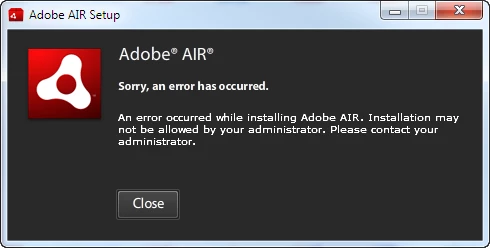
I cleaned out the AIR Install.log file and did a clean install (after having done a registry clean-up -- which actually didn't find anything to clean up).  The install failed again.  This is what is in the Install.log file -- it contains the uninstall and the install.  All I see is an error # 3001.  Any insights would be appreciated.


Based on other posts, I had killed the Logitech server processes and turned off the Windows Firewall.  Doing that obviously did not help me.  I've also tried installing Air v2.0.2.12610, as someone else suggested, but that didn't work either.
Thanks . . . . Brian
[Win 7 Ultimate x64, Intel Core i7-920, 8GB RAM, multiple hard drives with primary SSD drive, 2 x nVidia 9800GT 512MB video cards, MSI X58 Platinum MB]


[2010-10-13:10:24:17] UI SWF load is complete

[2010-10-13:10:24:17] UI initialized

[2010-10-13:10:24:17] starting user confirmation

[2010-10-13:10:24:18] Version of this installer: 2.0.4.13090

[2010-10-13:10:24:18] Installed version: 2.0.4.13090

[2010-10-13:10:24:18] Installation type: patchSame

[2010-10-13:10:24:20] starting elevated install

[2010-10-13:10:24:20] UI SWF load is complete

[2010-10-13:10:24:20] starting uninstall

[2010-10-13:10:24:20] Scheduling an MSI uninstall operation for active product GUID {B194272D-1F92-46DF-99EB-8D5CE91CB4EC}

[2010-10-13:10:24:20] Beginning install

[2010-10-13:10:24:20] Uninstalling product w/ GUID {B194272D-1F92-46DF-99EB-8D5CE91CB4EC}

[2010-10-13:10:24:21] Copying C:\Users\Default\AppData\Roaming\Macromedia\Flash Player\www.macromedia.com\bin\airappinstaller to e:\TEMP\fla409F.tmp\temp

[2010-10-13:10:24:21] Deleting C:\Users\Default\AppData\Roaming\Macromedia\Flash Player\www.macromedia.com\bin\airappinstaller

[2010-10-13:10:24:21] Execution complete; beginning commit phase

[2010-10-13:10:24:21] Deleting e:\TEMP\fla409F.tmp\temp

[2010-10-13:10:24:21] Commit complete

[2010-10-13:10:24:21] install complete

[2010-10-13:10:24:21] begin quitting

[2010-10-13:10:24:22] Elevated install completed

[2010-10-13:10:24:22] begin quitting

[2010-10-13:10:25:09] Performing runtime install

[2010-10-13:10:25:09] UI SWF load is complete

[2010-10-13:10:25:09] UI initialized

[2010-10-13:10:25:09] starting user confirmation

[2010-10-13:10:25:09] Version of this installer: 2.0.4.13090

[2010-10-13:10:25:09] Installation type: new

[2010-10-13:10:25:12] starting elevated install

[2010-10-13:10:25:12] performing an elevated runtime install

[2010-10-13:10:25:12] UI SWF load is complete

[2010-10-13:10:25:12] starting install

[2010-10-13:10:25:12] Scheduling runtime installation operations

[2010-10-13:10:25:12] Scheduling an MSI install operation

[2010-10-13:10:25:12] Beginning runtime installation

[2010-10-13:10:25:12] Beginning install

[2010-10-13:10:25:12] Installing e:\temp\airf213.tmp\setup.msi

[2010-10-13:10:25:13] Copying E:\temp\airf213.tmp\Adobe AIR\Versions\1.0\Resources\airappinstaller.exe to C:\Users\Default\AppData\Roaming\Macromedia\Flash Player\www.macromedia.com\bin\airappinstaller\airappinstaller.exe

[2010-10-13:10:25:13] Copying E:\temp\airf213.tmp\Adobe AIR\Versions\1.0\Resources\digest.s to C:\Users\Default\AppData\Roaming\Macromedia\Flash Player\www.macromedia.com\bin\airappinstaller\digest.s

[2010-10-13:10:25:13] Execution complete; beginning commit phase

[2010-10-13:10:25:13] Commit complete

[2010-10-13:10:25:13] install complete

[2010-10-13:10:25:13] begin quitting

[2010-10-13:10:25:13] Elevated install completed

[2010-10-13:10:25:17] Elevated install failed (3001)

[2010-10-13:10:25:17] runtime install entering error state: [ErrorEvent type="error" bubbles=false cancelable=false eventPhase=2 text="Error #3001" errorID=3001]

[2010-10-13:10:25:18] begin quitting

This topic has been closed for replies.

3 replies

Participating Frequently
November 6, 2010

Have we finally found a simple solution and

if so what is it?

chris.campbell
Community Manager
Community Manager
November 8, 2010

Hi David,

With installers, there unfortunately isn't a "one size fits all" solution.  We'll need to start with a description of what's occurring on your computer and the AIR installer log.  You can find basic instructions at the top of the Installation Issues forum.

Thanks,

Chris

Participating Frequently
November 9, 2010

I am struggling to find the installer log and to get this programme to attempt to re-install all I get is the same as others the window saying I dont have administrator rights.

Participant
October 22, 2010

I'm using a tool called Market Samurai, and it uses Adobe Air.  They recently did an update.  Adobe Air kicked off and must have installed for several minutes.  Then, Samurai started installation.  I had time to get a cup of coffee before all was completed.  Other software updates I've done in the past take seconds.  Is this the way it's going to be with Adobe Air? 

Josh Frankel

http://www.freeforex101.com

chris.campbell
Community Manager
Community Manager
October 22, 2010

Hi Josh,

Once I've downloaded the AIR installer, my installs typically take less than a minute to complete.  The installer runs about 12mb, so maybe the connection was slow during install?  If you'd like, you can upload your AIR install log and I can try and pinpoint which part took up all that time.

Chris

stolennickname
Inspiring
October 13, 2010

Sorry, I feel your pain. I'm still dealing with similar issues on AIR Win 7 x64 myself.

I love the part where it says:

Elevated install completed

Followed by:

Elevated install failed

brian505
brian505Author
Inspiring
October 13, 2010

Yes, that is pretty funny (if one can still laugh about this ongoing issue).

As you said it completes and then it fails...

[2010-10-13:10:25:13] Elevated install completed

[2010-10-13:10:25:17] Elevated install failed (3001)

In case anyone from Adobe does look at this, I did want to say that I am the Administrator of my PC.  UAC is not installed.  I have even run the AdobeAIR installer as an Administrator just in case that might help.  It obviously did not.

I have not expressed how I feel about Adobe AIR in general in this thread.  I'm doing my best to hold myself back.

brian505
brian505Author
Inspiring
October 14, 2010


I wanted to track this here:

Chris Campbel of Adobe asked:

In at least one of the logs generated from this thread, it appears that the .msi installer (which is launched silently from the AIR install) is failing.  Would anyone that is running into failures be willing to enable MSI logging and provide us both AIR and MSI installer logs?

Instructions for enabling and finding msi logs can be found here:  How to enable Windows Installer logging

On Windows 7, the AIR installer log can be found at: C:\Users\username\AppData\Local\Adobe\AIR\logs

Please feel free to email me at ccampbel@adobe.com

Thanks,

Chris


I set up MSI logging (on Win 7 x64) and the ran the Adobe AIR install.  I got the normal "administrator error".  I then sent both the Adobe AIR install log and the MSI log to Chris and he said that would look into it with the Adobe support team today.
I'll post any updates as I have them.

Regards . . . . Brian

(I have no idea what's going with the fonts when I edit messages in this forum!!!)