Exit
  • Global community
    • Language:
      • Deutsch
      • English
      • Español
      • Français
      • Português
  • 日本語コミュニティ
  • 한국 커뮤니티
0

Adobe Flash cs6 weird crashing issue

Explorer ,
Nov 15, 2020 Nov 15, 2020

I still use Adobe Flash cs6 since it is a very good program. But it keeps doing this weird crash thing which im not sure how to fix. 

cheyene_0-1605467496795.png


848
Translate
Report
Community guidelines
Be kind and respectful, give credit to the original source of content, and search for duplicates before posting. Learn more
community guidelines

correct answers 1 Correct answer

Valorous Hero , Nov 15, 2020 Nov 15, 2020

Make sure Flash is closed.

From your Windows Explorer make sure you choose Show Hidden Files.
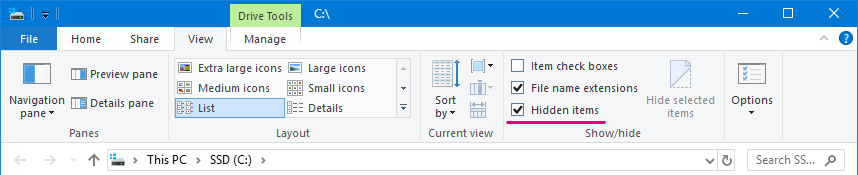
Manual_Installation_Show_Hidden_Files.png

Find this folder:

C:\Users\YourUserName\AppData\Local\Adobe\Flash CS6\YourLanguage\


Delete the folder called Configuration inside.


Start Flash.

It will create clean new config.


Translate
Advisor ,
Nov 15, 2020 Nov 15, 2020

try to erase all your preferences

Translate
Report
Community guidelines
Be kind and respectful, give credit to the original source of content, and search for duplicates before posting. Learn more
community guidelines
Explorer ,
Nov 15, 2020 Nov 15, 2020

I'm not sure how

Translate
Report
Community guidelines
Be kind and respectful, give credit to the original source of content, and search for duplicates before posting. Learn more
community guidelines
Valorous Hero ,
Nov 15, 2020 Nov 15, 2020
LATEST

Make sure Flash is closed.

From your Windows Explorer make sure you choose Show Hidden Files.

Manual_Installation_Show_Hidden_Files.png

Find this folder:

C:\Users\YourUserName\AppData\Local\Adobe\Flash CS6\YourLanguage\


Delete the folder called Configuration inside.


Start Flash.

It will create clean new config.


Nick - Character Designer and Animator, Flash user since 1998
Member of the Flanimate Power Tools team - extensions for character animation

Translate
Report
Community guidelines
Be kind and respectful, give credit to the original source of content, and search for duplicates before posting. Learn more
community guidelines
