
Inspiring
October 14, 2018
Answered

Animate CC drawing bug for Windows 10 Tablet PC users.

  • October 14, 2018
  • 22 replies
  • 18952 views

This issue is NOT solved


Animate CC has a serious bug pertaining to all Tablet PC devices using Windows 10, whenever you start to draw you will receive a lag that draws a straight line from where you started to put your pen down to wherever your stylus is at the time the lag is complete.

I would like to start by showing how real and sever this bug has been to the Animate CC community by referring to past forums I have found regarding this very same issue that goes back as far as 2013. All these posts are by the various professional users who are not able to use Animate CC properly on their tablet PC device. Many of these users (including me) need to use Animate CC as a source of income. Please take a look.


https://www.reddit.com/r/adobeanimate/comments/fuqjen/straight_lines_at_beginning_of_brush_strokes/?utm_medium=android_app&utm_source=share

https://forums.adobe.com/thread/2519059

https://www.newgrounds.com/bbs/topic/1427773

https://forums.adobe.com/message/9859004#9859004

https://forums.adobe.com/thread/1515604

https://answers.microsoft.com/en-us/surface/forum/all/adobe-flash-professionalanimate-cc-brush-stroke/292e31f4-5e35-4a14-a227-385317cf0781

https://forums.adobe.com/thread/1236230

https://www.reddit.com/r/Surface/comments/5zba7h/ive_read_everywhere_that_animate_cc_doesnt/deyn7fd/

https://answers.microsoft.com/en-us/surface/forum/surfpronew-surfupdate/new-surface-pro-drawing-bug-straight-lines-bug-in/d4e73726-c1a2-464e-a37c-20a707f6c265

https://forums.adobe.com/thread/2178683


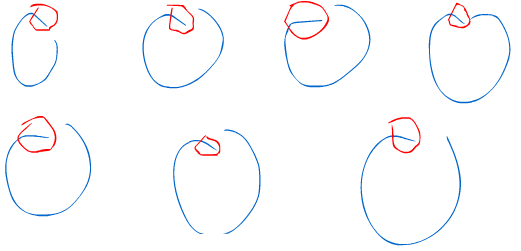
From what I can tell this issue is part Microsoft windows Ink's doing and part Adobe's doing. Microsoft released their Windows Ink update a few years back which did not sit well with many Adobe users. Over time Adobe has been able to accommodate this change by Microsoft, but has not yet solved all the issues for Adobe Animate CC leaving it's users wondering why there is no fix and resorting to reverting back to Windows 7 or abandoning Animate CC altogether for other animation packages. It's been very frustrating using Animate CC to draw because of the initial drawing line bug for many tablet users. For Adobe developers working on AnimateCC, I'll tell you everything I know in hopes of making this your top priority. The below image contains blue circles that I drew to demonstrate the issue. I'm using the absolute latest version of AnimateCC and Windows 10.  This issue persists on AES, N-Trig and EMR devices. So yes, Surface Book users will experience all these pains when trying to use Animate CC. I circled the problem areas in red which are essentially the initial start to the drawing of the circles. Ironically the red circles are also warped due to this bug. Keep in mind that I'm a professional artist and drawing circles is common practice for me. Pay notice unintentional lines that are created from my brushstrokes.
 

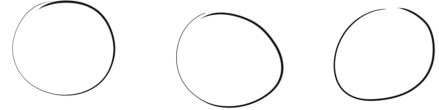
Below are some more circles but drawn with Adobe Photoshop CC on the same machine to show you the difference.
Let's look deeper into this issue. A big clue is that Windows uses screen holds to simulate right clicks. Below you can see this in action and how it relates to the issue. The radial matches up with the initial drawing line. Keep in mind that with Hold Right clicks turned on I am NOT able to draw until I cross that radial threshold.  You are not able to see it in the below animation but I am scribbling inside that radial circle during the time it looks like my cursor is frozen in the center. Only When I leave the radial area does my line begin to pick up.

DrawLineBug.gif

Now lets turn off Hold To Right Click
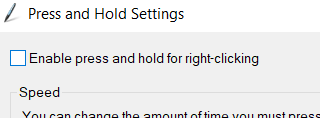
Just like previously, when the below cursor animation freezes I'm actually scribbling around a bit before I leave that now invisible radial area (at which point I'm not able to draw) and the drawing picks up with that straight line. If you are thinking in your head "this guy is claiming he can't draw dots or tiny circles" then you are correct.

DrawLineBug02.gif

but let's go ahead an turn on that Microsoft legacy patch that everyone's been talking about for photoshop (which is not needed currently with Photoshop CC). Then restart flash

what seems to be happening in the animation below is that the radial area seems to have gotten a lot smaller (maybe 1/5 the size) but still receiving the line drawing lag.

DrawLineBug03.gif


The faster you draw the more obvious and large that lag line becomes so the patch doesn't really fix much.

DrawLineBug04.gif

Below is just demonstrate how consistently bad this bug is. This is me trying to draw semi-circles. Red AnimateCC / Black Photoshop


DrawLineBug05.gifDrawLineBug06.gif


Please, please, please fix this bug as I need to make a living animating using AnimateCC. I have been a loyal Animate CC user for many years and have integrated Animate CC into many great projects. I do not wish to leave Animate CC and begin working with a new package, but unfortunately, I don't have much of an option at this point.


    This topic has been closed for replies.
    Correct answer Mohanaraj

    Hi,

    Appologise for the time it took to make progress on this. The latest Animate update 20.0.3 comes with a Windows Ink (Beta) Tablet Input option. This is actually amied to resolve this issue. Would really appreciate if you guys can try out this option and share your feedback

    Edit > Preferences > Drawing > Tablet Input > Windows Ink (Beta).

    https://helpx.adobe.com/in/animate/using/whats-new/2020-1.html#windows_ink


    Thanks!

    Mohan  

    22 replies

    Participant
    December 20, 2023

    Okay so I've been having this exact same problem. However, I am using Macromedia Flash Professional 8 which I am well aware of is outdated and not supported anymore but if there were solutions that would be nice. I also have heard of someone here who still does support Flash 8 by providing mods I think, had a uh, a monkey profile picture I think.

    I am currently using a Gaomon PD1161 Pen Display with an HP Laptop 14-dq2xxx with an 11th Gen Intel(R) Core(TM) i-1115G4 @ 3.00GHz 2.90GHz, 64-bit operating system and x64-based processor, Edition is Windows 11 Home and the version is 22H2; I have the option of using a Wacom Intuos Creative Pen Tablet instead of the Gaomon Monitor. 

    n. tilcheff
    Legend
    December 20, 2023

    Yeah, plug your Wacom in, install the Wacom driver. In the Wacom properties you might need to switch Windows Ink OFF for Flash. 

    All should work fine in Flash 8.


    If you face mapping issues set your Dispay Scaling to 100% from Windows Display Settings.


    You can also install EDAP Tools to get extra functionality.


    Nick - Character Designer and Animator, Flash user since 1998 | Member of the Flanimate Power Tools team - extensions for character animation
    Participant
    December 21, 2023

    Thanks alot! It works

    CristianoRonaldoRechUnite
    Inspiring
    September 3, 2020

    IT NOT HELPED

    Participant
    May 1, 2020

    Thank you so much for this. This was making me crazy! I´m buying Harmony cause i wasn´t able to issue with my tablet... I search a lot trying to understand why the trace was displazed. Is weird the fist time works fine. Next time the trouble appeared forever-

    ERA-DARKNIGHT
    Participant
    April 24, 2020

    Finally!!!! after a long time and insistence, they finally added a solution to the problem !!

    we just have to go to:


    Edit > Preferences > Drawing > Tablet Input > Windows Ink (Beta).


    For this time, I think it can finally be declared as a resolved case, unless it eventually causes problems again.

    Participating Frequently
    April 21, 2020

    Hi everyone. This problem still exists, but I did find a work-a-round since I doubt Adobe will solve this problem any time soon. This is an annoying solution, but it helped me revive my animation workflow in Animate. 


    Right now I am using a Surface Pro 6, Animate CC, and a Bamboo Pro Pen. My Surface has the latest version of Windows 10 and all of my Adobe programs are fully up to date - my bamboo pen's software is also up to date.


    When I click the top button on my pen and then draw as normal, my pen starts drawing right away. I'm in disbelief that this is something I didn't try 2 years ago! But it actually makes Animate recognize my pen as a pen and not a right-click. Depending on your hardware, you may need to click a different button altogether. This thread talks about it in more depth: https://answers.microsoft.com/en-us/surface/forum/all/new-surface-pro-drawing-bug-straight-lines-bug-in/d4e73726-c1a2-464e-a37c-20a707f6c265


    With that being said, this solution is still going to slow down production and cause major headaches. Especially since the same action in Photoshop makes my pen unresponsive. I know this solution isn't great, but I hope it helps someone out there that needs it.


    Please fix this Adobe, I'm ready to switch to another animation platform entirely.

    Mohanaraj
    Adobe Employee
    Adobe Employee
    April 21, 2020

    Hi,

    Are you facing the initial stright line issue after setting the Tablet Input to Windows Ink (Beta) in Preferences?


    Thanks!

    Mohan

    Participating Frequently
    April 25, 2020

    Hi Mohanaraj!


    Thank you for your response, you just fixed the entire problem for me. I've been facing this issue for the past 2 years, and switching this one setting fixed everything for me. Thank you so much!


    For others having this problem, here is what I did to fix this on my Surface Pro 6.


    1. Open Adobe Animate CC

    2. In the top menu click EDIT

    3. On this dropdown, click PREFERENCES

    4. Click EDIT PREFERENCES

    5. Click DRAWING

    6. Switch the Tablet Input to WINDOWS INK (BETA)

    7. Click OK

    8. Test out your pen!


    With these changes, I am able to draw in Animate without any issues. 

    Thank you Mohanaraj! This was very helpful and I appreciate it so much.

    AyekCela
    Participant
    April 19, 2020

    Logged in just to support this forum. This is still a problem. Have been experiencing this issue since last year and am still saddened to see that this hasn't been resolved yet.

    ODK9
    Participant
    April 18, 2020

    bruh. I just want to animate smoothly. how is there still no fix


    Inspiring
    April 4, 2020

    Im the creator of this post and this issue has not been resolved but yet it's marked as resolved. I continue to see users frustrated by this issue and turning away to other software packages. Here's a link to a user that has this problem in 2020. Please re-open this issue. It is not resolved!


    https://www.reddit.com/r/adobeanimate/comments/fuqjen/straight_lines_at_beginning_of_brush_strokes/?utm_medium=android_app&utm_source=share

    Mohanaraj
    Adobe Employee
    MohanarajCorrect answer
    Adobe Employee
    April 20, 2020

    Hi,

    Appologise for the time it took to make progress on this. The latest Animate update 20.0.3 comes with a Windows Ink (Beta) Tablet Input option. This is actually amied to resolve this issue. Would really appreciate if you guys can try out this option and share your feedback

    Edit > Preferences > Drawing > Tablet Input > Windows Ink (Beta).

    https://helpx.adobe.com/in/animate/using/whats-new/2020-1.html#windows_ink


    Thanks!

    Mohan  

    Known Participant
    April 20, 2020

    Wow finally !! Problem solved !!!
    Thank you very much!!
    Finally, I can use 2in1 laptop 100%.

    I hope many people know this !!!!!

    Participant
    March 16, 2020

    I have the latest version of adobe animate but i'm still experiencing this bug. It's annoying and seriously effects my workflow, yet somehow I am managing to live with it. I thought it was supposed to be fixed in late 2019? What happened?

    Known Participant
    February 14, 2020

    The problem was first recovered on October 14, 2018, and a year and four months passed.

    After several updates, the problem is still not resolved.

    May 16, 2019,
    Adobe has said it will solve the problem, but unfortunately Adobe doesn't seem to be able to solve it.

    After nine months, the problem has not been solved.

    Adobe won't be interested in this issue unless someone spreads it over to YouTube.

    I would like to let Adobe know what's going on to fix this.

    If this cannot be solved,
    I think it should be announced that Windows 10 2in1 PC can be difficult to use AnimateCC.
    That way, many users will not feel uncomfortable and will not feel betrayed.

    Adobe should take responsibility for this problem as soon as possible.