
Inspiring
October 14, 2018
Answered

Animate CC drawing bug for Windows 10 Tablet PC users.

  • October 14, 2018
  • 22 replies
  • 18925 views

This issue is NOT solved


Animate CC has a serious bug pertaining to all Tablet PC devices using Windows 10, whenever you start to draw you will receive a lag that draws a straight line from where you started to put your pen down to wherever your stylus is at the time the lag is complete.

I would like to start by showing how real and sever this bug has been to the Animate CC community by referring to past forums I have found regarding this very same issue that goes back as far as 2013. All these posts are by the various professional users who are not able to use Animate CC properly on their tablet PC device. Many of these users (including me) need to use Animate CC as a source of income. Please take a look.


https://www.reddit.com/r/adobeanimate/comments/fuqjen/straight_lines_at_beginning_of_brush_strokes/?utm_medium=android_app&utm_source=share

https://forums.adobe.com/thread/2519059

https://www.newgrounds.com/bbs/topic/1427773

https://forums.adobe.com/message/9859004#9859004

https://forums.adobe.com/thread/1515604

https://answers.microsoft.com/en-us/surface/forum/all/adobe-flash-professionalanimate-cc-brush-stroke/292e31f4-5e35-4a14-a227-385317cf0781

https://forums.adobe.com/thread/1236230

https://www.reddit.com/r/Surface/comments/5zba7h/ive_read_everywhere_that_animate_cc_doesnt/deyn7fd/

https://answers.microsoft.com/en-us/surface/forum/surfpronew-surfupdate/new-surface-pro-drawing-bug-straight-lines-bug-in/d4e73726-c1a2-464e-a37c-20a707f6c265

https://forums.adobe.com/thread/2178683


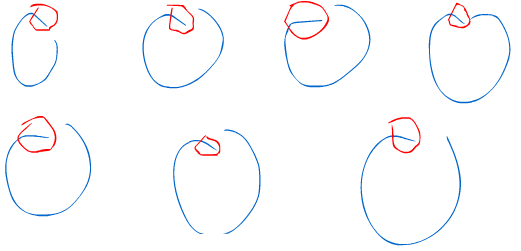
From what I can tell this issue is part Microsoft windows Ink's doing and part Adobe's doing. Microsoft released their Windows Ink update a few years back which did not sit well with many Adobe users. Over time Adobe has been able to accommodate this change by Microsoft, but has not yet solved all the issues for Adobe Animate CC leaving it's users wondering why there is no fix and resorting to reverting back to Windows 7 or abandoning Animate CC altogether for other animation packages. It's been very frustrating using Animate CC to draw because of the initial drawing line bug for many tablet users. For Adobe developers working on AnimateCC, I'll tell you everything I know in hopes of making this your top priority. The below image contains blue circles that I drew to demonstrate the issue. I'm using the absolute latest version of AnimateCC and Windows 10.  This issue persists on AES, N-Trig and EMR devices. So yes, Surface Book users will experience all these pains when trying to use Animate CC. I circled the problem areas in red which are essentially the initial start to the drawing of the circles. Ironically the red circles are also warped due to this bug. Keep in mind that I'm a professional artist and drawing circles is common practice for me. Pay notice unintentional lines that are created from my brushstrokes.
 

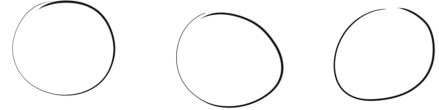
Below are some more circles but drawn with Adobe Photoshop CC on the same machine to show you the difference.
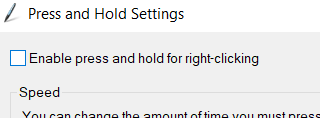
Let's look deeper into this issue. A big clue is that Windows uses screen holds to simulate right clicks. Below you can see this in action and how it relates to the issue. The radial matches up with the initial drawing line. Keep in mind that with Hold Right clicks turned on I am NOT able to draw until I cross that radial threshold.  You are not able to see it in the below animation but I am scribbling inside that radial circle during the time it looks like my cursor is frozen in the center. Only When I leave the radial area does my line begin to pick up.

DrawLineBug.gif

Now lets turn off Hold To Right Click
Just like previously, when the below cursor animation freezes I'm actually scribbling around a bit before I leave that now invisible radial area (at which point I'm not able to draw) and the drawing picks up with that straight line. If you are thinking in your head "this guy is claiming he can't draw dots or tiny circles" then you are correct.

DrawLineBug02.gif

but let's go ahead an turn on that Microsoft legacy patch that everyone's been talking about for photoshop (which is not needed currently with Photoshop CC). Then restart flash

what seems to be happening in the animation below is that the radial area seems to have gotten a lot smaller (maybe 1/5 the size) but still receiving the line drawing lag.

DrawLineBug03.gif


The faster you draw the more obvious and large that lag line becomes so the patch doesn't really fix much.

DrawLineBug04.gif

Below is just demonstrate how consistently bad this bug is. This is me trying to draw semi-circles. Red AnimateCC / Black Photoshop


DrawLineBug05.gifDrawLineBug06.gif


Please, please, please fix this bug as I need to make a living animating using AnimateCC. I have been a loyal Animate CC user for many years and have integrated Animate CC into many great projects. I do not wish to leave Animate CC and begin working with a new package, but unfortunately, I don't have much of an option at this point.


    This topic has been closed for replies.
    Correct answer Mohanaraj

    Hi,

    Appologise for the time it took to make progress on this. The latest Animate update 20.0.3 comes with a Windows Ink (Beta) Tablet Input option. This is actually amied to resolve this issue. Would really appreciate if you guys can try out this option and share your feedback

    Edit > Preferences > Drawing > Tablet Input > Windows Ink (Beta).

    https://helpx.adobe.com/in/animate/using/whats-new/2020-1.html#windows_ink


    Thanks!

    Mohan  

    22 replies

    December 29, 2019

    I am having the exact same problem. This has been going on for years I finally decided to make a account just to state my outrage. Really? Still no patch? How can you charge us money knowing we can barely even use it.

    Inspiring
    November 26, 2019

    Are there any updates? 

    florianw61389245
    New Participant
    December 19, 2019

    Hi, i've got the exact same issue. On Photoshop 20 or Illustrator, no problem but impossible to draw something on animate because of this line ... 


    Using Huion WH1409 ... 

    sergeyl94185497
    New Participant
    November 9, 2019

    Hi,


    I faced with the same issue in new 20.0 version. But it was well in previous version. I still didn't find solution


    I have Huion HS610. Windows 10. 

    I have updated drivers but didn't help. It is still works for version 19 but not for 20. In updated photoshop no issues, only with Animate

    Known Participant
    October 26, 2019

    Can this problem be solved this year?

    It's been a long time since this issue has been raised, but it's a pity that there are no updates yet...

    Pascal 17151487
    New Participant
    October 26, 2019

    I posted my solution to this as a reply to an Adobe dev, if you follow what I did it should work for you! 

    Known Participant
    October 26, 2019

    I saw your comment. 😄


    Like you said, I am using a Wacom cintiq when I need to work with AnimateCC on my laptop.
    With Wacom cintiq, drawing bugs do not occur.


    But this doesn't make sense.
    The purpose of using a 2in1 PC is to carry only one notebook.


    If you intend to use it with another digitizer device,
    You will buy a much lighter and better laptop for the same price.


    It is not a solution to carry another device because of an error in AnimateCC.


    I hope this resolves as soon as possible ...
    I would like to know what is going on right now.

    Participating Frequently
    October 14, 2019

    Hello, I'm still having this issue as well. I know this was raised a year ago but I wanted to see if there were any new developments with this bug. Thank you. 

    Participating Frequently
    October 11, 2019

    This is going to seem absurd but I was pulling my hair out trying to get around this bug and in addition to disabling click and hold to right click, I had to go into "Pen and Windows Ink" and turn off "Show Visual Effects". Apparently even if you disable click and hold Windows is still checking whether it should show the visual effect of clicking and holding. Also click "Let me use my pen as a mouse". Between the two I am now able to make small enough circles to represent pupils in my cartoons.

    Inspiring
    November 26, 2019

    I may be wrong, but I don't believe this actually fixed the issue. Trying this solution out made the "line" lag draw by time instead of by distance. So if you draw your circles really quickly the "line bug" will re-appear. Please let me know if i'm wrong. 

    Participating Frequently
    November 26, 2019

    You are not wrong. For me, it's an improvement over not being able to draw small circles at all. But I have to wait five seconds between drawing one circle and the next circle as the software performs its post stroke completion smoothing. 

    Participating Frequently
    August 7, 2019

    I want to buy a Surface Pro. Why are you destroying your Animate CC  clients?

    New Participant
    July 3, 2019

    having the same issue. please help!!!

    Mohanaraj
    Adobe Employee
    Adobe Employee
    May 17, 2019

    Hi - Thanks for all the details. We have raised a bug internally for investigation. Will update you once the issue is resolved.

    Thanks!

    Mohan

    Known Participant
    July 31, 2019

    When will the update be made?

    I am eagerly looking forward to resolving this issue.

    As an anime creator using AnimateCC on Samsung notebooks, I hope that this problem will be resolved as soon as possible.

    Because of this, I can not do anything with my laptop.

    It's really sad.

    natewattz1
    New Participant
    October 30, 2018

    I'm having the exact same issue on Dell Latitude 3590 computers, using Huion Inspiroy H430P tablets. I don't think that the samsung fix will work for me. Adobe, is there something else that I might be able to do to get this issue fixed? I'm teaching adobe programs in Middle school and they would love to learn animate but they get very frustrated when this issue arises. Whatever you guys can do to help would be hugely appreciated.

    Thank You,

    -Nate