
Known Participant
June 6, 2018
Answered

Animate - flipping the stage

  • June 6, 2018
  • 1 reply
  • 7876 views

Is there a way in Animate CC (18.0.1) to flip an entire stage/movie. I have a 150 frame, multi-layer animation of a number of right-facing objects moving left to right across the screen. I want to be able to flip everything horizontally so that they become left-facing objects moving from right to left. Is there an easy way to do this? Thanks in advance.
This topic has been closed for replies.
Correct answer JoãoCésar17023019

Hi.

Not the stage itself, but you can flip the main timeline using AS3 pasting this code in the first frame:

AS3 code:

if (!this.flipped)

{

    this.scaleX = -1;

    this.x += stage.stageWidth;

    this.flipped = true;

}

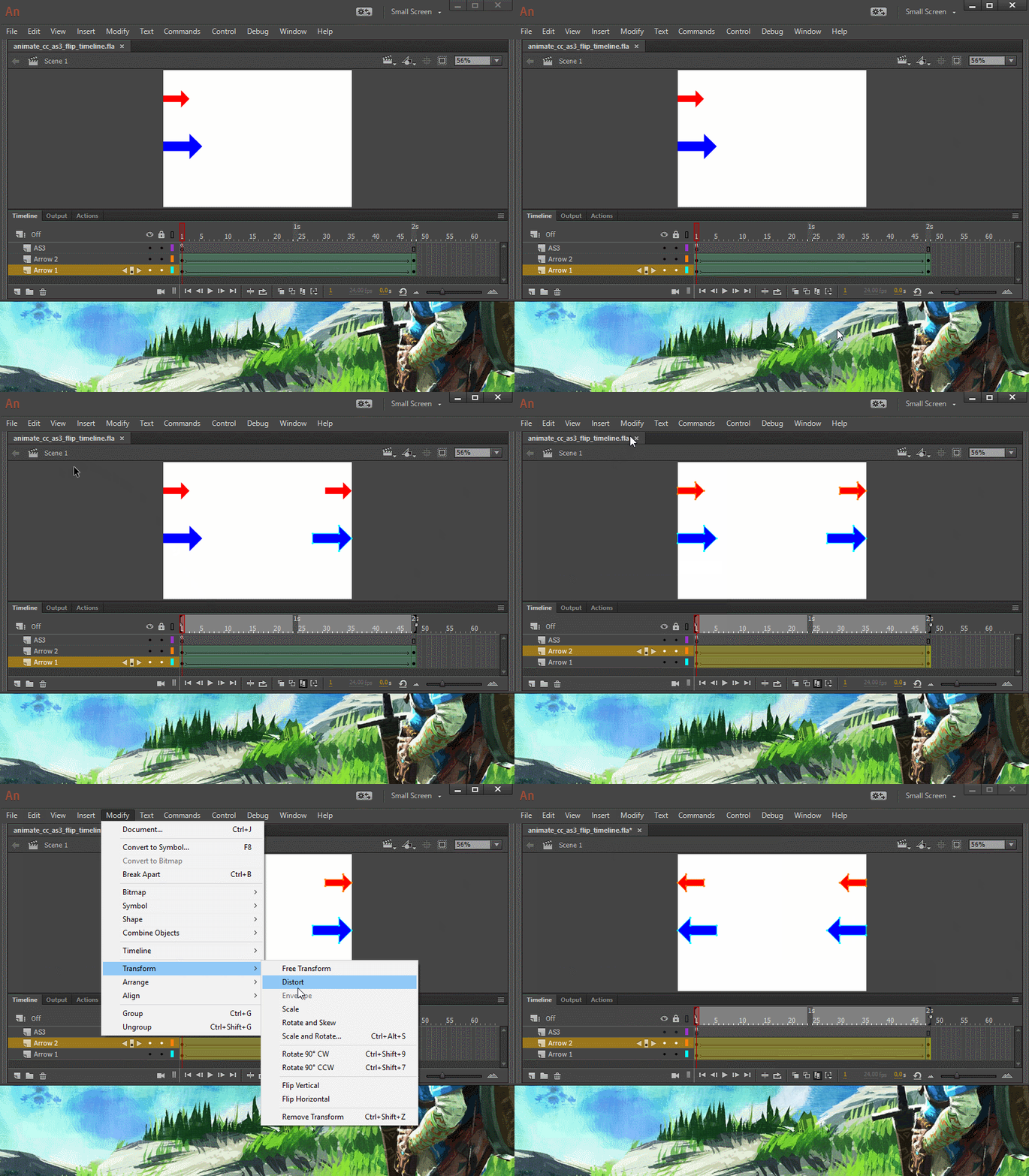
But the best practice in this situation is to select all objects at once and flip them. Like this:

- Go to the bottom of the timeline;

- Click the Modify Markers button;

- Select Marker Range All;

- Then click on the Edit Multiple Frames button (Shift + Alt + E);

- Press Ctrl/Cmd + A to select all objects;

- Go to Modify > Transform > Flip Horizontal.

This should do the job.

Demonstration:

I hope this helps.

Regards,

JC

1 reply

JoãoCésar17023019
Community Expert
JoãoCésar17023019Community ExpertCorrect answer
Community Expert
June 6, 2018

Hi.

Not the stage itself, but you can flip the main timeline using AS3 pasting this code in the first frame:

AS3 code:

if (!this.flipped)

{

    this.scaleX = -1;

    this.x += stage.stageWidth;

    this.flipped = true;

}

But the best practice in this situation is to select all objects at once and flip them. Like this:

- Go to the bottom of the timeline;

- Click the Modify Markers button;

- Select Marker Range All;

- Then click on the Edit Multiple Frames button (Shift + Alt + E);

- Press Ctrl/Cmd + A to select all objects;

- Go to Modify > Transform > Flip Horizontal.

This should do the job.

Demonstration:

I hope this helps.

Regards,

JC