

SamPotasz
Participant
October 4, 2019
Question

Animate PNG export slightly blurry

  • October 4, 2019
  • 5 replies
  • 6330 views

Hi all 🙂

I am having trouble preserving image quality when exporting symbols as PNG sequences from Animate.
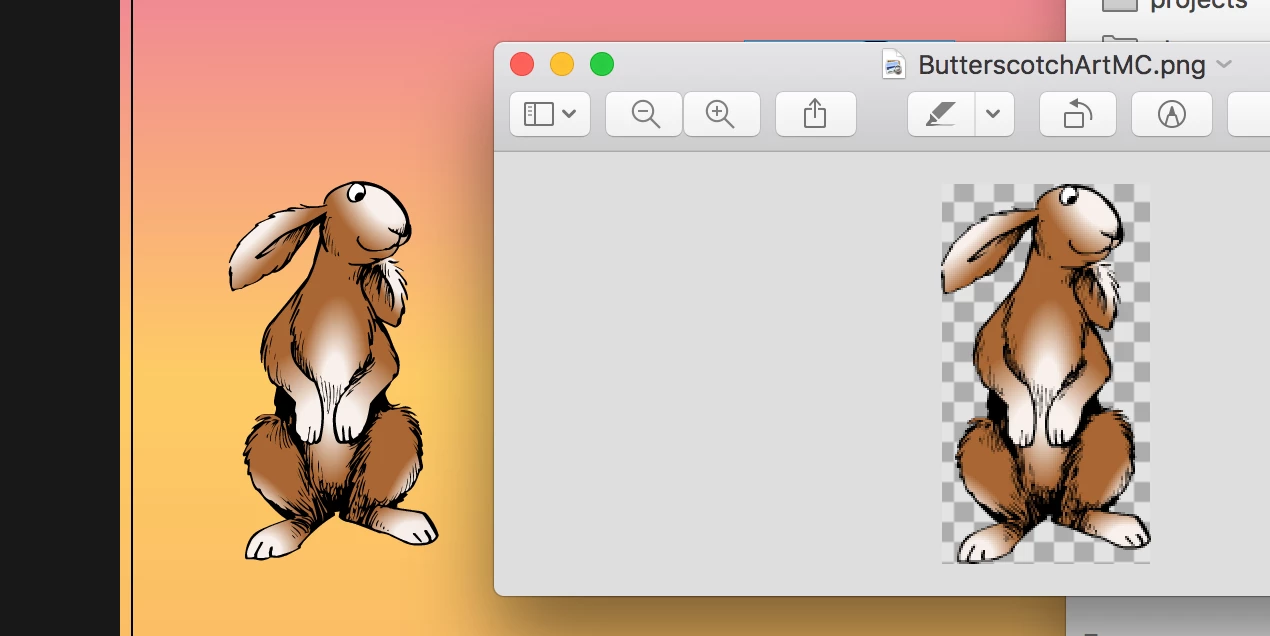
On the left is the symbol on the Animate stage, and on the right is the exported PNG. As you can see, it's not great 😞

My first thought was to bump up the DPI on the export, but I'm not able to do that without increasing the overall size of the image so that doesn't help at all, either.
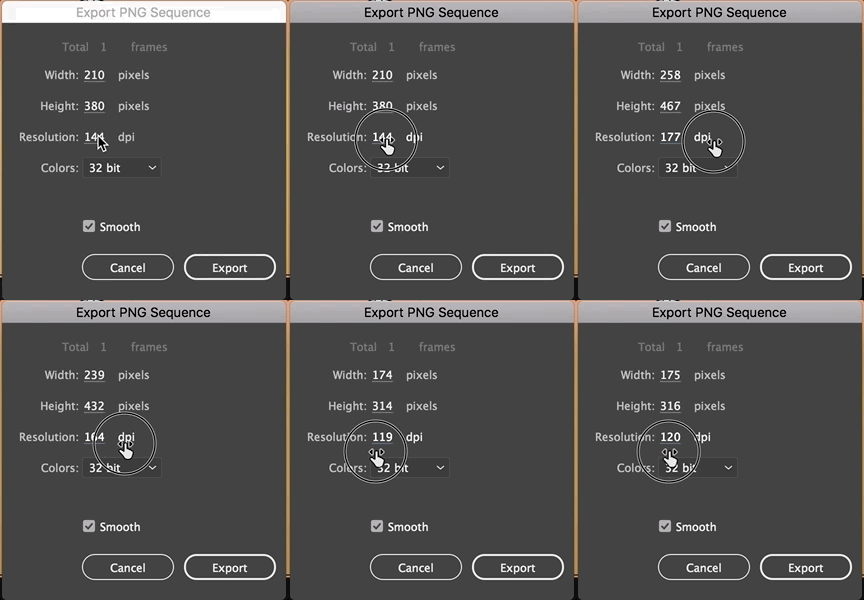
I need the image at the original size at the original high quality, in PNG format.


Is that at all possible with Animate?

Is it possible through some convoluted way of exporting it into some other CC application and then exporting it to a PNG?


Thanks so much,

Sam

    This topic has been closed for replies.

    5 replies

    SamPotasz
    SamPotaszAuthor
    Participant
    October 7, 2019

    Thank you all so much for your suggestions and taking the time to look into this frustrtating issue! I really appreciate it.


    Unfortunately, nothing seems to work in terms of exporting what I see on the stage cleanly to a PNG.


    I think the best solution is to take screenshots for now and then edit out the backgrounds. Pretty sloppy, but for a small amount of still images, it'll work!


    Is it possible that this weirdness is caused by this document being super old (as in, AS1) and then upgraded to the latest version?


    Thanks again,

    Sam

    n. tilcheff
    Legend
    October 7, 2019

    Can you  upload one FLA with one symbol somewhere, mate, so that I can have a look at the source file and do some tests?

    Ideally, it will be the original AS1 file.


    Nick - Character Designer and Animator, Flash user since 1998 | Member of the Flanimate Power Tools team - extensions for character animation
    n. tilcheff
    Legend
    October 6, 2019

    Hi mate,


    If I understood your explanations correctly, you export a symbol to PNG sequence by right-clicking it in the Library and choosing the option from the context menu.

    I haven't used this functionality before due to the nature of my work, but just did a quick test in AnCC 19.2.1 on Win 10 and the export is perfectly sharp.


    My guess is that the problem comes from some display scaling that you have on your high DPI mac monitor.

    I wouldn't be surprised if animate just captures the images via the screen buffer...


    Anyway... I'd suggest that you go to native resolution, restart Animate and try again. There is a chance that it will work as expected.


    Animate does not seem good at hadnling non-native resolutions well.


    Hope this helps!


    Nick - Character Designer and Animator, Flash user since 1998 | Member of the Flanimate Power Tools team - extensions for character animation
    Community Expert
    October 4, 2019

    Hi,


    I just tested this and unchecking smoothing unfortunately doesnt help. I see it does get pretty blurry. If you try the Export>Image option it works better then the Export>Image (Legacy). You will loose a little quality since the file is being rasterized to a bitmap, and all your vector lines are being converted to pixels. And because of that it will add some anti-aliasing to smooth the edges so it doesn't look like its made of up squares (pixels), which it indeed is.


    Not sure its worth the effort, but you can get it a little bit cleaner if you take a screen shot of your image as you want it in Animate then open the screenshots in Photoshop, drop out the background, and export to a PNG24. But the new export option seems to be pretty good. See my two test pics below..... not much of a difference, but maybe the Photoshop export is a little bit cleaner?
    excuse the quick art! 


    Hope this helps.

    Cheers,
    mark


    headTrix, Inc. | Adobe Certified Training & Consulting
    Legend
    October 4, 2019

    So what happens when you uncheck "Smooth"?

    SamPotasz
    SamPotaszAuthor
    Participant
    October 7, 2019
    it's much worse lol
    avid_body16B8
    Legend
    October 4, 2019

    Hi there. I am wondering if the publish setting for images in ANCC makes a difference when you export a symbol to png.

    Anyway, i would increase the dpi then you could probably bring it in PS after and change the image settings - upsampling/downsampling, etc...

    SamPotasz
    SamPotaszAuthor
    Participant
    October 4, 2019

    Thanks, @redesign. I am messing around with it in PS now with pretty much the same issue 🙂
    Seems like downsampling from a larger png runs into the same issue as Animate's PNG export.

    Is there just some natural loss going from vector to non?

    avid_body16B8
    Legend
    October 4, 2019
    Let me try to find a solution for you.