


Copy link to clipboard
Copied
I have three basic type of butons and navigation in a movie. Using action script 2 but would like to move to action script 3. Can anyone suggest how to convert or rewrite this lines (below) for AS3?
I've been away from Flash for a while and trying to get ack. I am not a programmer and will not understand any progammer lingo if thrown out there. Any help would be appreciated until I have time to learn more. Thanks in advance for any help. Yes I am reading and trying to figure it out while you read this. Just under pressure . 🙂
___________________________________
I use this to simply navigate timelines:
btn_back_main.onRelease = function(){
_root.gotoAndPlay("main");
};
___________________________________
I use this to open PDF's:
this.sec_01_btn_01.onRelease = function(){
getURL("pdf/sec_01_pdf_01.pdf");
};
___________________________________
I use this to load external SWF's into a particular spot:
this.btn_video.onRelease = function(){
load_targ.loadMovie("loads/sec_01.swf");
};
___________________________________


 1 Correct answer

Have fun with AS3.
Please mark this as answered.

 16
Replies
16
16
Replies
16


Copy link to clipboard
Copied
btn_back_main.onRelease = function(){
_root.gotoAndPlay("main");
};
btn_back_main.addEventListener(MouseEvent.CLICK,fMain);
function fMain(evt:MouseEvent)
{
MovieClip(this.root).gotoAndPlay("main");
}
this.sec_01_btn_01.onRelease = function(){
getURL("pdf/sec_01_pdf_01.pdf");
};
this.sec_01_btn_01.addEventListener(MouseEvent.CLICK,fMain);
function fGetURL(evt:MouseEvent)
{
navigateToURL(new URLRequest("pdf/sec_01_pdf_01.pdf"),"_blank");
}
Copy link to clipboard
Copied
Thank you HK.
I replaced my old code with this code in the in the same keyframe:
_________________________________
stop();
this.sec_01_btn_01.addEventListener(MouseEvent.CLICK,fMain);
function fGetURL(evt:MouseEvent)
{
navigateToURL(new URLRequest("pdf/sec_01_pdf_01.pdf"),"_blank");
}
btn_back_main.addEventListener(MouseEvent.CLICK,fMain);
function fMain(evt:MouseEvent)
{
MovieClip(this.root).gotoAndPlay("main");
}
_________________________________
but now the playhead doesn't stop and I get the following error:
Scene=Scene 1, layer=Actions, frame=19, Line 4 The class or interface 'MouseEvent' could not be loaded.

Copy link to clipboard
Copied
Make sure you have changed your Publish Settings to AS3.
Copy link to clipboard
Copied
Thank youNed. I thought I had but when I go to confirm I suddenly don't have that option any more. never seen this. Hmmm.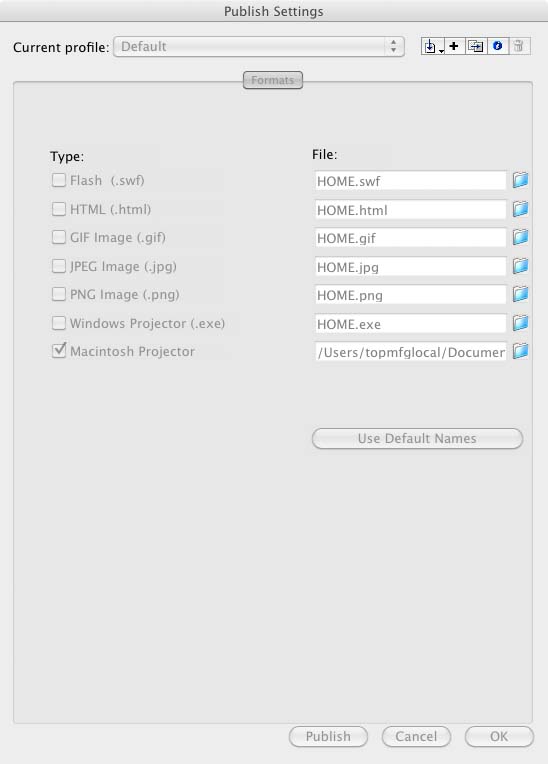
Copy link to clipboard
Copied
You'll find it in the Flash section of the Publish Settings, though I don't see any tabs for accessing the different sections in the image you provided.
Copy link to clipboard
Copied
Yeah I know. That's what I find weird. I've never "not" seen the Flash tab.
???
Copy link to clipboard
Copied
Duh. Never mind. I didn't have swf selected as an output option. The tab is there now.
Copy link to clipboard
Copied
OK, I know now that any AS2 code anywhere makes everything stop working. Ha!
I used the code for timeline navigation in two different keyframes. I changed the code to match the instance name of another button and frame label name of another frame:
__________________________
btn_back_main.addEventListener(MouseEvent.CLICK,fMain);
function fMain(evt:MouseEvent)
{
MovieClip(this.root).gotoAndPlay("main");
}
__________________________
btn_main_01.addEventListener(MouseEvent.CLICK,fMain);
function fMain(evt:MouseEvent)
{
MovieClip(this.root).gotoAndPlay("main_01");
}
__________________________
but get this error:
Scene 1, Layer 'Actions', Frame 19, Line 10 1021: Duplicate function definition.
Copy link to clipboard
Copied
Do not use the same function name for different functions.
Copy link to clipboard
Copied
I figured out the name thing.
Now I just need to learn what LOADER class is to load external SWF movies or images into a target or location.
Used to use this:
_____________________________________
this.btn_video.onRelease = function(){
load_targ.loadMovie("loads/sec_01.swf");
};
Copy link to clipboard
Copied
Thanks to both of you!!!!
I now have the following code that mimics the three basic button functions I used to use in AS2.0.
The weirdest part was figuring out what the function name was. 🙂
I'm grateful and now have a good starting point from which to grow and learn.
_____________________________________________
stop();
this.sec_01_btn_01.addEventListener(MouseEvent.CLICK,fGetURL);
function fGetURL(evt:MouseEvent)
{
navigateToURL(new URLRequest("pdf/sec_01_pdf_01.pdf"),"_blank");
}
this.btn_back_main.addEventListener(MouseEvent.CLICK,fMain2);
function fMain2(evt:MouseEvent)
{
MovieClip(this.root).gotoAndPlay("main");
}
btn_video.addEventListener(MouseEvent.CLICK,v);
function v(e:MouseEvent){
var ld:Loader = new Loader()
ld.load(new URLRequest("loads/TEST_VID_AS3.swf"))
addChild(ld)
}
Copy link to clipboard
Copied
Have fun with AS3.
Please mark this as answered.
Copy link to clipboard
Copied
I forgot to ask how I can load an external swf into a specific target or location.

Copy link to clipboard
Copied
Sample:
ldr= new Loader();
ldr.contentLoaderInfo.addEventListener(ProgressEvent.PROGRESS, progressListener);
ldr.contentLoaderInfo.addEventListener(Event.COMPLETE, swfLoaded);
ldr.contentLoaderInfo.addEventListener(Event.INIT, initListener);
ldr.load(new URLRequest(animPath+tmp));
function progressListener (e:ProgressEvent):void{
ploader.visible=true;
}
function swfLoaded(e:Event):void {
mcExt = e.target.content as MovieClip;
ldr.contentLoaderInfo.removeEventListener(Event.COMPLETE, swfLoaded);
ploader.visible=false;
addChild(mcExt);
}
Copy link to clipboard
Copied
Soory but I don't understand that last bunch of code.
I'm using this and it's OK except I can't get the movies to "unload" when I navigate back to a main menu and I can't specify a location I want them to load to.
I have a main menu with 30 butons. User ill click a button to go to another menu level with 7 buttons. 6 buttons will load pdfs. Another button will lead to one more menu with 6 buttons that will oad 6 different FLV's.
I think may just have to use a long timeline or scenes. 😞
__________________________________________
stop();
var fl_Loader:Loader = new Loader();
addChild(fl_Loader);
this.btn_01_06.addEventListener(MouseEvent.CLICK,f01_01);
function f01_01(evt:MouseEvent)
{
navigateToURL(new URLRequest("pdf/sec_01_pdf_01.pdf"),"_blank");
}
btn_01_01.addEventListener(MouseEvent.CLICK, fl_ClickToLoadUnloadSWF);
function fl_ClickToLoadUnloadSWF(event:MouseEvent):void
{
var url:String = event.currentTarget.name+".swf";
fl_Loader.load(new URLRequest("loads/TEST_VID_AS3.swf"));
}
btn_01_02.addEventListener(MouseEvent.CLICK, fl_ClickToLoadUnloadSWF2);
function fl_ClickToLoadUnloadSWF2(event:MouseEvent):void
{
var url:String = event.currentTarget.name+".swf";
fl_Loader.load(new URLRequest("loads/sec_01.swf"));
}
this.btn_back_main.addEventListener(MouseEvent.CLICK,fback_main);
function fback_main(evt:MouseEvent)
{
MovieClip(this.root).gotoAndPlay("main");
}
Copy link to clipboard
Copied
and for loading swf use LOADER class.


Get ready! An upgraded Adobe Community experience is coming in January.
Learn more
 AdChoices