
AlvaroLand
Participant
March 5, 2017
Answered

Bone tool not working properly. Animate cc 2017

  • March 5, 2017
  • 5 replies
  • 9995 views

Hello,
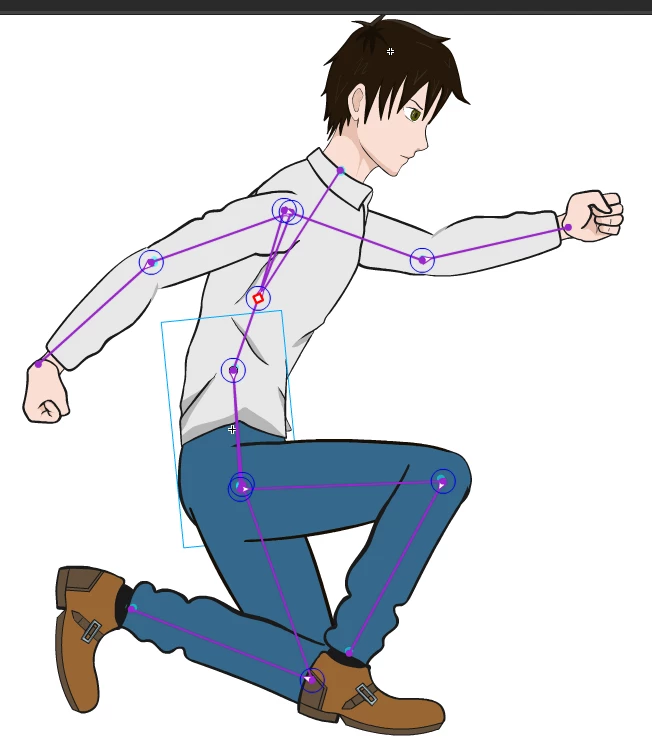
Im tryin to animate a guy using the bone tool. The body parts are all graphic symbols and the armature and the body parts are inside another graphic symbol named "character". I set the bone starting with the torax and then conecting down to the abdomen, then it turns into two branches, one for each leg-knee-foot. And the torax connects up to 3 branches: one for the head, a second one for the left shoulder-elbow-hand, and a third branch to the right shoulder-elbow-hand. The initial result is perfect, just like the first picture, it works fine.
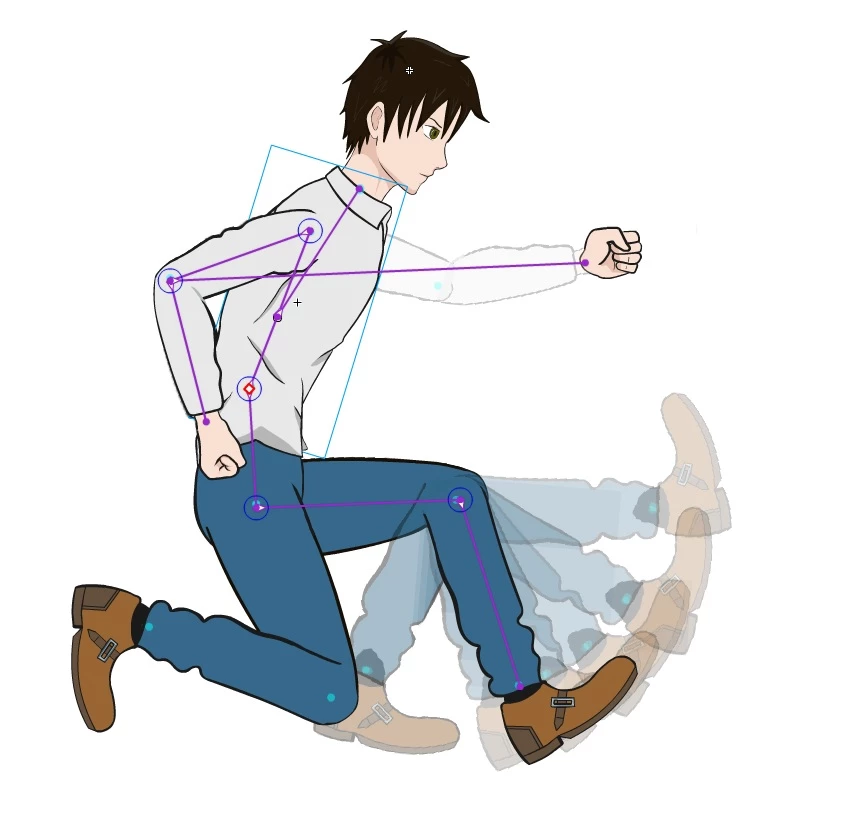
But at some point (usually when I close and open the same proyect) the bone tool stop working properly, now the bones are not conected properly, some body parts dissapear when I try to move them, some body parts are not displaying the bone lines but with the selection (V) tool over that parts I can see the bone icon, and the only body parts that keep connected and moving (without dissapearing) are leaving permanent shadows like those over the leg in the second picture.
I cant find a solution, I dont know where is the problem. This keeps happening restarting all again a new proyect and copying the same body parts, and it keeps happening in another PC. Also I deleted the "configuration" folder and it keeps happening. Sorry for the language mistakes.
I would apreciate your help. Thanks for reading.
This topic has been closed for replies.
Correct answer _keyframer

The Bone tool seems to have its share of issues and it's difficult to pinpoint them as they are random. But overall, I have found that armatures made with the Bone tool are very unstable and unpredictable. I did a live stream a few weeks ago where I created a simple stick man character and tried to rig it using Bones and pretty early on in my efforts, the bone tool made the animation process unusable. I quickly abandoned the bone tool and completed the animation using key poses, frame-by-frame and some tweening.

I wish I had a solution to offer. I'm happy to look at your FLA also if you can post it somewhere.

5 replies

Awesome_determination0D4D
Known Participant
December 6, 2020

Revisiting with Animate CC 2019. The bone rotate constraint is fine. The bone translate constraint tool is STILL BROKEN. On moving the rigged symbol with a mouse, the rig goes haywire. I guess people have given up on bones tool. I hardly found any answers on a Google search.

AlvaroLand
Participant
March 9, 2017

Thank you all for answering. Unfortunately I lost the file trying to do a clean reinstall of adobe animate. Anyway, I bet that following my steps will lead anyone to some bone errors. I´d love to see the bone tool improved too.

Preran
Community Manager
Community Manager
March 10, 2017

I checked with the team, and they said they are looking at making improvements to this feature in a future update.

Thanks,

Preran

Participant
October 30, 2017

on and off for months now (since April), I've been trying to learn how to use the bone tool in Animate. NOW I find out the reason my characters' various appendages fly off or otherwise dislocate is not my fault!? It's the programming!? geesh. I am not a happy customer.

Preran
Community Manager
Community Manager
March 7, 2017

Thanks, Nipun.

Alvaro: Nipun is a member of the product team and they can investigate the file for you. If you are OK with sharing your file, upload it to a shared location such as dropbox and share the URL with Nipun. To send Nipun a private message, click on his profile and use the Message button.

Thanks,

Preran

Community Expert
March 7, 2017

Basically the Issue with the bone tool is. You can create the skeleton and sometimes the bones stop responding and the only way to get them to respond and move around is to close and reopen adobe animate. Keyframer, has also had this issue.

Hope that helps Preran and Nipun.

_keyframer
Community Expert
_keyframerCommunity ExpertCorrect answer
Community Expert
March 7, 2017

The Bone tool seems to have its share of issues and it's difficult to pinpoint them as they are random. But overall, I have found that armatures made with the Bone tool are very unstable and unpredictable. I did a live stream a few weeks ago where I created a simple stick man character and tried to rig it using Bones and pretty early on in my efforts, the bone tool made the animation process unusable. I quickly abandoned the bone tool and completed the animation using key poses, frame-by-frame and some tweening.

I wish I had a solution to offer. I'm happy to look at your FLA also if you can post it somewhere.

Animator and content creator for Animate CC
UDESCO
Adobe Employee
Adobe Employee
March 7, 2017

Hi Alvaro,

We have not seen this issue at our end and will need your help to understand and investigate the problem. Can you share your file along with detailed steps to reach this state.  a video recording would also help.

Thanks!

Community Expert
March 5, 2017

I don't know a real solution for this issue yet, but I will say some others are having the same issue.

One thing that I have been doing to fix it, is to save close Animate and re-open it.