
BLAKEOTRON
Participating Frequently
October 26, 2017
Answered

Camera Tool ruins video

  • October 26, 2017
  • 1 reply
  • 1003 views

When I make an animation with  the camera tool being used, when I publish or export to a swf video it only shows the bottom right corner of the animation but shows all of the background colour, not just a corner. This only started happening after the I installed the latest update. I use a surface pro 4 to animate on.
    This topic has been closed for replies.
    Correct answer Colin Holgate

    This one:

    1 reply

    Colin Holgate
    Inspiring
    October 26, 2017

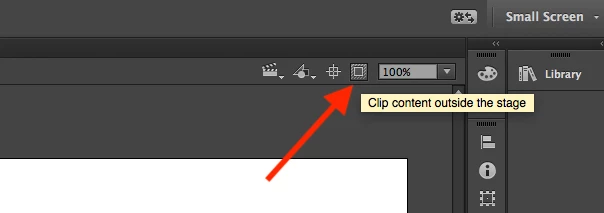
    I have seen similar issues if you are using the Clip content outside of stage option (the button next to the stage scale text field). Does it make a difference if that button isn't selected?

    BLAKEOTRON
    Participating Frequently
    October 26, 2017

    Where is the button? I cant find anything that says clip content

    Adobe Employee
    October 26, 2017

    Its located at the top right corner of the document. The attached image might help.

    We are working on a proper fix to this issue. In the meantime, please use this workaround.