

[CANVAS] dynamic text input to output
Hello, new to posting here. This is my experimental project for a numeric keypad that I have. I have been studying this forum for all kinds of stuff over the past few months and have got lots of useful info.
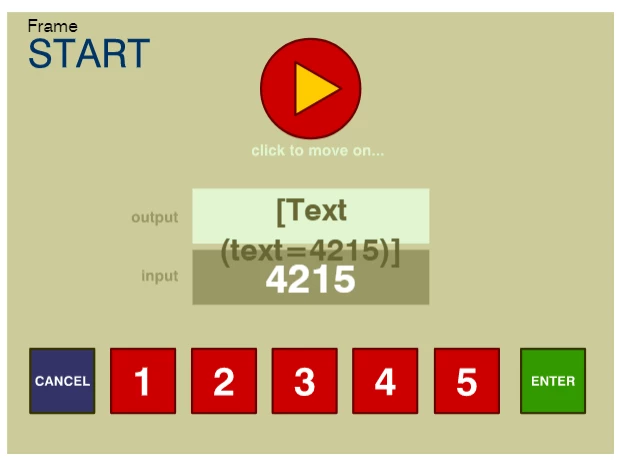
The problem I am getting is shown in the image above in the output text box. The user would press any combo of numbers and then press enter to populate the output box. The eventual use will be to input a map grid reference so will require letters at some point 
I've been adapting the 'code snippets' within Animate CC and from what I have seen here on this Forum, but unable to decipher how to write or identify the code I need to make this work. This is the code I have created so far. Apologies if it's not how it should be done, so be patient with me because I think in Pictures & Patterns as I'm not 'code clever'.
//--
this.stop();
this.button.rotation=0;
//--Global Variables
//
var displayInputNumbers = this.myNumbersInput;
//-- Functions
function clickToGoToTwenty(){
this.gotoAndStop("twenty");
this.myNumbersInput.text = "";
this.myNumbersOutput.text = "";
}
function displayNumberOne(){
this.myNumbersInput.text += "1";
}
function displayNumberTwo(){
this.myNumbersInput.text += "2";
}
function displayNumberThree(){
this.myNumbersInput.text += "3";
}
function displayNumberFour(){
this.myNumbersInput.text += "4";
}
function displayNumberFive(){
this.myNumbersInput.text += "5";
}
function displayNumbersEntered(){
this.myNumbersOutput.text = displayInputNumbers;
}
function cancelNumbersDisplayed(){
this.myNumbersInput.text = "";
this.myNumbersOutput.text = "";
}
//-- Event Listeners
this.button.addEventListener("click", clickToGoToTwenty.bind(this));
this.oneButton.addEventListener("click", displayNumberOne.bind(this));
this.twoButton.addEventListener("click", displayNumberTwo.bind(this));
this.threeButton.addEventListener("click", displayNumberThree.bind(this));
this.fourButton.addEventListener("click", displayNumberFour.bind(this));
this.fiveButton.addEventListener("click", displayNumberFive.bind(this));
this.enterButton.addEventListener("click", displayNumbersEntered.bind(this));
this.cancelButton.addEventListener("click", cancelNumbersDisplayed.bind(this));
//--
Thank you, for being here.
Dom
 AdChoices