Exit
  • Global community
    • Language:
      • Deutsch
      • English
      • Español
      • Français
      • Português
  • 日本語コミュニティ
  • 한국 커뮤니티
0

Command for applied Blend mode on frame

Contributor ,
May 04, 2022 May 04, 2022

Since version 2019, Animate allows you to apply blending modes to graphic symbols in the selected frame. I want to apply to a graphic symbol a blend mode by command, but it applies it in object mode and my desire is to apply it in the frame. Copying what it does in the labels I create this:


an.getDocumentDOM().getTimeline().setFrameProperty('BlendMode', 'erase');

But it doesn't work.
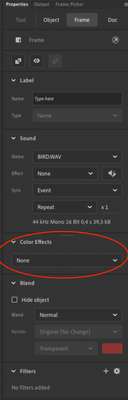
Captura de pantalla 2022-05-04 a las 11.11.51.png


Because this code is for a movie clip and applies it in properties/object:
an.getDocumentDOM().setBlendMode('erase').


Is there any way to create the command to apply it on frame?


____
2D vector animator since 2000 & PhD

261
Translate
Report
Community guidelines
Be kind and respectful, give credit to the original source of content, and search for duplicates before posting. Learn more
community guidelines
Community Expert ,
May 04, 2022 May 04, 2022

Hi.


This is odd because the History panel shows...

an.getDocumentDOM().setBlendMode('erase')


... when the blend mode of a frame is changed.


But if a JSFL is run, it doesn't work.


Not sure why...


I think it's worth letting the team know about it.

https://www.adobe.com/products/wishform.html


Or maybe the extension developers here have an idea.


Regards,

JC


Translate
Report
Community guidelines
Be kind and respectful, give credit to the original source of content, and search for duplicates before posting. Learn more
community guidelines
Contributor ,
May 04, 2022 May 04, 2022
LATEST

Thanks, that's why I was asking here because it comes up in the history.


____
2D vector animator since 2000 & PhD
Translate
Report
Community guidelines
Be kind and respectful, give credit to the original source of content, and search for duplicates before posting. Learn more
community guidelines