
Participating Frequently
April 17, 2020
Answered

connecting jsfl array with swf

  • April 17, 2020
  • 4 replies
  • 2351 views

guys, I need some advice about how can I connect my jsfl array (for example "all movie clips in the library") with Actionscript and then show it in the "List" in swf panel like in code below but with an array of names of library items
//var my_array:Array = new Array();
//my_array = MMExecute("fl.getDocumentDOM().library.items.name");


var dp:DataProvider = new DataProvider();
dp.addItem( { iconSource:RedBox, label:"Item 1" } );
dp.addItem( { iconSource:RedBox, label:"Item 2" } );
dp.addItem( { iconSource:RedBox, label:"Item 3" } );
dp.addItem( { iconSource:RedBox, label:"Item 4" } );

var list:List = new List();
list.iconField = "iconSource";
list.dataProvider = dp;
addChild(list);
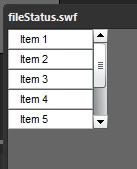
I want to do with array something as I did with simple texts update in swf (count of movie clips "myItems")
function callMeFromJavascript(arg:String):void
{
try {
var name:String = String(arg);
myTextField.text = name;
var numLibItems = MMExecute("fl.getDocumentDOM().library.items.length");
myItems.text = numLibItems;
} catch (e:Error) {
}
}
ExternalInterface.addCallback("callMySWF", callMeFromJavascript);
MMExecute("fl.runScript( fl.configURI + \"WindowSWF/fileOp.jsfl\" );");
MMExecute("fl.trace(\"AS3 File Status Panel Initialized\");");


This topic has been closed for replies.
Correct answer JoãoCésar17023019

Hi again.


The big catch here is to notice that MMExecute can run JSFL scripts without needing an external file. So to call the command to edit Library items, you just pass a string to MMExecute. Like this:


AS3 code (List Libray Items.swf):


import fl.data.DataProvider;
import flash.events.Event;
import flash.events.MouseEvent;

var currentPath:String = "";

function start():void
{	
	ExternalInterface.addCallback('callSWF', fromJSFL);
	MMExecute('fl.runScript(fl.configURI + "/WindowSWF/List Library Items.jsfl");');
}

function fromJSFL(arg:String):void 
{
	var dp:DataProvider = new DataProvider();
	var items:Array = arg.split(",");
	var total:int = items.length;
	var i:int;
	
	for (i = 0; i < total; i++)
		dp.addItem({label:items[i]});		
		
	list.dataProvider = dp;
	totalText.text = total + " items";
	list.addEventListener(Event.CHANGE, listChangeHandler);
	editButton.addEventListener(MouseEvent.CLICK, editClickHandler);
}

function listChangeHandler(e:Event):void
{
	currentPath = e.currentTarget.selectedItem.label;
	selectedText.text = "selected: " + currentPath;
}

function editClickHandler(e:MouseEvent):void
{
	MMExecute('fl.getDocumentDOM().library.editItem("' + currentPath + '");');
}

start();


JSFL code (List Library Items.jsfl):


var items = [];

function list()
{
	var array = [];
	
	fl.getDocumentDOM().library.items.forEach(function(item, index)
	{
		array[index] = item.name;
	});
	
	return array;
}

function edit(item)
{
	fl.getDocumentDOM().library.editItem(item);
}

function callMyPanel(panelName, arg) 
{	
    if (fl.swfPanels.length > 0)
	{ 
        for (i = 0; i < fl.swfPanels.length; i++)
		{ 
			if (fl.swfPanels[i].name == panelName)
			{
				fl.swfPanels[i].call("callSWF", arg); 
				break; 
			} 
        } 
    } 
    else 
        fl.trace("no panels"); 
}

items = list();
callMyPanel("List Library Items", items.join(","));


I've just updated the same link with this new version.

https://github.com/joao-cesar/adobe/tree/master/animate%20cc/jsfl/list_libray_items


I hope it helps.


Regards,

JC

4 replies

JoãoCésar17023019
Community Expert
JoãoCésar17023019Community ExpertCorrect answer
Community Expert
April 21, 2020

Hi again.


The big catch here is to notice that MMExecute can run JSFL scripts without needing an external file. So to call the command to edit Library items, you just pass a string to MMExecute. Like this:


AS3 code (List Libray Items.swf):


import fl.data.DataProvider;
import flash.events.Event;
import flash.events.MouseEvent;

var currentPath:String = "";

function start():void
{	
	ExternalInterface.addCallback('callSWF', fromJSFL);
	MMExecute('fl.runScript(fl.configURI + "/WindowSWF/List Library Items.jsfl");');
}

function fromJSFL(arg:String):void 
{
	var dp:DataProvider = new DataProvider();
	var items:Array = arg.split(",");
	var total:int = items.length;
	var i:int;
	
	for (i = 0; i < total; i++)
		dp.addItem({label:items[i]});		
		
	list.dataProvider = dp;
	totalText.text = total + " items";
	list.addEventListener(Event.CHANGE, listChangeHandler);
	editButton.addEventListener(MouseEvent.CLICK, editClickHandler);
}

function listChangeHandler(e:Event):void
{
	currentPath = e.currentTarget.selectedItem.label;
	selectedText.text = "selected: " + currentPath;
}

function editClickHandler(e:MouseEvent):void
{
	MMExecute('fl.getDocumentDOM().library.editItem("' + currentPath + '");');
}

start();


JSFL code (List Library Items.jsfl):


var items = [];

function list()
{
	var array = [];
	
	fl.getDocumentDOM().library.items.forEach(function(item, index)
	{
		array[index] = item.name;
	});
	
	return array;
}

function edit(item)
{
	fl.getDocumentDOM().library.editItem(item);
}

function callMyPanel(panelName, arg) 
{	
    if (fl.swfPanels.length > 0)
	{ 
        for (i = 0; i < fl.swfPanels.length; i++)
		{ 
			if (fl.swfPanels[i].name == panelName)
			{
				fl.swfPanels[i].call("callSWF", arg); 
				break; 
			} 
        } 
    } 
    else 
        fl.trace("no panels"); 
}

items = list();
callMyPanel("List Library Items", items.join(","));


I've just updated the same link with this new version.

https://github.com/joao-cesar/adobe/tree/master/animate%20cc/jsfl/list_libray_items


I hope it helps.


Regards,

JC

BaldininiAuthor
Participating Frequently
April 21, 2020

thanks for your help
it saved a lot of my time...
by the way, if I am not mistaken stumbled upon your tutorials on youtube, I found there a lot of interesting for me. thnx
https://www.youtube.com/channel/UCaETeAAdW-j2n33Y9oVSv9g/videos

JoãoCésar17023019
Community Expert
Community Expert
April 21, 2020

That's great to hear!


Yeah! That's my channel. I'll try to add new videos as soon as I can.


I wish you a really nice time coding.


Regards,

JC

JoãoCésar17023019
Community Expert
Community Expert
April 21, 2020

Hi again.


Did you manage to solve the issue?


If not, do you want do edit the symbol you have selected in that list? Is that it?


Please let me know.


Regards,

JC

BaldininiAuthor
Participating Frequently
April 21, 2020

hi
yes, you got me right - I want to edit the selected MC..
now I probably, on the right way, I added "eventListener" for the list to your AS code. And now I get "selection element"

AS code:


import fl.data.DataProvider;
import fl.controls.List;
import fl.controls.Button;
import flash.events.MouseEvent;
import flash.events.Event;
btnFindMc.addEventListener(MouseEvent.CLICK, onBtnClick);
function onBtnClick(e:MouseEvent):void{
	MMExecute('fl.runScript(fl.configURI + "/WindowSWF/find_mc.jsfl");');
	}
function start():void
{	ExternalInterface.addCallback('callSWF', fromJSFL);
	//MMExecute('fl.runScript(fl.configURI + "/WindowSWF/find_mc.jsfl");');
}
function fromJSFL(arg:String):void 
{	var dp:DataProvider = new DataProvider();
	var items:Array = arg.split(",");
	var i:int;
	var total:int = items.length;	
	for (i = 0; i < total; i++)
		dp.addItem({label:items[i]});
	list.dataProvider = dp;
	var numLibItems = items.length;
	myItems.text = "were found " + numLibItems + " objects";		
}
list.addEventListener(Event.CHANGE,itemClick);	
	function itemClick(event:Event):void{
		var addVar = event.currentTarget.selectedItem.label;
		status_text.text = "choosen: " + addVar;	
	}
start();


but I have no idea how to give back this result - "selected element" to the .jsfl and then operate (edit) with it there.
Also please pay attention that I replaced code: MMExecute('fl.runScript(fl.configURI + "/WindowSWF/find_mc.jsfl");');
I cut it from function Start to function onBtnClick. Is it ok?

BaldininiAuthor
Participating Frequently
April 19, 2020

hello JC
I am continuing to work with your script..
could you give some advice or some example for a noob on how to connect the selected element (movie clip) with my jsfl code when I will add new btn "edit" to swf?

and then I could edit it by ".enterEditMode('inPlace');" for example or smth else.
I a bit changed your JSFL code (changed your array of items to the array of items (MC) names) :

var curDoc = an.getDocumentDOM();
var curLib = curDoc.library;
var curItems = curLib.items;
var items = [];

function list()
{
var myArray = [];
for(var i=0; i<curItems.length; i++){
var o = curItems[i];
if(o.itemType=="movie clip")
{
myArray.push(o.name);
an.trace("name of the MC ==> "+ o.name);
}}
fl.trace(myArray.length)
return myArray;
//return fl.getDocumentDOM().library.items;
}

function callMyPanel(panelName, arg)
{
if(fl.swfPanels.length > 0)
{
for(i = 0; i < fl.swfPanels.length; i++)
{
if(fl.swfPanels[i].name == panelName)
{
fl.swfPanels[i].call("callSWF", arg);
break;
}}}
else
fl.trace("no panels");
}

items = list();
callMyPanel("find_mc", items.join(","));
and also changed actionscript code (run jsfl code by the button, is it correct?):

import fl.data.DataProvider;
import fl.controls.List;
import fl.controls.Button;
import flash.events.MouseEvent;

btnLocal.addEventListener(MouseEvent.CLICK, onBtnClick);
function onBtnClick(e:MouseEvent):void{
MMExecute('fl.runScript(fl.configURI + "/WindowSWF/find_mc.jsfl");');
}
function start():void
{
ExternalInterface.addCallback('callSWF', fromJSFL);
//MMExecute('fl.runScript(fl.configURI + "/WindowSWF/find_mc.jsfl");');
}

function fromJSFL(arg:String):void
{
var dp:DataProvider = new DataProvider();
var items:Array = arg.split(",");
var i:int;
var total:int = items.length;
for (i = 0; i < total; i++)
dp.addItem({label:items[i]});
list.dataProvider = dp;
}

start();
thank you for advance!

JoãoCésar17023019
Community Expert
Community Expert
April 17, 2020

Hi.


Here is a sample of a very simple listing of the Library items.


In this example, the List component is already on stage and its instance name is "list".


AS3 code (List Libray Items.swf):

import fl.data.DataProvider;

function start():void
{	
	ExternalInterface.addCallback('callSWF', fromJSFL);
	MMExecute('fl.runScript(fl.configURI + "/WindowSWF/List Library Items.jsfl");');
}

function fromJSFL(arg:String):void 
{
	var dp:DataProvider = new DataProvider();
	var items:Array = arg.split(",");
	var i:int;
	var total:int = items.length;
	
	for (i = 0; i < total; i++)
		dp.addItem({label:items[i]});
		
	list.dataProvider = dp;
}

start();


JSFL code (List Library Items.jsfl):

var items = [];

function list()
{
	return fl.getDocumentDOM().library.items;
}

function callMyPanel(panelName, arg) 
{	
    if(fl.swfPanels.length > 0)
	{ 
        for(i = 0; i < fl.swfPanels.length; i++)
		{ 
			if(fl.swfPanels[i].name == panelName)
			{
				fl.swfPanels[i].call("callSWF", arg); 
				break; 
			} 
        } 
    } 
    else 
        fl.trace("no panels"); 
}

items = list();
callMyPanel("List Library Items", items.join(","));


FLA / JSFL files / code: https://github.com/joao-cesar/adobe/tree/master/animate%20cc/jsfl/list_libray_items


Please let us know if you have any further questions.


Regards,

JC

BaldininiAuthor
Participating Frequently
April 17, 2020

thank you very much

JoãoCésar17023019
Community Expert
Community Expert
April 17, 2020

You're welcome!