
MochaMage
Participant
January 4, 2016
Answered

Eraser Preferences Gone in Flash CC

  • January 4, 2016
  • 5 replies
  • 23468 views

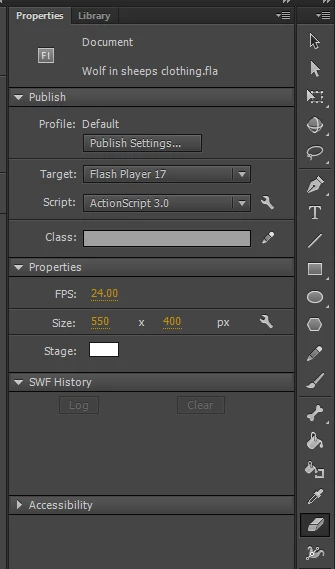
For the amount of time I've had Flash on my computer I've never been able to change the size of my eraser. Changing the size of the brush tool never helped either. I'm unsure about how to find my preferences for my eraser, even after playing around with settings to see what works. Here's a screenshot of what I see:
This topic has been closed for replies.
Correct answer Colin Holgate

Your screen isn't tall enough to show the erase shape option button. Grab the division between Properties and the Tools, and drag left to give the tools more space. It will become two or more columns, and you should easily find the Shape button.

5 replies

khairh58939177
Participant
August 19, 2018

Theres a circle at the bottom and if u do {} then it will show

Participant
May 29, 2018

try pressing this button [] (square brackets buttons) it works for me

Participant
January 20, 2018

This is the worst kind of solution. Are you telling us that the screen of my laptop is not able to display such a common feature properly. I am unable to find it and this is just ridiculous. Please tell me the keyboard shortcut for eraser in mac

Colin Holgate
Inspiring
January 21, 2018

The key to select the eraser is e. But then the eraser tool is only the 11th one in a single column Tools palette, you're unlikely to have such a small screen that you only see the top 10 tools.

Getting at the eraser size option isn't that needed too often, because you can erase more or less content by zooming in or out. But there are other tools that have useful options near the bottom. Living with two columns or two rows of tools isn't that much of a hardship, if it then gives you easy access to the tool options.

Colin Holgate
Colin HolgateCorrect answer
Inspiring
January 4, 2016

Your screen isn't tall enough to show the erase shape option button. Grab the division between Properties and the Tools, and drag left to give the tools more space. It will become two or more columns, and you should easily find the Shape button.

Participant
August 9, 2017

I'm having the same issue & this solution is not fixing it. I've provided enough space however the eraser size is not showing up. Is there an update to this issue?

Colin Holgate
Inspiring
August 9, 2017

Are your tools in two columns or only one? Can you show a screenshot?

Captiv8r
Legend
January 4, 2016

Thread moved from the RoboHelp FlashHelp forums.