
Participant
June 19, 2013
Answered

Flash CC - Drawing Tablets slow response

  • June 19, 2013
  • 28 replies
  • 87240 views

In this new version of flash, When I drew quick strokes with a curve they convert into a single line as seen below.
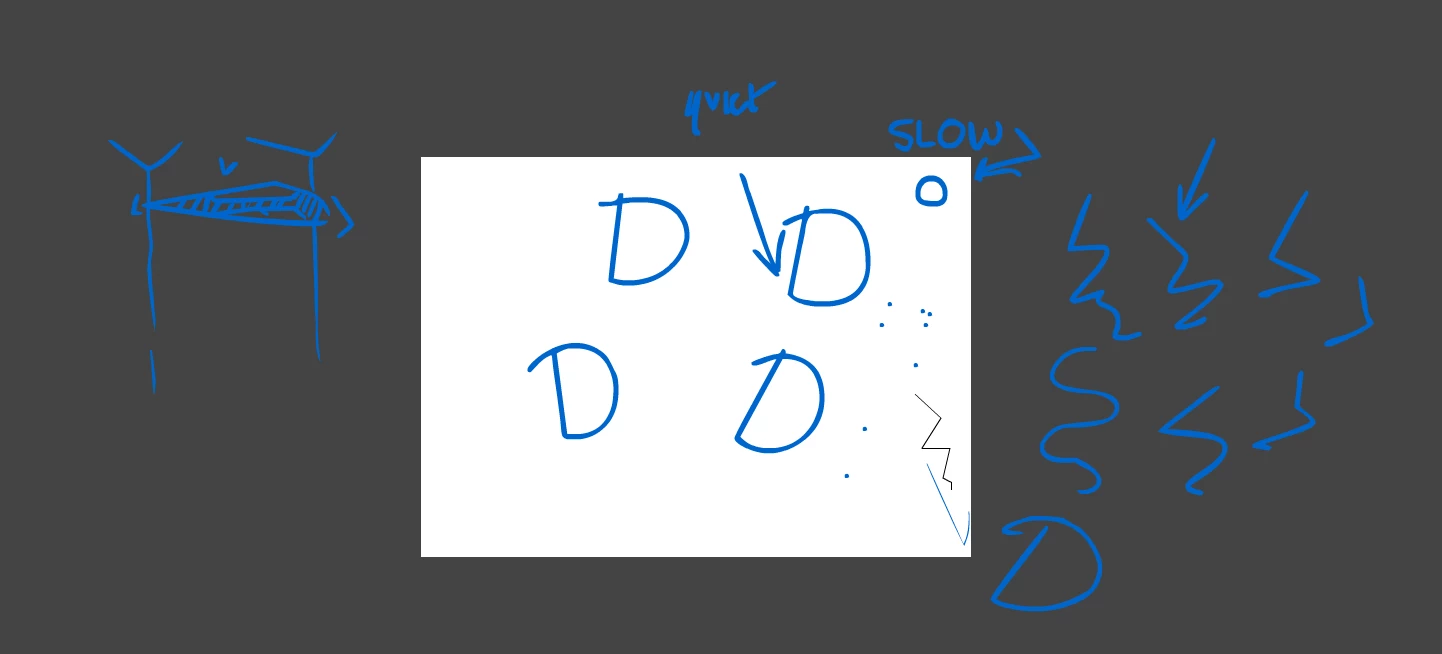
I have tried a reset with having no other programs open and setting the priority higher.

It's a cintiq13HD and I didnt have this problem with CS6.

The things on the stage are meant to be circles.

This topic has been closed for replies.
Correct answer SujaiS

"asap"


The update that contains fix for this bug is now available.

Please refer to the release notes for details on bugs fixed.

http://helpx.adobe.com/flash/release-note/release-notes-flash-pro-cc.html#Flash%20Professional%20CC%20Update%201%20%2813.0.1%29

-Sujai

28 replies

Inspiring
October 14, 2018

It's October 2018 now, the original post was in 2013, it's been over 4 years that I've(we've) been waiting for a fix. Back on Windows 7 with Flash CS6, drawing worked great. It's very frustrating to be in this situation where I can't get work done, especially since I need to use Animate CC to make income.

It's been very frustrating using Animate CC to draw because of the initial drawing line bug. For Adobe developers working on AnimateCC, I'll tell you everything I know in hopes of making this your top priority. The below image is of blue circles that I drew to demonstrate the issue. I'm using the absolute latest version of AnimateCC and Windows 10. I circled the problem areas in red which are essentially the initial start to the drawing of the circles. Ironically the red circles are also warped due to this bug. Keep in mind that I'm a professional artist and drawing circles is common practice for me.

Below are some more circles but drawn with Adobe Photoshop CC on the same machine to show you the difference.

Let's look deeper into this issue. A big clue is that Windows uses screen holds to simulate right clicks. Below you can see this in action and how it relates to the issue. The radial matches up with the initial drawing line. Keep in mind that with Hold Right clicks turned on I am NOT able to draw until I cross that radial threshold.  You are not able to see it in the below animation but I am scribbling inside that radial circle during the time it looks like my cursor is frozen in the center. Only When I leave the radial area does my line begin to pick up.

DrawLineBug.gif

Now lets turn off Hold To Right Click

Just like previously, when the below cursor animation freezes I'm actually scribbling around a bit before I leave that now invisible radial area (at which point I'm not able to draw) and the drawing picks up with that straight line. If you are thinking in your head "this guy is claiming he can't draw dots or tiny circles" then you are correct.

DrawLineBug02.gif

but let's go ahead an turn on that Microsoft legacy patch that everyone's been talking about for photoshop (which is not needed currently with Photoshop CC). Then restart flash

what seems to be happening in the animation below is that the radial area seems to have gotten a lot smaller (maybe 1/5 the size) but still receiving the line drawing lag.

DrawLineBug03.gif

The faster you draw the more obvious and large that lag line becomes so the patch doesn't really fix much.

DrawLineBug04.gif

Below is just demonstrate how consistently bad this bug is. This is me trying to draw semi-circles. Red AnimateCC / Black Photoshop

DrawLineBug05.gifDrawLineBug06.gif

Please, please, please fix this bug. I make a living animating using AnimateCC and need this to work properly


Participating Frequently
September 26, 2017

This is a big problem. Im using Adobe Animate CC 2017 and I can assure you...... THE PROBLEM IS NOT FIXED.

Specifications:

Processor: AMD Ryzen 7 1700, 8-Core

RAM: 32GB

Boot SSD: 1TB

Samsung 960 Evo: 250 GB for Adobe Suite

Video Card: Nvidia GeForce X 1050 Ti

Im using a Wacom Cintiq 22HD with Windows 10

Participant
May 3, 2017

I have a Fujitsu lifebook t5010... having the same issue with most recent version of animate cc. Definitely didn't have this issue with older versions of flash...   I guess no-one has found a solution for this yet

Nordinart
Participating Frequently
December 13, 2016

solved the problem
i Updated to the last version and changed the smoothing to be 100 Or zero
both of them stop the lines to be "laggy", but when i get it back to 50 the issue jumps back.

Participating Frequently
December 14, 2016

Hey, I got so excited when I saw this but I'm afraid it didn't work for me! What version of Animate CC and drivers do you have installed - I know it's a bit much to ask but could you take a quick video of what you did to resolve? This issue is KILLING me.

Thankyou so much!

narekg
Participant
November 10, 2016

this is still a problem (on a mac) in the new Animate CC 2017

sanderjoon
Participant
November 1, 2016

Any fix yet?

Participating Frequently
August 19, 2016

This exact issue is still present in Animate CC on the Surface Pro 4 - this is ridiculous, I've submitted bug report after bug report without even a response from Adobe, and I'm resorting to digging through years old articles trying to find a fix.

Honestly I feel like giving up on Adobe entirely. I had no idea these issues went back so far.

Dair Biroli
Participant
October 12, 2015

Hi! I have the same problem here. The lag started more and less two minutes after I open of use too. Firstly I thought it was because I have imported PSD image but I already tested again and the lag happened without nothing imported. I did everything you said, but nothing happened. I have a wacom cintiq  and when I tried to draw a brush line appears crossing the screen, the eraser happens the same thing. What could I do to fix it? Help me to understand, please?

Thanks.

Participant
September 21, 2015

Hello,

I have had a similar problem and have reported it.

basically the faster I drew the choppier the lines.

Hide or close the info panel when drawing.

Regards.

Participant
September 29, 2015

Hello Everyone!

Resorting to the Adobe Forums is the last thing I wanted to do, however I'm incapable of finding a solution elsewhere and the problem is extremely annoying to deal with.
Flash is working perfectly fine except for one very essential detail.


The brush tool draws just fine, however after working in the flash program a while, the brush tool line lags noticeably behind the cursor. The same applies to any tool when used by the tablet, however there is instant response when the mouse is used with the tools.
Closing Flash CC and rebooting the program resets the lag, however it comes back after a while. I haven't encountered this problem in any of my other Adobe Programs.

Flash Adobe CC 2015 Progressive Brush Lag - YouTube


I work with Intuos Pro, and the driver is up to date.
I also have two graphics cards, NVIDIA 760 and NVIDIA 960, and my operating system is Windows 10 Pro.

Thank you for your time!

Participant
October 1, 2015

I have exactly the same problem. I have to keep saving the work and initiation flash again every 2 minutes or so.

Participant
August 31, 2015

Um, i'd like to know what are the best "drawing pads" choices to buy for adobe. if anyone has any suggestions .

enocho67941554
Participant
September 7, 2015

the intuos pen and touch is good for beginners ( I think Wacom released new models) and if you're advanced or you do art or whatever for a living then you might want to invest in an intuos pro or cintiq