


Flash Form with file upload

Copy link to clipboard
Copied
Hi all,
I'm trying to put together a news system which allows users to write a headline, a short article (300 words)
then upload an image to with the piece.
I can do the text part with LoadVariables ("uploader.php" , this, "POST" ) which just sends the vars to php
and then on into an SQL table and I can do the upload image part with the code below (taken from a Kirups tutorial) - but I can't seem to do both
in one go !
I Don't care if the image goes to a blob in SQL or into the file system of the server - I just need the text posted to SQL
and the image uploaded.
Any advice, links, examples much appreciated.
Tony
AS2 CODE:
import flash.net.FileReference;
var progressBar:MovieClip;
var reference:FileReference = new FileReference();
var referenceListener:Object = {};
var scriptLocation:String = 'uploader.php';
var progressBarHeight:Number = 10;
var progressBarY:Number = 50;
var progressBarColor:Number = 0x66ccff;
uploadButton_mc._visible = false;
reference.addListener(referenceListener);
referenceListener.onSelect = activateUploadButton;
referenceListener.onProgress = updateProgress;
referenceListener.onComplete = restart;
referenceListener.onHTTPError = handleError;
referenceListener.onIOError = handleError;
referenceListener.onSecurityError = handleError;
chooseButton_mc.onRelease = choose;
uploadButton_mc.onRelease = uploadCurrent;
function activateUploadButton():Void {
display_txt.text = reference.name;
uploadButton_mc._visible = true;
}
function choose():Void {
reference.browse([{description:'All Files (*.*)', extension:'*.*'}]);
}
function handleError(errorName:String, detail:Object):Void {
restart();
if (arguments.length === 2) {
if (typeof detail === 'number') {
display_txt.text = 'HTTP Error #'+detail;
} else {
display_txt.text = 'Security Error: '+detail;
}
} else {
display_txt.text = 'IO Error';
}
}
function makeProgressBar(x:Number, y:Number):MovieClip {
var bar:MovieClip = createEmptyMovieClip('progressBar_mc', 0);
bar._visible = false;
bar.beginFill(progressBarColor);
bar.lineTo(Stage.width, 0);
bar.lineTo(Stage.width, progressBarHeight);
bar.lineTo(0, progressBarHeight);
bar.lineTo(0, 0);
bar.endFill();
bar._width = 0;
bar._visible = true;
bar._x = x;
bar._y = y;
return bar;
}
function restart():Void {
removeMovieClip(progressBar);
display_txt.text = '';
uploadButton_mc._visible = false;
chooseButton_mc._visible = true;
}
function updateProgress(fileReference:FileReference, bytesLoaded:Number, bytesTotal:Number):Void {
display_txt.text = fileReference.name+' - '+Math.ceil((bytesLoaded/bytesTotal)*100)+'%';
progressBar._width = Math.ceil(Stage.width*(bytesLoaded/bytesTotal));
}
function uploadCurrent():Void {
chooseButton_mc._visible = false;
progressBar = makeProgressBar(0, progressBarY);
reference.upload(scriptLocation);
}


 20
Replies
20
20
Replies
20


Copy link to clipboard
Copied
once you know the file name you can update your database with the text and the corresponding file's path/name.
Copy link to clipboard
Copied
Thing is I need to do it all in one go - so the form includes two input boxes (headline and article) and one file field.
Write a headline, paste in your article, choose a picture and hit "Publish". The text is inserted into the table under
"headline" and "article" given a number by SQL and the path to the image is added into "picture" - I can do the php part no problem.
What I'm really looking for is a way to add the loadVariables line (or something else maybe...) to the code above in such a way that it doesn't
screw up the functionality (which is working for the picture upload).
Any ideas ?
Best wishes
Tony
Copy link to clipboard
Copied
why do you think you need to add the file name to your database at the same time as the file is uploading?
Copy link to clipboard
Copied
I don't need to do it at the same time - just at some time 
I just need to find a way of having BOTH things happen - the picture uploaded and the headline, article and file name
added to the DB. Currently, the code above will upload the picture and thats all. All my attempts to add code to post
the variables of "headline, "article" "picname" etc to php have failed.
I'd be really grateful if you could show me how to do it.
Best wishes
Tony
Copy link to clipboard
Copied
again, upload the file and when that's complete you can update your database.
Copy link to clipboard
Copied
I couldn't see your thinking earlier but a couple of hours away (and a glass of red) have cleared my tired old brain.
Of course....
Good advice.
Thanks.
Maybe you can help with the "finishing and poishing" of this little number ?
It's a news article publishing widget and users need to be able to publish articles with or without pictures associated.
So I rewrote the uploadCurrent function at the end to allow this - only it doesn't work. I think it's my equality testing thats at fault.
Could you take a look and let me know what I've got wrong ?
My idea is to use line 22 of the original code ( display_txt.text = reference.name;) and when users hit "Publish"
simply test if "display_txt" is empty (i.e. no picture has been browsed for) or not empty (a picture has been browsed for)
and then run parameters based on that test.
Very grateful if you could help to fix the code as I have no ftp access at work (new job and new Macs on a 100% Windows network and the network manager
hates me and my Macs with a passion so he's got it linked up via some Heath Robinson Qnap via ethernet contraption and it just
doesn't come close to giving proper access to the net, ftp ... etc etc etc ). I had a day at home today to fx this and I'm close (at midnight)
but it would be nice to go in tomorrow and say "Of course I got it working".
Best wishes
Tony
Code below
- - - - - - - - - - - - - - - - - - - - - - - - - - - - - - - - - - - - - - - - - - - - - - - - - - - - - - - - - - - - - - - -
function uploadCurrent():Void {
// publish WITH a picture
if (display_txt.text !="") {
chooseButton._visible = false;
uploadButton._visible = false;
spinny_mc._visible = true;
reference.upload(scriptLocation);
doSQL();
display_txt.text = "Storing picture and";
usrMsg = "publishing article";
} else if (display_txt.text =="") {
// publish WITHOUT a picture
chooseButton._visible = false;
uploadButton._visible = false;
spinny2_mc._visible = true;
//progressBar = makeProgressBar(0, progressBarY);
doSQL();
usrMsg = "Publishing article";
}
}
Copy link to clipboard
Copied
how is it determined whether users want to upload text without an image vs text with an image? and can they upload an image without text?
Copy link to clipboard
Copied
You could upload a picture without text - but no-one would. This is not for public use, it's for a small group of admins in
a British secondary school to publish news stories to the public website. The interface is pretty simple:
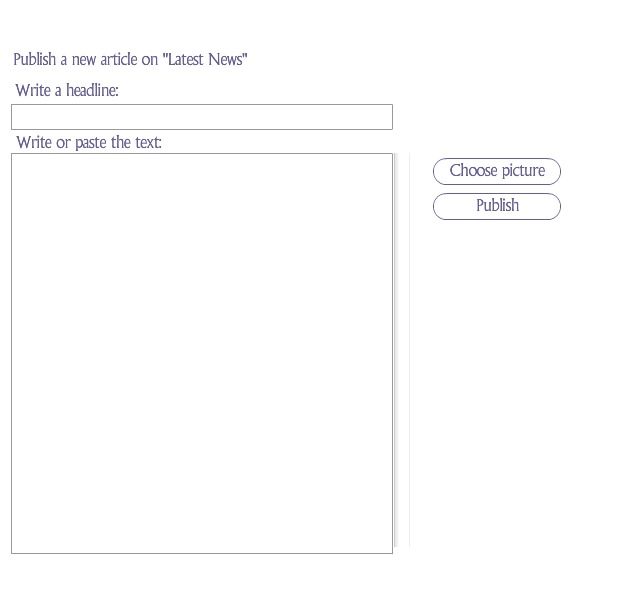
Copy link to clipboard
Copied
ok, so if the publish button is pressed with no pic having been uploaded, then the article will publish without a pic.
now, you need two different php scripts. one to handle your image upload and one to update your database. it looks like you need some publish_btn coding to unless you're calling that something else (which is a bad idea).
Copy link to clipboard
Copied
I'm already using two scripts - one for the image upload and one for the SQL insert.
So if the filefield (var name 'filename' instance name "display_txt) is empty (i.e. no picture browsed for) I should just be able to send the playhead
to a different frame and call the php from there - only I can't test if it's empty !
I thought I was going crazy so I opened a blank file, made an input field (var name 'fum') and a dynamic field (var name 'foo')
and a button. On the button is this code:
on (release) {
if (fum == "") {
foo = "EMPTY";
} else if (fum != "") {
foo = "Something in there...";
}
}
Test this - whether there is text in the input field or not the result is always "Something in there..."
Have I forgotten something truly fundamental about equality testing ?
Copy link to clipboard
Copied
don't attach code to objects, don't use the textfield variable (use the textfield's text property and instance name) and make sure your textfield is not an html textfield and does not have kerning enabled if you want to check if it's empty.
what are the name of your 2 php scripts and what is your publish button?
Copy link to clipboard
Copied
Scripts are "simple.php" for he upload and "dotext.php" for the SQL.
The publish button is called "uploadButton".
Copy link to clipboard
Copied
if the publish button (that calls dotext.php) is uploadButton, what's the button used to upload a file (and call simple.php)?
Copy link to clipboard
Copied
It's the same button - it calls this function (which is the bit I need some hard core coding help with) 
I'm currently at a stage where the pictuer upload works fine and the sql insert fails every time.
I realise you must be trying to keep your head around fifty different problems with all the people you're helping
so I've pasted the whole frame 1 code beneath the function for reference. (I'm not using the progress bar at all)
Best wishes
Tony
- - - - - - - - - - - - - -
function uploadCurrent():Void {
// publish WITH a picture
if (filename.length != usrMsg.length) {
chooseButton._visible = false;
uploadButton._visible = false;
dots_mc._visible = true;
spinny_mc._visible = true;
reference.upload(scriptLocation);
doSQL();
usrMsg = "Publishing article & picture";
} else if (filename.length == usrMsg.length) {
// publish WITHOUT a picture
spinny2_mc._visible = true;
dots_mc._visible = true;
chooseButton._visible = false;
uploadButton._visible = false;
doSQL();
usrMsg = "Publishing article";
}
}
- - - - - - - - - - - - - - - - - - - - - - -
The WHOLE code:
import flash.net.FileReference;
var progressBar:MovieClip;
var reference:FileReference = new FileReference();
var referenceListener:Object = {};
var scriptLocation:String = 'simple.php';
var progressBarHeight:Number = 10;
var progressBarY:Number = 50;
var progressBarColor:Number = 0x675f8f;
uploadButton._visible = true;
spinny_mc._visible = false;
spinny2_mc._visible = false;
dots_mc._visible = false;
reference.addListener(referenceListener);
referenceListener.onSelect = activateUploadButton;
referenceListener.onProgress = updateProgress;
referenceListener.onComplete = restart;
referenceListener.onHTTPError = handleError;
referenceListener.onIOError = handleError;
referenceListener.onSecurityError = handleError;
chooseButton.onRelease = choose;
uploadButton.onRelease = uploadCurrent;
function activateUploadButton():Void {
display_txt.text = reference.name;
uploadButton._visible = true;
}
function choose():Void {
reference.browse([{description:'All Files (*.*)', extension:'*.*'}]);
}
function handleError(errorName:String, detail:Object):Void {
restart();
if (arguments.length === 2) {
if (typeof detail === 'number') {
display_txt.text = 'HTTP Error #'+detail;
} else {
display_txt.text = 'Security Error: '+detail;
}
} else {
display_txt.text = 'IO Error';
}
}
function makeProgressBar(x:Number, y:Number):MovieClip {
var bar:MovieClip = createEmptyMovieClip('progressBar_mc', 0);
bar._visible = false;
bar.beginFill(progressBarColor);
bar.lineTo(Stage.width, 0);
bar.lineTo(Stage.width, progressBarHeight);
bar.lineTo(0, progressBarHeight);
bar.lineTo(0, 0);
bar.endFill();
bar._width = 0;
bar._visible = true;
bar._x = x;
bar._y = y;
return bar;
}
function restart():Void {
removeMovieClip(progressBar);
display_txt.text = '';
head_txt.text = '';
art_txt.text = '';
spinny_mc._visible = false;
spinny_mc2._visible = false;
uploadButton._visible = true;
chooseButton._visible = true;
usrMsg = "";
dots_mc._visible = false;
}
function updateProgress(fileReference:FileReference, bytesLoaded:Number, bytesTotal:Number):Void {
display_txt.text = fileReference.name+' - '+Math.ceil((bytesLoaded/bytesTotal)*100)+'%';
progressBar._width = Math.ceil(Stage.width*(bytesLoaded/bytesTotal));
}
function doSQL() {
this.picname = _root.reference.name;
loadVariables("dotext.php", this, "POST");
}
function uploadCurrent():Void {
// publish WITH a picture
if (filename.length != usrMsg.length) {
chooseButton._visible = false;
uploadButton._visible = false;
dots_mc._visible = true;
spinny_mc._visible = true;
reference.upload(scriptLocation);
doSQL();
usrMsg = "Publishing article & picture";
} else if (filename.length == usrMsg.length) {
// publish WITHOUT a picture
spinny2_mc._visible = true;
dots_mc._visible = true;
chooseButton._visible = false;
uploadButton._visible = false;
doSQL();
usrMsg = "Publishing article";
}
}
Copy link to clipboard
Copied
it shouldn't be the same button. otherwise, there's no way for a user to indicate when they want both text and image or just text.
Copy link to clipboard
Copied
Of course there's a way to indicate whether you want to include a picture - you either choose to click the "picture" button or you don't.
One "publish" button makes for a good UI. Two makes it clumsy and second rate. The code ought to be able to distinguish between a user who has or hasn't chosen to include
a picture with their article. That's the whole poiont of the "upload Current" function I'm struggling with.
It's 99% there - can we focus on getting it the last 1% please ?
Picture up load always workd an the user message tells me that the code can disginguish between "has chosen a picture" and "hasn't chosen a picture"
so it's just a question of getting the vars posted to the php now...
Your opinions on design are interesting - but I have a breigf that I have to follow - some code to make the final function work would help.
Best wishes
Tony
- - - - - - - - - - - - - - -
function uploadCurrent():Void {
// publish WITH a picture
if (filename.length != usrMsg.length) {
chooseButton._visible = false;
uploadButton._visible = false;
dots_mc._visible = true;
reference.upload(scriptLocation);
loadVariables("dotext.php", this, "POST");
//doSQL();
usrMsg = "Publishing article & picture";
} else if (filename.length == usrMsg.length) {
// publish WITHOUT a picture
dots_mc._visible = true;
chooseButton._visible = false;
uploadButton._visible = false;
loadVariables("dotext.php", this, "POST");
//doSQL();
usrMsg = "Publishing article";
}
}
Copy link to clipboard
Copied
chooseButton is used to select an image and upload it and uploadButton is used to update the database?
Copy link to clipboard
Copied
Yes.
Copy link to clipboard
Copied
as long as that makes sense to you:
var picname:String = "";
function choose():Void {
reference.browse([{description:'All Files (*.*)', extension:'*.*'}]);
}
function activateUploadButton(fRef:FileReference):Void {
picname = fRef.name;
display_txt.text = fRef.name;
reference.upload(scriptLocation);
}
function uploadCurrent():Void {
// you should be using loadvars
loadVariables("dotext.php", this, "POST");
picname = "";
}
Copy link to clipboard
Copied
Sorry - I misread your question.
chooseButton ONLY selects the image. It doesn't upload anything or call any other functions - it just fires the file reference.
uploadCurrent fires the uploadCurrent function which does all the work (upload image and insert to DB).
I finally got it working about ten minutes ago (with some pretty clumsy code by your standards) but it works so I'm happy !
I also have it running with one php script to do both jobs (upload and / or insert). The script also renames the image with a
random name (timestamp) so that flash can pull in the image and guarantee it's the right one. (otherwise every time someone
uploaded 1.jpg it would over-write and associate with many, many articles).
Honestly I'm kind of surprised there aren't "boilerplate" versions of this all over the net. Upload pic and insert data
seems like something that a lot of people would have wanted over the years. Maybe I'm just bad at searching....
Thanks for your help - you got me thinking in the right direction.
Best wishes
Tony
PS - why should I be using loadvars instead of loadVariables ?
And why do you say "don't put code on objects" ? I thought that was the whole point of AS2 - that we CAN put code on objects... ?
- - - - - - - - - - - - - - - - - -
Final version: (please feel free to suggest clean ups or a more "elegant" version.
function doSQL() {
this.picname = _root.reference.name;
loadVariables("dotext.php", this, "POST");
}
function uploadCurrent():Void {
// publish WITH a picture
if (filename.length != usrMsg.length) {
chooseButton._visible = false;
uploadButton._visible = false;
dots_mc._visible = true;
// dots_mc is just an animation
reference.upload(scriptLocation);
doSQL();
usrMsg = "Publishing article & picture";
} else if (filename.length == usrMsg.length) {
// publish WITHOUT a picture
loadVariables("dotext.php", this, "POST");
chooseButton._visible = false;
uploadButton._visible = false;
usrMsg = "Publishing article";
dots2_mc._visible = true;
dots2_mc.play();
}
}


Get ready! An upgraded Adobe Community experience is coming in January.
Learn more
 AdChoices