


- Home
- Animate
- Discussions
- Flash snow effect without causing lag?
- Flash snow effect without causing lag?
Flash snow effect without causing lag?

Copy link to clipboard
Copied
Hello i am making a platform game and i would love to make it snow during the game. I have tried to make a snow effect and it works but it is quite laggy which reduces the joy of playing my game. Right now i am using this code from my Main Class:
function AddSnowFlakes()
{
for (var i=0; i<100; i++)
{
var snowflake = new Snowflake();
addChild(snowflake);
SnowArray.push(snowflake);
}
}
Then i have made a Snowflake class for the snowflake movieclip:
public class Snowflake extends MovieClip{
var Xspeed = 2 - Math.random() * 4;
var Yspeed = 2 + Math.random() * 3;
public function Snowflake()
{
this.x = Math.random()* 840;
this.y = Math.random()* 650;
addEventListener(Event.ENTER_FRAME,Loop);
}
function Loop(event:Event)
{
this.x += Xspeed;
this.y += Yspeed;
if (this.y > 650)
{
this.x = Math.random()* 840;
this.y = -10;
}
}
}
}
This is probably not the most effecient way to do, so i was hoping for some advice to make it snow without causing lag!
Thanks in advance 


 7
Replies
7
7
Replies
7



Copy link to clipboard
Copied
Is this for desktop or mobile?
ENTER_FRAME loops are pretty expensive when you consider this is a small portion of what could be going on in your game.
First thing I would be sure of, you actually did, which is object pooling. It's not a formal pool but it's the same concept. You created your snowflakes and then re-use them instead of destroying and re-creating, so that's good.
You should consider using a Tween engine like TweenLite or TweenNano. You can see from their performance tests they can easily tween thousands of objects at once, and the code is pretty simple. You can get those libraries here:
Copy link to clipboard
Copied
It is just meant as a game to be played on the computer, i will publish it as an exe and burn it to a disc
Copy link to clipboard
Copied
A couple things that will help you a bit is setting each flake to cacheAsBitmap = true; and mouseChildren = false;. The former will keep the object from being redrawn each frame, even though it's moving (not scaling or rotating). The latter will tell Flash it doesn't need to echo events through these objects.
To show how much they can help, here's an example of TweenLite as well as the performance advantages of those two settings.
I'm increasing the snow by 10 times (1000 flakes) and in the first example I'll exclude using those performance options as well as use a simplified flash vector (no outline), just a red circle. At 1000 objects animating it's taking about ~6% CPU to animate them all:
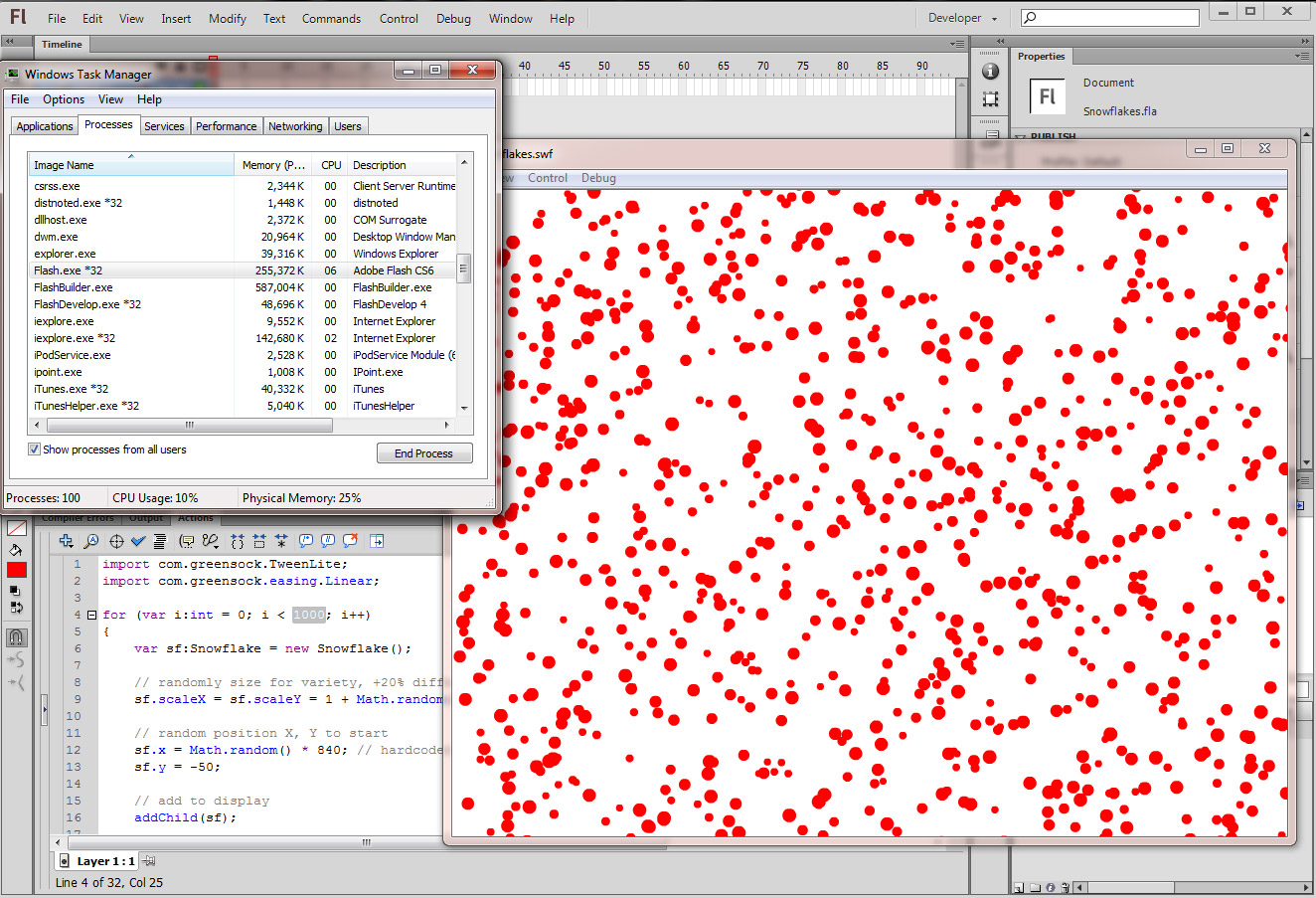
Now adding those two properties, and making this more of a fitting exercise, I'll import a snowflake image (PNG with transparency) and animate that. It will take more processing power frame to frame to composite all of that transparency properly. Just setting the cache property alone brings the processing down to ~2%. And looks much nicer of course:

Here's an example project to give you something to look at.
Example Source (Saved down to CS5)
Or just the code on the first frame (it expects a library linkage 'Snowflake' to exist, no class associated with it). I'm not even adding these into an array as it wasn't necessary for a demo:
import com.greensock.TweenLite;
import com.greensock.easing.Linear;
for (var i:int = 0; i < 1000; i++)
{
// create (make sure it exists in Library linkage)
var sf:Snowflake = new Snowflake();
// optimize
sf.cacheAsBitmap = true;
sf.mouseChildren = false;
// randomly size for variety, +20% difference
sf.scaleX = sf.scaleY = 1 - Math.random() * .9;
// random position X, Y to start
sf.x = Math.random() * 840; // hardcoded 840 width?
sf.y = -50;
// add to display
addChild(sf);
// animate toward landing at 650 with TweenLite, setting seek randomly
animateFlake(sf,true);
}
function animateFlake(sf:Snowflake,randSeek:Boolean = false):void
{
// position
sf.x = Math.random() * 840;
sf.y = -50;
// start the animating
var myTween:TweenLite = TweenLite.to(sf, ((Math.random() * .5) + 1), { y:650, ease:Linear.easeNone, onComplete:animateFlake, onCompleteParams:[sf]});
// randomly seek into this flakes fall? used during startup
if (randSeek) myTween.currentTime = Math.random() * 1;
}
At only 100 flakes it uses 0% CPU (any acceleration mode, auto, direct, gpu).
BTW you can slightly further performance by changing your array to a Vector. You'd use it just how you are but the instantiation would be different:
var SnowArray:Vector.<Snowflake> = new Vector.<Snowflake>();
Then just use it like you do with your array..
SnowArray.push(snowflake);
You can't ever put an object in this Vector that is not the correct type however. It must be an object of type "Snowflake" or you'll get an error. The performance will come if you start to do calculations over thousands of flakes, like make them respond to wind, etc. Otherwise if you're just keeping a reference for later housekeeping just use a regular Array.
Copy link to clipboard
Copied
Thanks for the reply, i've just tested the project and it looks very promising. However when i use the same code in my own project i get these errors:
Definition com.greensock.TweenLite could not be found.
Definition com.greensock.easing:Linear could not be found.
and so on...
How do i make flash able to find these definitions?
Copy link to clipboard
Copied
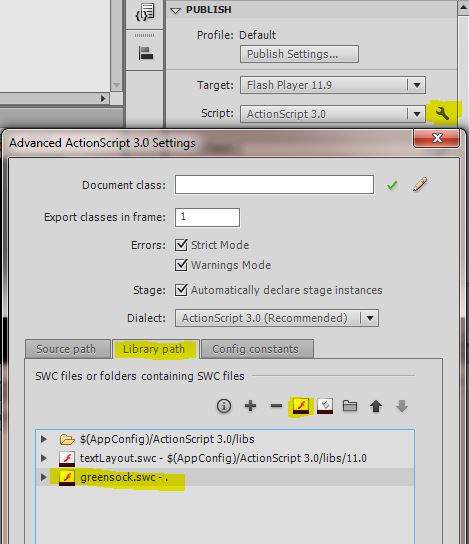
Go in your ActionScript 3.0 Settings (the wrench icon next to the drop-down) in your project and include the greensock.swc I included in the project (it's a file), or download the latest and include that. They also offer the normal package non-SWC version if you download it. My SWC is probably a bit old, from 08-2013. It was new enough to demo this basic stuff though.
Copy link to clipboard
Copied
Thank you it all works now! Clever little plugin that is. Thanks for taking the time to help me
Copy link to clipboard
Copied
If you're all set please mark any helpful/correct so we can filter unanswered. You're welcome and good luck!


Get ready! An upgraded Adobe Community experience is coming in January.
Learn more
 AdChoices