

neonimator
Known Participant
March 19, 2023
Question

Flickering black background on the extension panel

  • March 19, 2023
  • 1 reply
  • 979 views

Hello!

I love Adobe Animate, I've been using it for a long time. I have a YouTube channel associated with this program. There are already 9000+ subscribers and 4500 views every month. A little over a month ago, I took a course in JavaScript and as practice, I decided to write an extension for my favorite program.

I created the framework for the extension in "Creative Cloud Extension Builder for Brackets", then adapted the CSS to the Animate interface and built the panel into a convenient place.
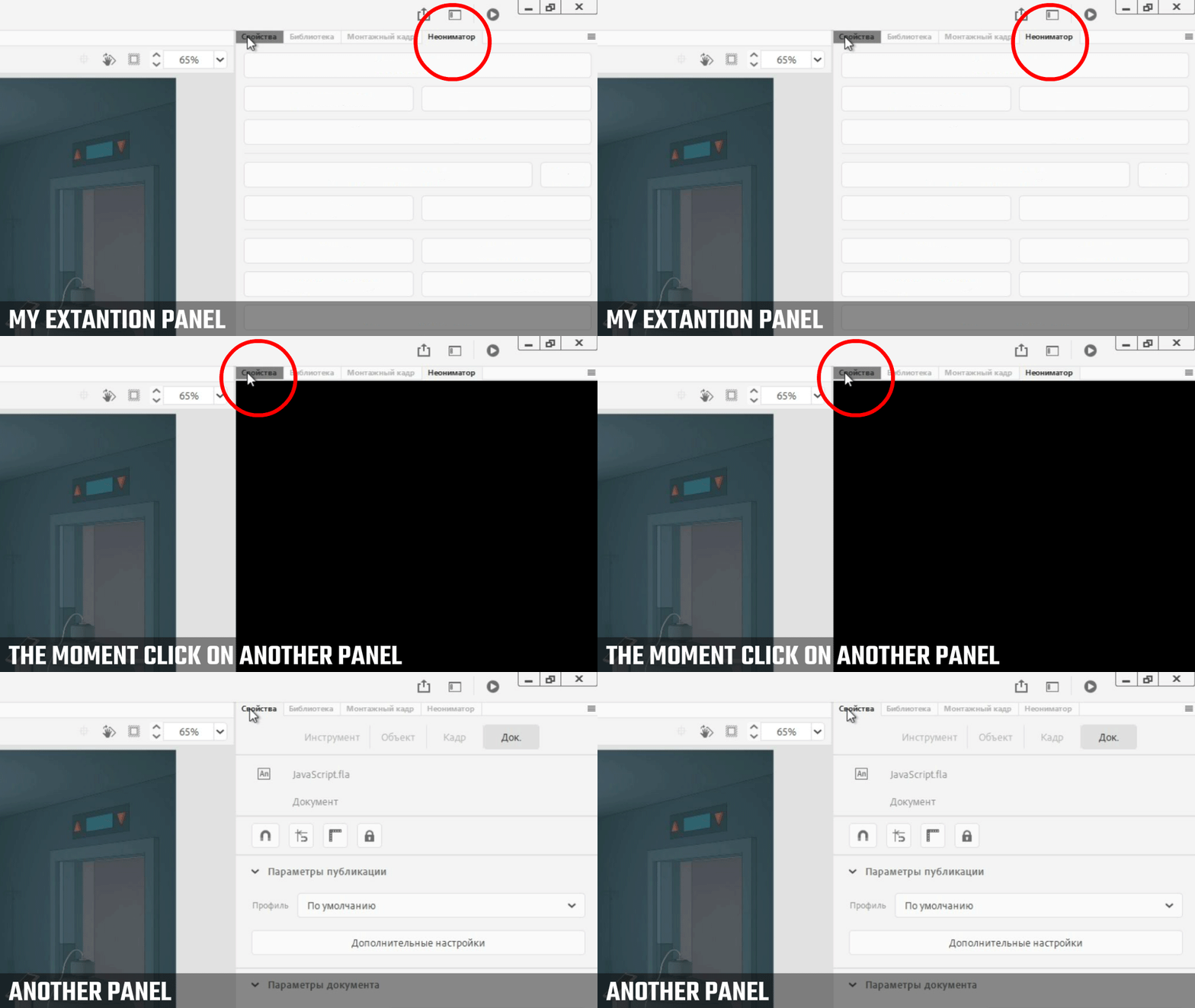
 
The problem is that when I switch between panels - a black background flickers! No such thing with the native panels. Immediately thought on my CSS and tried loading the standard CSS "Extension Builder for Brackets" - same thing, black frame. That is, the problem is not in Animate and not in my CSS, but where to look for the problem I do not know.

Perhaps someone has faced with similar or at least have a suggestion what could be the problem?

    This topic has been closed for replies.

    1 reply

    Multoman
    Inspiring
    March 21, 2023

    Попробуйте использовать swf панель для вашего расширения. С ней такой проблемы не замечал. Плюс swf панель будет работать даже на старых версиях анимейта или флеша.  

    neonimator
    Known Participant
    March 21, 2023

    If you make the panel in swf format, do you only need to edit the "manifest" to integrate it, or does this require revising the entire process?

    neonimator
    Known Participant
    March 23, 2023

    Have to review the whole process. The SWF panel is written in AS3. As for me, it is much easier to use the swf panel than the CEP extension.

    Here is a simple example of how this can be done:

    https://github.com/AdobeDocs/developers-animatesdk-docs/blob/master/swfPanel_object/swfPanel.md


    Thank you for your recommendation. I converted the panel to SWF format and there is no flickering. "MMExecute" does a good job. Plus, I can bind the panel to a hotkey, and easier to install for the user on the computer.

    Of course, it's not as flexible and quick to play with the appearance as in HTML/CSS. And the round borders of the buttons don't display as cleanly as I'd like, as if the pixels were sprawling where they were rounded. I had to leave the buttons square. But it's all worth it, because the old flickering is not an option at all.


    I don't know how to do it in AS3 yet, maybe some of these things had to be solved:

    1. "align top" to make the panel display correctly on a monitor with a resolution greater than 1080p. Tested on the second monitor.


    2. make the buttons hover with native arrow of user's current OS, instead of a hand, taking into account the resolution. In CSS did it with attribute "cursor: default", and in AS3 found only "replace cursor with symbol", but it is doubtful option


    3. тo add at code level analog of title="Button description on hovering", so you can flexibly and in the same style add/change explanations for the user. Edit the description when hovering can be inside the symbol in the frame "Hover", but I want to at the code level, for greater flexibility, the correct appearance and a single style.

    I understand, all this is not critical, but desirable.