Copy link to clipboard
Copied
I'm trying to develop code for a single object to rotate on a 2-dimensional axis. I want the object to rotate in the direction that I move the mouse. For example, if my object were an eye - the pupil would watch the cursor move around the screen.
Here is where I'm at:
stage.addEventListener("mouseMove", arjun);
function arjun(e:MouseEvent):void
{
var var1=mouseY - eyeR.y;
var var2=mousex - eyeR.x;
var radiusR=Math.atan2(var1,var2);
var degreeR=radiusR/(Math.Pl/180);
eyeR.rotation=degreeR;
var var1=mouseY - eyeL.y;
var var2=mousex - eyeL.x;
var radiusR=Math.atan2(var1,var2);
var degreeR=radiusR/(Math.Pl/180);
eyeL.rotation=degreeR;
}
Copy link to clipboard
Copied
Hi.
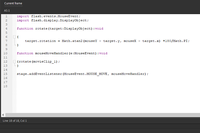
If the objects are directly placed in the root, then the code could be something like this:
import flash.events.MouseEvent;
import flash.display.DisplayObject;
function rotate(target:DisplayObject):void
{
target.rotation = Math.atan2(mouseY - target.y, mouseX - target.x) * 180 / Math.PI;
}
function mouseMoveHandler(e:MouseEvent):void
{
rotate(eyeL);
rotate(eyeR);
}
stage.addEventListener(MouseEvent.MOUSE_MOVE, mouseMoveHandler);
And please noticed that the artwork inside of the Movie Clip instance you want to rotate must point to the right (e.g.: =>);
Please let us know if you have any further questions.
Regards,
JC

Copy link to clipboard
Copied
Thank You for your time and response JC. Does this look right?
Get ready! An upgraded Adobe Community experience is coming in January.
Learn more