
Participant
June 18, 2013
Answered

Fonts Mangled In Flash CC

  • June 18, 2013
  • 7 replies
  • 17744 views

I just installed Flash CC eager to try out the features and quickly discovered that any fla that I opened that uses Library embedded fonts completely looks mangled, the font is wrong, kerning gets screwed up, text randomly is cut off. Very dissapointing. Is this something that might get fixed soon.
    This topic has been closed for replies.
    Correct answer dharmk

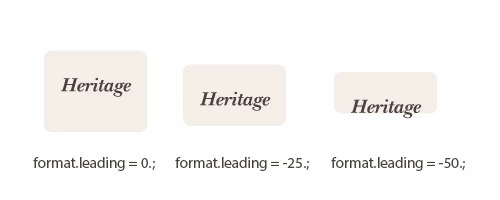
    format.leading = 0;

    myText.text = "hello";

    myText.setTextFormat(format);

    There's not much mystery to changing leading.


    We are looking into this issue. However, for the time being you can use a workaround for this issue. Just create an invisible text element on the first frame which uses the same embedded font, it should solve the issue. You may need to clearn the publish cache in some cases (Control -> Clear publish cache).

    One way you can create an invisible text on stage would be to create a text element, apply the embedded font and create a movie clip out of it. You can then go to the PI and uncheck the visible checkbox to hide the movieclip.

    -Dharmendra.

    7 replies

    BladePoint
    Inspiring
    January 9, 2015

    I am also having this problem with the leading magically changing on me. A while ago, I first noticed that some of my text was not positioned properly vertically, so I went and changed the textfield's y value to put it where it was supposed to be. Then a few weeks later, it was too far in the other direction, so I changed it back to how it originally was. Now it has gone to the wrong position again and I don't know what is triggering the changes. Is there a way to know what I need to set the leading to to fix it, or do I just have to eyeball it?

    EDIT: I tried the thing where I put a textfield on frame 1 and when I tested the movie, it worked. Then I deleted the textfield and the leading was still correct.

    Participating Frequently
    October 6, 2014

    I am experiencing this problem (disappearance of embedded fonts when published). Creating invisible text on the stage and applying the embedded font to it does not fix the problem. Has there been any further movement on resolving this?

    Participant
    November 13, 2013

    I have a similar problem.  I replaced the font in it with a font from an external library - and then the line spacing went haywire. I have a separate movieclip where I used the external embedded fonts from the start which is fine. The workaround mentioned is not working for me.

    As soon as I uncheck "import for runtime sharing" for the externally embedded font, the leading issues disappear.

    SujaiS
    Adobe Employee
    Adobe Employee
    December 3, 2013

    The new update(Flash Pro CC release - November 2013) is now available to you. This Flash CC update will update your flash version to 13.1.0.217. Can you check this using this latest update

    You can update from the Adobe Creative Cloud application or from Flash Pro CC Help -> Updates menu.

    You will more information about the update at: http://helpx.adobe.com/flash/using/whats-new.html

    Thanks,

    Sujai

    Adobe Flash Professional Team

    Participant
    December 3, 2013

    I just tested the update and it certainly has improved the situation, however, Flash files published with CS6 still look different than those published with CC which means I still can't use CC as I would have to go back through every project and alter the text fields to be accurate again.

    Instead of the line spacing being radically too large it is now too small, This is likely a default value issue though? I am not implicetly setting a leading value:

    Flash CS6:

    Flash CC:

    The failure to display the "bold" variation of a font also still persists. The Bold variation of the font is embedded in the FLA:

    Flash CS6:

    Flash CC:

    Participant
    October 11, 2013

    this worked for me: 

      var tf:TextFormat = new TextFormat();

      tf.leading = -70;

      this.flashTextField.defaultTextFormat = tf;

      this.flashTextField.text = 'this text appeared with correct leading';

    September 12, 2013

    This thread doesn't specifically recommend a fix that works in all cases. I am unsure how adding a textfield to frame one has helped others but it has not helped me (for example do you have to still set leading to some silly number such as "-50" for the font to display correctly?). In my case Arial is rendering correctly but another Font is not. When I use both in the same textfield (classic text field) the leading is different for the two. There doesn't appear to be a way to specify leading inline with HTML within the font tag so I am stuck. If there is a way around the problem in the case of multiple fonts in the same field, please let me know!

    This bug needs to get fixed!

    Known Participant
    September 12, 2013

    There was a Flash CC update but this was not resolved. How can this bug not be a top priority?

    Adobe do something.

    Participant
    June 28, 2013

    Simple way to recreate the bug:

    import flash.text.TextField;

    import flash.text.TextFormat;

    import flash.text.TextFieldAutoSize;

    var tf : TextFormat;

    var tb1 : TextField;

    var tb2 : TextField;

    tf = new TextFormat();

    tf.font     = "Arial";

    tf.color     = 0x000000;

    tf.size      = 20;

    function makeTb( txt : String ) : TextField {

        var tb : TextField = new TextField();

            tb = new TextField();

            tb.multiline             = false;

            tb.selectable             = false;

            tb.defaultTextFormat     = tf;

            tb.autoSize             = TextFieldAutoSize.LEFT;

            tb.mouseWheelEnabled     = false;

            tb.antiAliasType         = AntiAliasType.ADVANCED;

            tb.embedFonts             = true;

            tb.border                 = true;

            tb.borderColor             = 0xff00ff;

            tb.condenseWhite         = true;

            tb.text                    = txt;

        return tb;

    }

    tb1 = makeTb( "how the bug looks" );

    tb2 = makeTb( "how it should be" );

    tb2.embedFonts = false;

    tb2.x = 200;

    addChild( tb1 );

    addChild( tb2 );

    And a screenshot ( win7 pro + flash cc )"

    Known Participant
    June 29, 2013

    Just to add more info here, I'm having exactly the same bug.

    http://forums.adobe.com/message/5459908

    Adobe do something!!!

    Does anyone have the link to the bug report?

    Participant
    June 29, 2013

    Hey PierBover, Adobe Bugbase doesnt have the selection. I've notified some people on twitter on how to report bugs for flash cc.

    kglad
    Community Expert
    Community Expert
    June 18, 2013

    i don't see a problem.

    create a new fla in cs6 add the minimum needed to exhibit the problem then post your results.

    Participant
    June 18, 2013

    Here is a quick example:

    SWF exported using CS6:

    http://terminalvelocity.ca/temp/flashCC/a.png

    SWF exported using CC

    http://terminalvelocity.ca/temp/flashCC/b.png

    (this example only really shows a line spacing problem)

    Here is also an example of one of my project FLAs which reveals more issues such as the wrong font variant being used (non bold) and the "height" property of the textfield being wrong which is causing the buttons to misdraw as being too tall (and the input elements being too short)

    CS6:

    http://terminalvelocity.ca/temp/flashCC/c.png

    CC:

    http://terminalvelocity.ca/temp/flashCC/d.png

    You can download my test FLA here:

    http://terminalvelocity.ca/temp/flashCC/test.fla

    The font problems seem prevailent in any FLA I open that uses embedded fonts. I am on a Mac running the latest version of Mountain Lion. I suspect this may be caused by a few default params changing in the TextFormat object perhaps? Though if so I won't be happy if I have to go back through every text field in every FLA in order to use the CC version of Flash.

    Devarai
    Known Participant
    June 19, 2013

    you can use the following function to set the leading of all textfields (that exist and are on the display list).  just past the main timeline (cast as a movieclip) to setLeadingF and specify the leading you want to apply.

    the function can be made more efficient by creating the textformat instance outside setLeadingF to prevent it from being created repeatedly.

    function setLeadingF(mc:MovieClip,leading:int):void{

        var tfor:TextFormat = new TextFormat();

        tfor.leading = leading;

        for(var i:int=0;i<mc.numChildren;i++){

            if(mc.getChildAt(i) is TextField){

                TextField(mc.getChildAt(i)).defaultTextFormat=tfor;

                TextField(mc.getChildAt(i)).setTextFormat(tfor);

            } else if(mc.getChildAt(i) is MovieClip){

                setLeadingF(MovieClip(mc.getChildAt(i)),leading);

            }

        }

    }


    That is not really practical. Advanced coders create TextField objects dynamically during run-time. Some of my projects have hundreds of source code files. Correcting each one manually is really a pain in the ass.