


Copy link to clipboard
Copied
Hi.
I am creating HTML5 apps for classroom digital boards.
I would like to make them full screen. At the moment, you can see white around the edges ie: they are not filling the whole window. If I make the background wider at design time, it still doesn't fill it.
I know there is probably a very simple answer but I can't find it.
Any help would be appreciated.


 1 Correct answer


full browser: file>publish settings>enable make responsive - both>enable scale to fill and pick one of the options:
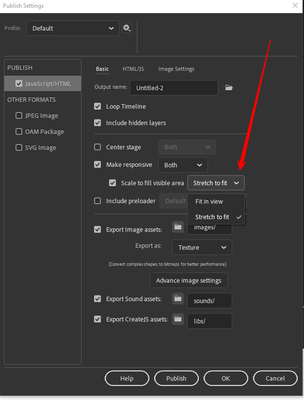
for fullscreen do the same plus add:
// put something on stage so "this" can respond to a click
this.addEventListener("click", f);
var element = document.getElementById("animation_container");
function f(){
element.requestFullscreen()
.then(function() {
// fs success
})
.catch(function(error) {
console.log(error.message);
});
}

 6
Replies
6
6
Replies
6

Copy link to clipboard
Copied
you want fullscreen (requires user interaction) or full browser (fills the browser display window)?
Copy link to clipboard
Copied
Both methods would be interesting to know about because we are going to have different scenarios. Teachers in a classroom would want to go full screen - kids at home would probably prefer to keep the browser visible - or maybe not. Until we test we don't know.
Copy link to clipboard
Copied
I've just come across a setting in publish settings - stretch to fit which remedies the white spaces. It was that easy so I feel a little dumb, anyway,
It would also be nice to know - "fullscreen (requires user interaction)"
Copy link to clipboard
Copied
full browser: file>publish settings>enable make responsive - both>enable scale to fill and pick one of the options:
for fullscreen do the same plus add:
// put something on stage so "this" can respond to a click
this.addEventListener("click", f);
var element = document.getElementById("animation_container");
function f(){
element.requestFullscreen()
.then(function() {
// fs success
})
.catch(function(error) {
console.log(error.message);
});
}
Copy link to clipboard
Copied
Excellent - thanks - I just tried it and it works beautifully.
Copy link to clipboard
Copied
you're welcome.


Get ready! An upgraded Adobe Community experience is coming in January.
Learn more
 AdChoices