
Answered
getDay ()
Hi, this 12th day of the month day.
myDate.getDay (); write time is only 2.

Hi, this 12th day of the month day.
myDate.getDay (); write time is only 2.
I have wanted to do exactly the picture below
I would like to mark this day, 7 days.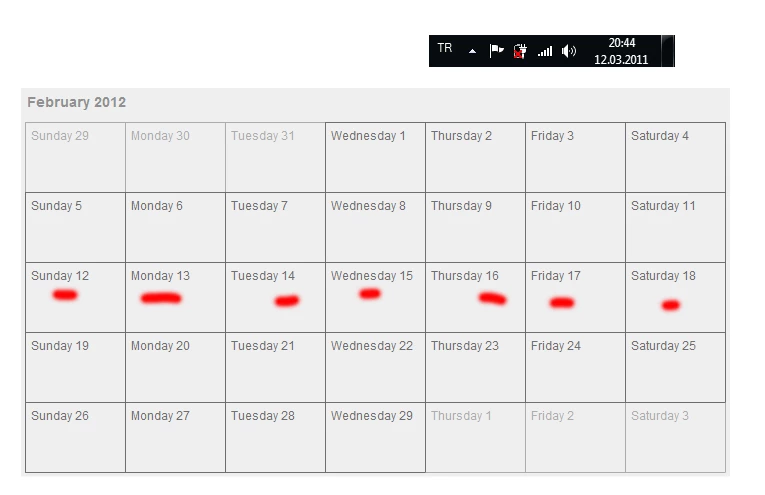
This code highlights 7 days from date specified. Now it runs on timer and highlights new ranges every 2 seconds:
stop();
// day display width
var dw:Number = 100;
// day display height
var dh:Number = 70;
// week days strings
var weekDays:Array = ["Sunday", "Monday", "Tuesday", "Wednesday", "Thursday", "Friday", "Saturday"];
// months strings
var months:Array = ["January", "February", "March", "April", "May", "June", "July", "August", "September", "October", "November", "December"];
// number of columns - number of days in the week
var cols:int = 7;
// one day in milliseconds
var dayDiff:Number = 1000 * 60 * 60 * 24;
// calendar header display
var header:TextField;
// calnedar container
var container:Sprite = new Sprite();
// padding inside container
var padding:Number = 4;
// style of regular display
var regularStyle:Object = { color: 0xE8E8E8, backgroundColor: 0x6F6F6F };
// inactive month style
var mootStyle:Object = { color: 0xACACAC, backgroundColor: 0xE6E6E6 };
// highlight style
var hilightStyle:Object = { color: 0xE4E4E4, backgroundColor: 0x242424 };
// color of active month
var color:uint = 0x6F6F6F;
// color of inactive month - previous of following
var mootColor:uint = 0xACACAC;
// accont for header y and height
var yOffset:Number;
// collection of date display objects
var datesUIs:Array;
// first day of month
var date:Date;
// timer for highlights
var timer:Timer;
// number of days in displayed month
var daysInMonth:int;

init();

function init():void {
     header = new TextField();
     header.multiline = header.wordWrap = false;
     header.autoSize = "left";
     header.defaultTextFormat = new TextFormat("Arial", 14, 0x909090, "bold");
     header.text = "Month Year";
     header.x = header.y = padding;
     yOffset = header.y + header.height + 10;
     container.addChild(header);
     container.x = container.y = 20;
     addChild(container);
     // pass whatever year and month is desired
     buildMonth(2013, 1);
     drawContainer();
     highlightWeek(12);
     timer = new Timer(2000);
     timer.addEventListener(TimerEvent.TIMER, onTimer);
     timer.start();
}
// randomly hightlights dates
function onTimer(e:TimerEvent):void
{
     highlightWeek(1 + Math.random() * (daysInMonth - 1));
}
// highlights dates a week ahead from date specified in the active month
function highlightWeek(startDate:int):void
{
     var endDate:int = startDate + 6;
     var mcDate:Date;
     var mcX:Number;
     var mcY:Number;
     for each(var mc:MovieClip in datesUIs) {
          mcDate = mc.date;
          if (mcDate.month == date.month) {
               if (mcDate.getDate() >= startDate && mcDate.getDate() <= endDate) {
                    mc.style =  hilightStyle;
                    drawDateBox(mc);
               }
               else {
                    if (mc.style != regularStyle) {
                         mc.style = regularStyle;
                         drawDateBox(mc);
                    }
               }
          }

     }
}
// builds UI
function buildMonth(year:int, month:int):void {
     datesUIs = [];
     // change header text
     header.text = months[month] + " " + year;
     // create first day of the month
     date = new Date(year, month, 1);
     // get how many days are in the month
     daysInMonth = new Date(date.fullYear, date.month + 1, 0).date;
     // get day of the week of the first day
     var firstDay:int = date.getDay();
     var prependDate:Date = new Date(date.time - dayDiff * firstDay);
     // date to display - calculated as we go
     var displayDate:Date;
     // day visual - is reused in the loop
     var dayBox:MovieClip;
     // prepend from prevous month
     for (var i:int = 0; i < firstDay; i++) {
          displayDate = new Date(prependDate.time + dayDiff * i);
          dayBox = new MovieClip();
          dayBox.date = displayDate;
          dayBox.style = mootStyle;
          drawDateBox(dayBox);
          dayBox.x = dw * displayDate.day + padding;
          dayBox.y = yOffset;
          container.addChild(dayBox);
          datesUIs.push(dayBox);
     }
     // current month
     for (i = 0; i < daysInMonth; i++) {
          displayDate = new Date(date.time + dayDiff * i);
          dayBox = new MovieClip();
          dayBox.date = displayDate;
          dayBox.style = regularStyle;
          drawDateBox(dayBox);
          dayBox.x = dw * displayDate.day + padding;
          dayBox.y = dh * int((i + firstDay) / cols) + yOffset;
          container.addChild(dayBox);
          datesUIs.push(dayBox);
     }
     var append:int = i + cols - displayDate.day - 1;
     // append from the following month
     for (; i < append; i++) {
          displayDate = new Date(date.time + dayDiff * i);
          dayBox = new MovieClip();
          dayBox.date = displayDate;
          dayBox.style = mootStyle;
          drawDateBox(dayBox);
          dayBox.x = dw * displayDate.day + padding;
          dayBox.y = dh * int((i + firstDay) / cols) + yOffset;
          container.addChildAt(dayBox, 0);
          datesUIs.push(dayBox);
     }
}
// draws single day visual
function drawDateBox(mc:MovieClip):void {
     var g:Graphics = mc.graphics;
     g.clear();
     // remove all the children
     for (var i:int = 0; i < mc.numChildren; i++) mc.removeChild(mc.getChildAt(i));
     g.beginFill(mc.style.backgroundColor);
     g.drawRoundRect(2.5, 2.5, dw - 2.5, dh - 2.5, 7);
     g.endFill();
     var t:TextField = new TextField();
     t.multiline = t.wordWrap = false;
     t.autoSize = "left";
     t.defaultTextFormat = new TextFormat("Arial", 12, mc.style.color);
     t.text = weekDays[mc.date.day] + " " + mc.date.getDate();
     t.x = t.y = 4;
     mc.addChild(t);
}
// draws background
function drawContainer():void {
     var g:Graphics = container.graphics;
     g.beginFill(0xF7F7F7);
     g.drawRect(0, 0, container.width + padding * 2,  container.height + padding * 2);
}
Already have an account? Login
Enter your E-mail address. We'll send you an e-mail with instructions to reset your password.
 AdChoices