
sunghoon jung
Known Participant
June 11, 2019
Answered

How to change to twos while keeping the nondestructive editing state of the tween?

  • June 11, 2019
  • 1 reply
  • 4258 views

2D drawing animations typically use twelve drawings instead of 24 drawings on a 24fps timeline.

Using 24 drawings is called full-frame animation or ones. The way to use twelve drawings is called twos.

The animations created by Tween in AN are ones. But I want twos for tonne manners in my project.

And at the same time I want to keep the nondestructive editing state of Tween.

That is, 'convert to frame by frame animation' function is not an option for me.

I can do this with the timeremap feature in AE.

But how do I do this in AN?

If you know how, please introduce me.

Thank you in advance.
This topic has been closed for replies.
Correct answer n. tilcheff

Hi mate,

You should work inside a container where all your tweens are on ones.

On the outside the container should be set to Play Once.

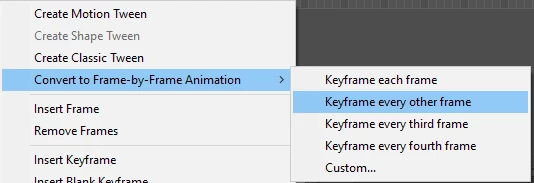
Then you select it and right-click to choose - Keyframe every other frame

When this is done you select the whole range of frames with Edit Multiple Frames and stop them.

The result will be animation on twos, referring to frames 1, 3, 5, 7 and so on on the internal timeline.

You can still keep working inside the container; Main Timeline will always preview on twos.

Very easy...

and quite pointless in my opinion. Aesthetically you will not gain anything.

If you want to do all animation on twos just set your document to 12 or 12.5 fps and then 50% speed in Premiere before rendering the video.

I've seen studios do this in the Flash 8 days to save time and processing power. Results again are not as good as one might think.

Twos suit hand-drawn animation well because not only reduce the amount of drawings needed but also also reduces the flickering due to imperfections of the linework.

Hope this helps!

NT

1 reply

n. tilcheff
n. tilcheffCorrect answer
Legend
June 11, 2019

Hi mate,

You should work inside a container where all your tweens are on ones.

On the outside the container should be set to Play Once.

Then you select it and right-click to choose - Keyframe every other frame

When this is done you select the whole range of frames with Edit Multiple Frames and stop them.

The result will be animation on twos, referring to frames 1, 3, 5, 7 and so on on the internal timeline.

You can still keep working inside the container; Main Timeline will always preview on twos.

Very easy...

and quite pointless in my opinion. Aesthetically you will not gain anything.

If you want to do all animation on twos just set your document to 12 or 12.5 fps and then 50% speed in Premiere before rendering the video.

I've seen studios do this in the Flash 8 days to save time and processing power. Results again are not as good as one might think.

Twos suit hand-drawn animation well because not only reduce the amount of drawings needed but also also reduces the flickering due to imperfections of the linework.

Hope this helps!

NT

Nick - Character Designer and Animator, Flash user since 1998 | Member of the Flanimate Power Tools team - extensions for character animation
sunghoon jung
Known Participant
June 11, 2019

Your method works perfectly for me.

Of course, as you say, I get the same aesthetic result.

However, by maintaining the nondestructive state of the tween, I can more flexibly respond to frequent client retake requests.

Thanks!

n. tilcheff
Legend
June 11, 2019

Excellent!

You're most welcome, mate.

Nick - Character Designer and Animator, Flash user since 1998 | Member of the Flanimate Power Tools team - extensions for character animation