
atek.
Participant
May 17, 2017
Answered

how to import or make scroll bar

  • May 17, 2017
  • 1 reply
  • 1557 views

Im practicing to make a mobile app in flash CC 2014.  I have a big list of button and the page i.e. 800 is not fit so its is drop down to a long list.
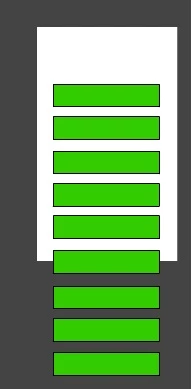
When i click ctrl+enter to preview i cannot scroll the rest of the buttons below. The buttons fit inside the 800 area are visible rest they are hidden or below the screen size. How can i have a scroll bar or slide my button up to visible. Any suggestion or help. Thanks

This topic has been closed for replies.
Correct answer kglad

i don't download and correct files unless i'm hired.

but you should be able to do this yourself, UIScrollBar - Adobe ActionScript® 3 (AS3 Flash) API Reference

if you're not familiar with actionscript 3, you can start with the code examples at the above link and come close enough to getting it to work to need no further help, or return here, post your code and get more help.

1 reply

kglad
Community Expert
Community Expert
May 17, 2017

you can create your own or use the ui scrollbar component (in the components panel).  or you could use the scrollpane (in the components panel).

atek.
atek.Author
Participant
May 17, 2017

Thanks for replying. Can you plz show me how it works. I have attach a demo file. After Dragging the UIScroll bar it did not work.

demo file

kglad
Community Expert
kgladCommunity ExpertCorrect answer
Community Expert
May 17, 2017

i don't download and correct files unless i'm hired.

but you should be able to do this yourself, UIScrollBar - Adobe ActionScript® 3 (AS3 Flash) API Reference

if you're not familiar with actionscript 3, you can start with the code examples at the above link and come close enough to getting it to work to need no further help, or return here, post your code and get more help.