
Known Participant
July 23, 2010
Question

How to make a draggable object snap into place?

  • July 23, 2010
  • 2 replies
  • 8357 views

I'm new to Flash (sort of - I used it a bit back in 1999-2000, but it's changed a LOT since then). I'm making an educational game for my company that involves dragging labels from a word-bank to their correct position on a diagram. I want the kids to be able to drag any one of the five labels and move them to any one of five marked positions on the diagram. I'm using Flash CS5 with Actionscript 3. I used code snippets, so that each individual label has the following code associated with it:

movieClip_1.addEventListener(MouseEvent.MOUSE_DOWN, fl_ClickToDrag);

function fl_ClickToDrag(event:MouseEvent):void

{

movieClip_1.startDrag();

}

stage.addEventListener(MouseEvent.MOUSE_UP, fl_ReleaseToDrop);

function fl_ReleaseToDrop(event:MouseEvent):void

{

movieClip_1.stopDrag();

}

Is there any code that I could add in there to make the objects then snap into positions when dragged near them? Note that there are five possible positions for them to snap to. The coordinates for those are:
XY

299.75

235.90
775.40244.65
421.15447.45
804.15484.85
437.15599.60

Here is a screenshot of the area of the game that this is concerning to give you an idea of what I'm talking about:
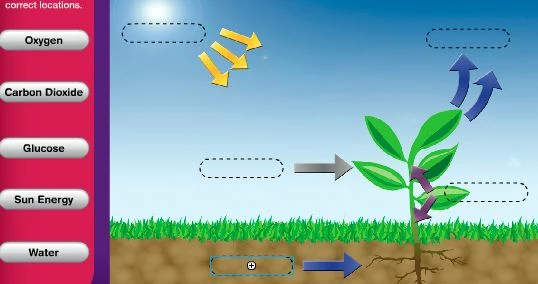
Thanks for any help you can give me.

This topic has been closed for replies.

2 replies

kerry7Author
Known Participant
July 28, 2010

It might help if I give ALL of my code for this project. Here it is:

movieClip_1.addEventListener(MouseEvent.MOUSE_DOWN, fl_ClickToDrag);

function fl_ClickToDrag(event:MouseEvent):void

{

     movieClip_1.startDrag();

}

stage.addEventListener(MouseEvent.MOUSE_UP, fl_ReleaseToDrop);

function fl_ReleaseToDrop(event:MouseEvent):void

{

     movieClip_1.stopDrag();

}

movieClip_2.addEventListener(MouseEvent.MOUSE_DOWN, fl_ClickToDrag_2);

function fl_ClickToDrag_2(event:MouseEvent):void

{

     movieClip_2.startDrag();

}

stage.addEventListener(MouseEvent.MOUSE_UP, fl_ReleaseToDrop_2);

function fl_ReleaseToDrop_2(event:MouseEvent):void

{

     movieClip_2.stopDrag();

}

movieClip_3.addEventListener(MouseEvent.MOUSE_DOWN, fl_ClickToDrag_3);

function fl_ClickToDrag_3(event:MouseEvent):void

{

     movieClip_3.startDrag();

}

stage.addEventListener(MouseEvent.MOUSE_UP, fl_ReleaseToDrop_3);

function fl_ReleaseToDrop_3(event:MouseEvent):void

{

     movieClip_3.stopDrag();

}

movieClip_4.addEventListener(MouseEvent.MOUSE_DOWN, fl_ClickToDrag_4);

function fl_ClickToDrag_4(event:MouseEvent):void

{

     movieClip_4.startDrag();

}

stage.addEventListener(MouseEvent.MOUSE_UP, fl_ReleaseToDrop_4);

function fl_ReleaseToDrop_4(event:MouseEvent):void

{

     movieClip_4.stopDrag();

}

movieClip_5.addEventListener(MouseEvent.MOUSE_DOWN, fl_ClickToDrag_5);

function fl_ClickToDrag_5(event:MouseEvent):void

{

     movieClip_5.startDrag();

}

stage.addEventListener(MouseEvent.MOUSE_UP, fl_ReleaseToDrop_5);

function fl_ReleaseToDrop_5(event:MouseEvent):void

{

     movieClip_5.stopDrag();


}

answers_but.addEventListener(MouseEvent.CLICK, fl_ClickToPosition);

function fl_ClickToPosition(event:MouseEvent):void

{

     answersflyin.x = 230.00;

     answersflyin.y = 187.50;

}

hide_but.addEventListener(MouseEvent.CLICK, fl_ClickToPosition_2);

function fl_ClickToPosition_2(event:MouseEvent):void

{

     answersflyin.x = 693;

     answersflyin.y = 865.8;

}

clear_but.addEventListener(MouseEvent.CLICK, fl_ClickToPosition_3);

function fl_ClickToPosition_3(event:MouseEvent):void

{

     movieClip_1.x = 112;

     movieClip_1.y = 246.55;

     movieClip_2.x = 112;

     movieClip_2.y = 327.85;

     movieClip_3.x = 112;

     movieClip_3.y = 415.55;

     movieClip_4.x = 112;

     movieClip_4.y = 495.5;

     movieClip_5.x = 112;

     movieClip_5.y = 578.25;

     answersflyin.x = 693;

     answersflyin.y = 865.8;


}

stop();

That all works really well, too, except that the objects don't snap into place. Other than that, I'm able to drag each of the 5 movie-clips onto the board, arrange them as I like, click one button to show correct answers, another to hide answers, and another to sweep the board clean.

kerry7Author
Known Participant
July 28, 2010

I solved it...sort of!

I remade the entire thing in AS2.0 and got it to work perfectly. I followed the same fix I figured out for my coloring book issues to make the show answers, hide answers, and clear board buttons.

To make the drag and snap, I cheated and downloaded the dragNdrop component from Flash Valley:

http://www.flashvalley.com/fv_components/dragNdrop/

Works like a charm. Once my company approves them for uploading to our website, I'll post a link so people can check it out. Thanks for all the help everyone.

kglad
Community Expert
Community Expert
July 23, 2010

you can probably use the movieclip's dropTarget:


movieClip_1.addEventListener(MouseEvent.MOUSE_DOWN, fl_ClickToDrag);

function fl_ClickToDrag(event:MouseEvent):void

{

movieClip_1.startDrag();

}

stage.addEventListener(MouseEvent.MOUSE_UP, fl_ReleaseToDrop);

function fl_ReleaseToDrop(event:MouseEvent):void

{

movieClip_1.stopDrag();

movieClip_1.x=movieClip_1.dropTarget.x;

movieClip_1.y=movieClip_1.dropTarget.y;

}


kerry7Author
Known Participant
July 23, 2010

Thanks for the quick reply. I'm not sure how to put my 5 target coordinates into use with what you gave me, though.

kglad
Community Expert
Community Expert
July 23, 2010

just try that code.