February 4, 2017
Answered

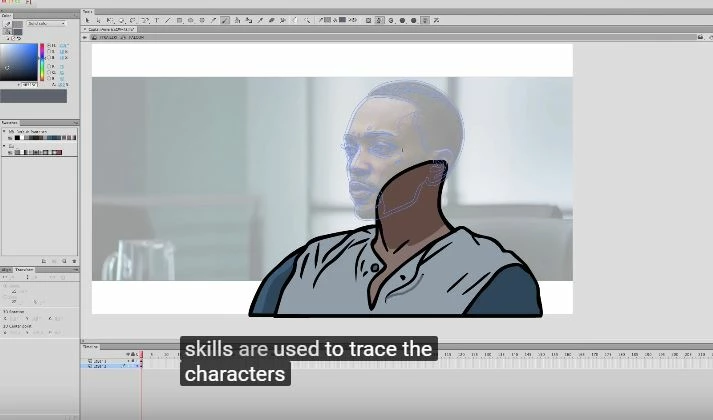
How to trace a face from a pic in aminate cc??
  • February 4, 2017
  • 2 replies
  • 4541 views

so that it will be way easy to draw the face exactly. note the blue pointed lines(how to dow that??)

This topic has been closed for replies.
Correct answer _keyframer

Wouldn't Trace Bitmap get you close?


ybe. Depends on the complexity oif the image. If you convert the bitmap to vectore using the trace feature, you'd still have to in and erase the unwanted parts of the image with the erasor tool. I personally would find it faster to simply draw the lines I want on a new layer. But then again have Cintiq.

2 replies

Legend
February 4, 2017

I don't see any blue pointed lines. I do see blue lines without points.

Your screenshot appears to be from a tutorial video. Maybe if you posted a link to the video instead, we'd be able to answer your question.

February 4, 2017

theres nothing much in the video..only this..!!

Colin Holgate
Inspiring
February 6, 2017

You can not convert an imported bitmap to outlines like that. You can convert the layer it's on to outline mode but that turns the bitmap into the outlined square. Outlines are converted from strokes. On a layer above the bitmap, grab the Pencil or Brush tool and trace the contours of the face in the image. When you have only the details you want, convert THAT drawing layer to outline mode (it's located to the right of the layer name). Create a new layer and use that to draw your final drawing on.


Wouldn't Trace Bitmap get you close?

kglad
Community Expert
Community Expert
February 4, 2017

import your bitmap

add it to the stage

click it to select it, if it's not already selected

click modify>bitmap>trace bitmap

select some settings to experiment and click ok.

watch the magic.

you can then do much more like select regions and recolor, remove etc.

February 4, 2017

But nothing like this line appeared..??