
Inspiring
March 4, 2022
Question

HTML5 Canvas - Lens magnify effect

  • March 4, 2022
  • 3 replies
  • 1068 views

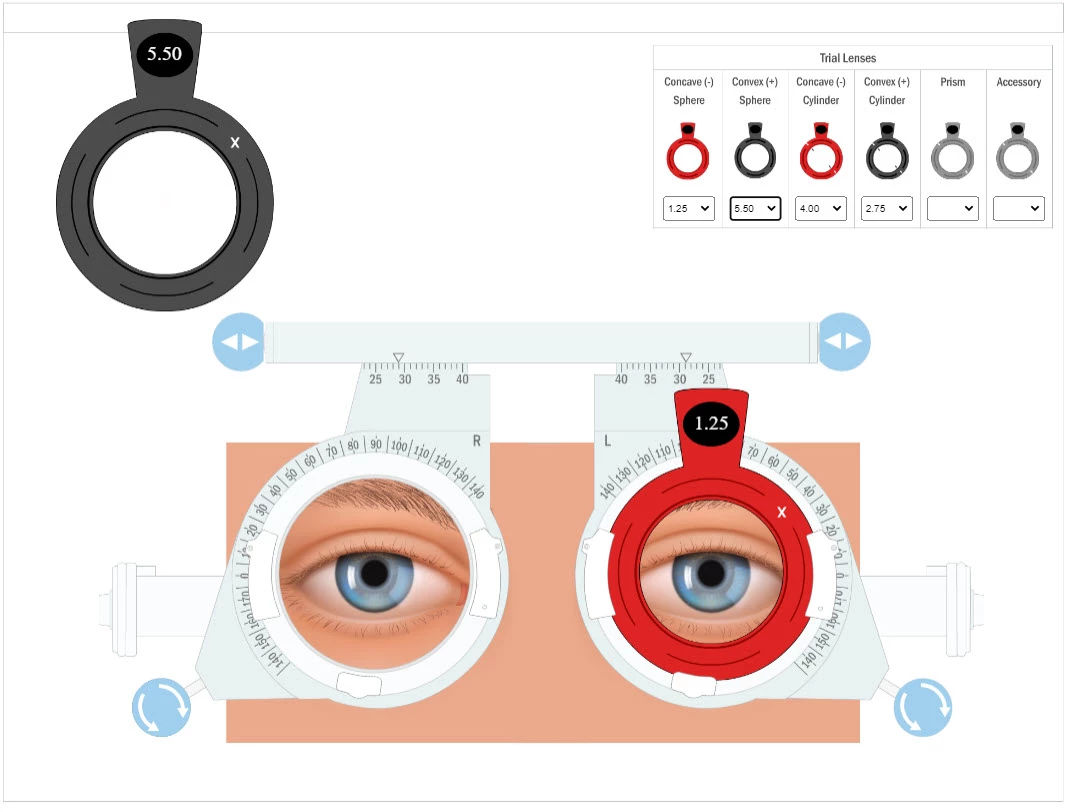
I have several (dozens actually) symbols representing optometry lenses of different magnification. 


What would be the best solution for acheiving this effect?


This is to dynamically magnify the area behind the lenses (one lens shown fitted to the frame below), e.g. the eyes.  The faces will change depending on the patient.


Note:  The lenses can be moved left and right and rotated.
 

    This topic has been closed for replies.

    3 replies

    Ko.Maruyama
    Community Expert
    Community Expert
    March 7, 2022

    Does your magnification need to animate with some kind of rotation?

    Isn't the lens just a value that can be called when a new magnification is chosen?

    Doesn't using the lens value as a size/scale multiplier work for this? (plus crop)

    FlatChatAuthor
    Inspiring
    March 7, 2022

    @Ko.Maruyama 


    Thanks for your reply!


    1.  Magnification and rotation.  You can see in the above image and in the video below that there are multiple lenses that are dragged onto a parent MC in each side of the optometry trial frame.  Once in place, the lenses can be rotated and moved left and right in their holders. The magnification for the lenses should not make any difference for rotation for symmetrical lenses.  So we can just go with that.  Rotation no effect.  However, with the movement left and right, the lenses would need to magnify the underlying image, the face and eyes etc., on movement.


    2.  Yes the lens is just a magnification value that can be set when a new lens is placed either from the combo boxes that put the lenses in a position on stage at a certain X Y (they are actually just off stage) or when parented on the frame.  There are only four magnification lenses (Concave and Convex types – the first four comboboxes) and when a type and magnification is selected from the comboboxes, the relevant combobox is moved to a location on stage visible to the user.  Also the text showing the magnification is changed to match the selected magnification in the combobox.


    3.  So yes, the lens magnification can just be used as a scale factor together with a mask to potentially achieve the effect.  Though of course there are approx. 34 unique magnification multipliers in total if looking at just the magnification factor, which is probably all that needs doing at this stage.


    FlatChatAuthor
    Inspiring
    March 8, 2022

    And my code:


    var root = this;
    
    //Lens comboboxes change events
    if (!this.LensMagCombo_1_change_cbk) {
    	function LensMagCombo_1_change(evt) {
    		root.ConcaveSphereLens.x = 200;
    		root.ConcaveSphereLens.y = 200;
    		root.ConcaveSphereLens.ConcaveSphereLens_text.text = evt.target.value;
    	}
    	$("#dom_overlay_container").on("change", "#LensMagCombo_1", LensMagCombo_1_change.bind(this));
    	this.LensMagCombo_1_change_cbk = true;
    	console.log(this.x, this.y);
    }
    
    if (!this.LensMagCombo_2_change_cbk) {
    	function LensMagCombo_2_change(evt) {
    		root.ConvexSphereLens.x = 200;
    		root.ConvexSphereLens.y = 200;
    		root.ConvexSphereLens.ConvexSphereLens_text.text = evt.target.value;
    	}
    	$("#dom_overlay_container").on("change", "#LensMagCombo_2", LensMagCombo_2_change.bind(this));
    	this.LensMagCombo_2_change_cbk = true;
    }
    
    if (!this.LensMagCombo_3_change_cbk) {
    	function LensMagCombo_3_change(evt) {
    		root.ConcaveCylinderLens.x = 200;
    		root.ConcaveCylinderLens.y = 200;
    		root.ConcaveCylinderLens.ConcaveCylinderLens_text.text = evt.target.value;
    	}
    	$("#dom_overlay_container").on("change", "#LensMagCombo_3", LensMagCombo_3_change.bind(this));
    	this.LensMagCombo_3_change_cbk = true;
    }
    
    if (!this.LensMagCombo_4_change_cbk) {
    	function LensMagCombo_4_change(evt) {
    		root.ConvexCylinderLens.x = 200;
    		root.ConvexCylinderLens.y = 200;
    		root.ConvexCylinderLens.ConvexCylinderLens_text.text = evt.target.value;
    	}
    	$("#dom_overlay_container").on("change", "#LensMagCombo_4", LensMagCombo_4_change.bind(this));
    	this.LensMagCombo_4_change_cbk = true;
    }
    
    if (!this.LensMagCombo_5_change_cbk) {
    	function LensMagCombo_5_change(evt) {
    		root.PrismLens.x = 200;
    		root.PrismLens.y = 200;
    		root.PrismLens.PrismLens_text.text = evt.target.value;
    	}
    	$("#dom_overlay_container").on("change", "#LensMagCombo_5", LensMagCombo_5_change.bind(this));
    	this.LensMagCombo_5_change_cbk = true;
    }
    
    if (!this.LensMagCombo_6_change_cbk) {
    	function LensMagCombo_6_change(evt) {
    		if (evt.target.value == 'GF') {
    			root.AccessoryLens_GF.x = 200;
    			root.AccessoryLens_GF.y = 200;
    		} else if (evt.target.value == 'RF') {
    			root.AccessoryLens_RF.x = 200;
    			root.AccessoryLens_RF.y = 200;
    		} else if (evt.target.value == 'SS') {
    			root.AccessoryLens_SS.x = 200;
    			root.AccessoryLens_SS.y = 200;
    		} else if (evt.target.value == 'FL') {
    			root.AccessoryLens_FL.x = 200;
    			root.AccessoryLens_FL.y = 200;
    		} else if (evt.target.value == 'PH') {
    			root.AccessoryLens_PH.x = 200;
    			root.AccessoryLens_PH.y = 200;
    		}
    	}
    	$("#dom_overlay_container").on("change", "#LensMagCombo_6", LensMagCombo_6_change.bind(this));
    	this.LensMagCombo_6_change_cbk = true;
    }
    
    //Move stuff
    
    this.ConcaveSphereLens.cursor = "move";
    this.ConvexSphereLens.cursor = "move";
    this.ConcaveCylinderLens.cursor = "move";
    this.ConvexCylinderLens.cursor = "move";
    this.PrismLens.cursor = "move";
    this.AccessoryLens_GF.cursor = "move";
    this.AccessoryLens_RF.cursor = "move";
    //this.AccessoryLens_FL.cursor = "move";
    this.AccessoryLens_PH.cursor = "move";
    
    
    //Left Frame Buttons
    this.ButtonLeftFrameMoveRight.addEventListener("mousedown", LF_MoveRight_Down.bind(this));
    
    this.ButtonLeftFrameMoveRight.addEventListener("pressup", LF_MoveRight_Up.bind(this));
    
    this.ButtonLeftFrameMoveLeft.addEventListener("mousedown", LF_MoveLeft_Down.bind(this));
    
    this.ButtonLeftFrameMoveLeft.addEventListener("pressup", LF_MoveLeft_Up.bind(this));
    
    
    //Left Frame Buttons functions to move Left Frame left and right on X axis
    function LF_MoveRight_Down() {
    	createjs.Ticker.addEventListener("tick", updateLF_Move_Right);
    }
    
    function LF_MoveRight_Up() {
    	createjs.Ticker.removeEventListener("tick", updateLF_Move_Right);
    }
    
    function updateLF_Move_Right() {
    	if (root.LeftFrame.x <= 597.3) {
    		root.LeftFrame.x += 1;
    		root.LFLensHolder.x += 1;
    		root.LFLensSupports.x += 1;
    		root.ButtonRotateCWLeftFrame.x += 1;
    		root.ButtonRotateCCWLeftFrame.x += 1;
    		root.lensParentLeft.x += 1;
    	}
    }
    
    function LF_MoveLeft_Down() {
    	createjs.Ticker.addEventListener("tick", updateLF_Move_Left);
    }
    
    function LF_MoveLeft_Up() {
    	createjs.Ticker.removeEventListener("tick", updateLF_Move_Left);
    }
    
    function updateLF_Move_Left() {
    	if (root.LeftFrame.x >= 508.3) {
    		root.LeftFrame.x -= 1;
    		root.LFLensHolder.x -= 1;
    		root.LFLensSupports.x -= 1;
    		root.ButtonRotateCWLeftFrame.x -= 1;
    		root.ButtonRotateCCWLeftFrame.x -= 1;
    		root.lensParentLeft.x -= 1;
    	}
    }
    
    
    //Right Frame Buttons
    this.ButtonRightFrameMoveRight.addEventListener("mousedown", RF_MoveRight_Down.bind(this));
    
    this.ButtonRightFrameMoveRight.addEventListener("pressup", RF_MoveRight_Up.bind(this));
    
    this.ButtonRightFrameMoveLeft.addEventListener("mousedown", RF_MoveLeft_Down.bind(this));
    
    this.ButtonRightFrameMoveLeft.addEventListener("pressup", RF_MoveLeft_Up.bind(this));


    //Right Frame Buttons functions to move Right Frame left and right on X axis
    function RF_MoveRight_Down() {
    	createjs.Ticker.addEventListener("tick", updateRF_Move_Right);
    }
    
    function RF_MoveRight_Up() {
    	createjs.Ticker.removeEventListener("tick", updateRF_Move_Right);
    }
    
    function updateRF_Move_Right() {
    	if (root.RightFrame.x <= 137.6) {
    		root.RightFrame.x += 1;
    		root.RFLensHolder.x += 1;
    		root.RFLensSupports.x += 1;
    		root.ButtonRotateCWRightFrame.x += 1;
    		root.ButtonRotateCCWRightFrame.x += 1;
    		root.lensParentRight.x += 1;
    	}
    }
    
    function RF_MoveLeft_Down() {
    	createjs.Ticker.addEventListener("tick", updateRF_Move_Left);
    }
    
    function RF_MoveLeft_Up() {
    	createjs.Ticker.removeEventListener("tick", updateRF_Move_Left);
    }
    
    function updateRF_Move_Left() {
    	if (root.RightFrame.x >= 47.8) {
    		root.RightFrame.x -= 1;
    		root.RFLensHolder.x -= 1;
    		root.RFLensSupports.x -= 1;
    		root.ButtonRotateCWRightFrame.x -= 1;
    		root.ButtonRotateCCWRightFrame.x -= 1;
    		root.lensParentRight.x -= 1;
    	}
    }


    //Lens Holder rotation functions
    
    //Left Frame Rotate Buttons
    this.ButtonRotateCWLeftFrame.addEventListener("mousedown", LF_RotateCW_Down.bind(this));
    
    this.ButtonRotateCWLeftFrame.addEventListener("pressup", LF_RotateCW_Up.bind(this));
    
    this.ButtonRotateCCWLeftFrame.addEventListener("mousedown", LF_RotateCCW_Down.bind(this));
    
    this.ButtonRotateCCWLeftFrame.addEventListener("pressup", LF_RotateCCW_Up.bind(this));
    
    
    //Left Frame Rotate CW Buttons functions to rotate LFLensHolder CW
    function LF_RotateCW_Down() {
    	createjs.Ticker.addEventListener("tick", updateLF_RotateCW);
    }
    
    function LF_RotateCW_Up() {
    	createjs.Ticker.removeEventListener("tick", updateLF_RotateCW);
    }
    
    function updateLF_RotateCW() {
    	var angle = 1 / Math.PI;
    	root.LFLensHolder.rotation += angle;
    	root.LFLensSupports.rotation += angle;
    	root.lensParentLeft.rotation += angle;
    }
    
    //Left Frame Rotate CCW Buttons functions to rotate LFLensHolder CCW
    function LF_RotateCCW_Down() {
    	createjs.Ticker.addEventListener("tick", updateLF_RotateCCW);
    }
    
    function LF_RotateCCW_Up() {
    	createjs.Ticker.removeEventListener("tick", updateLF_RotateCCW);
    }
    
    function updateLF_RotateCCW() {
    	var angle = 1 / Math.PI;
    	root.LFLensHolder.rotation -= angle;
    	root.LFLensSupports.rotation -= angle;
    	root.lensParentLeft.rotation -= angle;
    }
    
    
    //Right Frame Rotate Buttons
    this.ButtonRotateCWRightFrame.addEventListener("mousedown", RF_RotateCW_Down.bind(this));
    
    this.ButtonRotateCWRightFrame.addEventListener("pressup", RF_RotateCW_Up.bind(this));
    
    this.ButtonRotateCCWRightFrame.addEventListener("mousedown", RF_RotateCCW_Down.bind(this));
    
    this.ButtonRotateCCWRightFrame.addEventListener("pressup", RF_RotateCCW_Up.bind(this));
    
    
    //Right Frame Rotate CW Buttons functions to rotate RFLensHolder CW
    function RF_RotateCW_Down() {
    	createjs.Ticker.addEventListener("tick", updateRF_RotateCW);
    }
    
    function RF_RotateCW_Up() {
    	createjs.Ticker.removeEventListener("tick", updateRF_RotateCW);
    }
    
    function updateRF_RotateCW() {
    	var angle = 1 / Math.PI;
    	root.RFLensHolder.rotation += angle;
    	root.RFLensSupports.rotation += angle;
    	root.lensParentRight.rotation += angle;
    }
    
    //Right Frame Rotate CCW Buttons functions to rotate RFLensHolder CCW
    function RF_RotateCCW_Down() {
    	createjs.Ticker.addEventListener("tick", updateRF_RotateCCW);
    }
    
    function RF_RotateCCW_Up() {
    	createjs.Ticker.removeEventListener("tick", updateRF_RotateCCW);
    }
    
    function updateRF_RotateCCW() {
    	var angle = 1 / Math.PI;
    	root.RFLensHolder.rotation -= angle;
    	root.RFLensSupports.rotation -= angle;
    	root.lensParentRight.rotation -= angle;
    }


    //Drag and Drop lens onto trial frame behaviours
    createjs.Touch.enable(stage);
    
    var Lenses = [this.ConcaveSphereLens, this.ConvexSphereLens, this.ConcaveCylinderLens, this.ConvexCylinderLens, this.PrismLens, this.AccessoryLens_GF, this.AccessoryLens_RF, this.AccessoryLens_SS, this.AccessoryLens_PH];
    
    // Apply the same code for each lens MovieClip symbol in the array Lenses with a For Loop
    for (var i = 0; i < Lenses.length; i++) {
    	Lenses[i].on("mousedown", onMouseDown.bind(this));
    	Lenses[i].on("pressmove", onMouseMove.bind(this));
    	Lenses[i].on("pressup", onMouseUp.bind(this));
    	Lenses[i].LFLensHolder = this.LFLensHolder;
    	Lenses[i].lensParentLeft = this.lensParentLeft;
    	Lenses[i].RFLensHolder = this.RFLensHolder;
    	Lenses[i].lensParentRight = this.lensParentRight;
    	Lenses[i].originX = Lenses[i].x;
    	Lenses[i].originY = Lenses[i].y;
    }
    
    function onMouseDown(evt) {
    	var item = evt.currentTarget;
    	item.offset = {
    		x: 0,
    		y: 0
    	};
    	var pt = item.parent.globalToLocal(evt.stageX, evt.stageY);
    	item.offset.x = pt.x - item.x;
    	item.offset.y = pt.y - item.y;
    	item.drag = true;
    }
    
    function onMouseUp(evt) {
    	var item = evt.currentTarget;
    	//Left Frame
    	if (item.parent != this.lensParentLeft) {
    		item.drag = false;
    		var ptLeft = item.localToLocal(item.dot.x, item.dot.y, item.LFLensHolder.hitBox);
    		if (item.LFLensHolder.hitBox.hitTest(ptLeft.x, ptLeft.y)) {
    			item.x = item.LFLensHolder.x;
    			item.y = item.LFLensHolder.y;
    			item.lensParentLeft.addChild(item);
    			item.x -= item.lensParentLeft.x - 9.5;
    			item.y -= item.lensParentLeft.y - 9.5;
    			item.scale = 0.54;
    		}
    	} else if (item.parent == this.lensParentLeft) {
    		this.addChild(item);
    		item.x = evt.stageX;
    		item.y = evt.stageY;
    		item.scale = 1.00;
    
    	}
    	//Right Frame
    	if (item.parent != this.lensParentRight) {
    		item.drag = false;
    		var ptRight = item.localToLocal(item.dot.x, item.dot.y, item.RFLensHolder.hitBox);
    		if (item.RFLensHolder.hitBox.hitTest(ptRight.x, ptRight.y)) {
    			item.x = item.RFLensHolder.x;
    			item.y = item.RFLensHolder.y;
    			item.lensParentRight.addChild(item);
    			item.x -= item.lensParentRight.x - 9.5;
    			item.y -= item.lensParentRight.y - 9.5;
    			item.scale = 0.54;
    		}
    	} else if (item.parent == this.lensParentRight) {
    		this.addChild(item);
    		item.x = evt.stageX;
    		item.y = evt.stageY;
    		item.scale = 1.00;
    	}
    
    }
    
    function onMouseMove(evt) {
    	var item = evt.currentTarget;
    	if (item.drag) {
    		var pt = item.parent.globalToLocal(evt.stageX, evt.stageY);
    		item.x = pt.x - item.offset.x;
    		item.y = pt.y - item.offset.y;
    	}
    }

    any update?

    FlatChatAuthor
    Inspiring
    March 7, 2022

    Anyone??  It's a dynamice magnifying glass question...  masks?

    FlatChatAuthor
    Inspiring
    March 4, 2022

    All images are vector from Illustrator.