
Known Participant
October 30, 2013
Question

I've hit a very complicated brick wall

  • October 30, 2013
  • 3 replies
  • 2814 views

I'm sorry that I can't be more descriptive in my title, but I think I stuck my neck too deep and now I can't tell what is not working. I'm going to atempt to be as clear and concise as possible in my explanation, but sorry if I do something completely wrong or don't understand it fully.

Basically, what I am trying to do is load a bunch of .swf files that each extend the class "Plugin" from a folder called "plugins", and then execute specific code from them at specific times.To do this properly, I'm making a test plugin that is using a .swc library from the main program to extend "Plugin". Whenever I want to instantiate something that extends "Plugin", I have to give it a reference to my main program. However, here is where the problem occurs: when I try to load and then instantiate the plugin, I get an error saying that my main class is not my main class:

TypeError: Error #1034: Type Coercion failed: cannot convert me.bleachisback.cocmod::CoCMain@51b31f1 to me.bleachisback.cocmod.CoCMain.

I've been trying to fix this problem for the past week, and I just can't figure it out. I have a feeling it might have something to do with how I use the .swc file, but I can't tell if that is true/how to fix it because there is barely any documentation out there on it, especially in normal Flash and not Flash Builder.

Below is my source and how I attempted to get it to work:

https://mega.co.nz/#!Pdtn2SiB!ISszSDdGkaZyw6HB1ntRaVD2kckmnAxDeGsMTqS9SVw (A rar file containing my source)

There are 10 main files in the rar:

System/CoCMod.fla - The fla file for the main program

System/CoCMod.swc - The swc file for the main programe, and the library my plugin is using

System/CoCMod.swf - The swf for the main program

System/me/bleachisback/cocmod/CoCMain.as - The main class for the main program

System/me/bleachisback/cocmod/Plugin.as - The "abstract" class that every plugin should extend

System/plugins/TestMod.swf - The swf for the plugin, same as below. Does not do anything unless loaded by the main program.

Test Mod/TestMod.fla - The fla file for the plugin. Has actionscript on frame 1.

Test Mod/TestMod.swf - The swf for the plugin, same as above.

Test Mod/main.xml - Embedded into TestMod.swf, contains information about the mod.

Test Mod/plugin/bleachisback/testPlugin/TestMain - The main class for the plugin - extends Plugin.

This is how I export the .swc file (in CoCMod.fla):
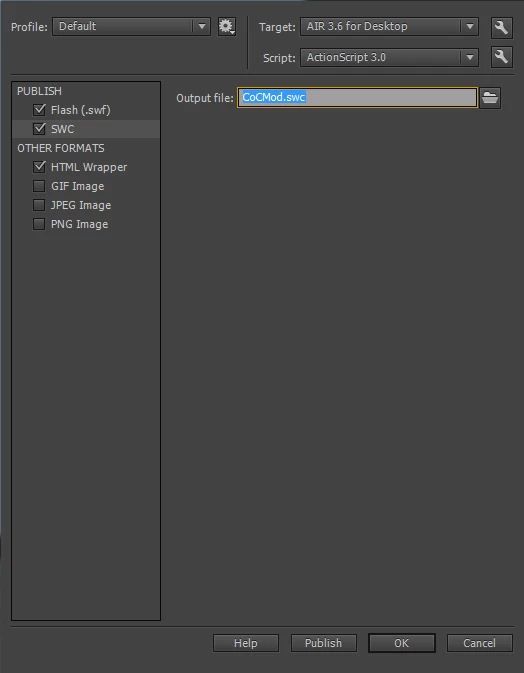
And this is how I reference it in TestMod.fla:
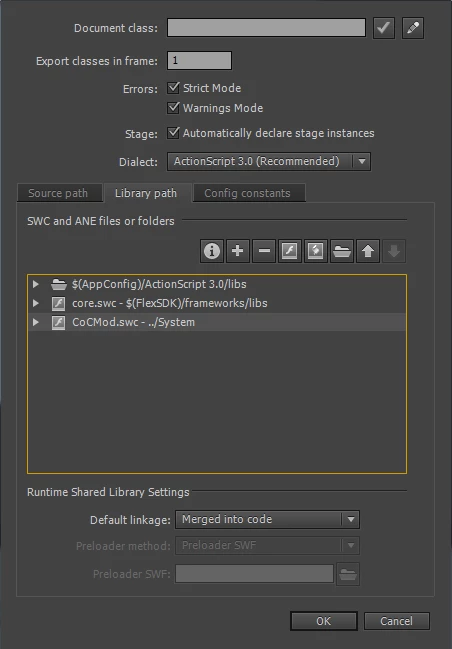
What should happen is just a simple "blah" appears in the console, but for as few lines of code as I have, it doesn't want to work. Can someone tell me what I'm doing wrong?

This topic has been closed for replies.

3 replies

kglad
Community Expert
Community Expert
October 30, 2013

you have to publish your swc first.  then publish the swf that uses that swc.  then test.

Amy Blankenship
Legend
October 30, 2013

It's an applicationDomain or securityDomain issue. Essentially, you have multiple swfs loading in the same Class, but they're seen as different Classes because they're not in the same applicationDomain or securityDomain. That should give you enough background to go find the solution with a web search--I always have to look it up myself.

Known Participant
October 30, 2013

I thought it was an applicationDomain issue, so I tried loading it into my current application domain:

var loader:Loader = new Loader();

var url:URLRequest = new URLRequest(file.nativePath);

loader.load(url, new LoaderContext(false, ApplicationDomain.currentDomain));

loader.contentLoaderInfo.addEventListener(Event.COMPLETE, pluginLoadingComplete);


                    private function pluginLoadingComplete(e:Event):void {

                              trace(e.target.applicationDomain == ApplicationDomain.currentDomain); //outputs false

                              plugin.initialise(this, desc.name[0], desc.description[0], desc.version[0], desc.author[0]); //error here


                              plugin.onEnable();

                    }

But when I do this, the trace outputs false, even though I esentially copied and pasted it from the adobe documentation.

Also, I am publishing the swc before I publish my plugin swf.

Known Participant
October 31, 2013

I'd look for blog posts about ApplicationDomain and SecurityDomain issues. My experience with the Help is "this is what we think it's going to do when we're finished," and blog posts are "this is what I had to do to get it to really work."

Just a piece of advice: Anything that both your main swf and the plugin swfs need to reference should really be an Interface, not a Class. Swfs don't really "own" the definition of an Interface in the same way they do a Class, so I think that even if the base implementation of the Class really is the same Class under the hood, you may be able to get away with a bit more as far as whether it casts to be the same Class. Honestly, though, I'd allow the plugins freedom to implement the Interface however they want (or if they're getting an instance that implements an Interface, inject that by Interface, not implementation).

You may want to also consider that instead of using:

e.target.content.foo and e.target.content.bar, use

var plugin:IPluginDefinition = e.target.content as IPluginDefinition;

Then you can test to see if the cast worked and not get Null Pointer Exceptions if for some reason the properties you think you can access aren't there.

Once you create the Class based on what you're getting from the definition, test to see that it actually also implements the properties and methods you need (again by casting and checking for null).


I made Plugin implement the interface IPlugin, and TestMain extends Plugin.

This is my IPlugin interface:

package me.bleachisback.cocmod {

          public interface IPlugin {

                    function get author():String;

                    function get description():String;

                    function get enabled():Boolean;

                    function get name():String;

                    function onDisable():void;

                    function onEnable():void;

                    function onLoad():void;

                    function get version():String;

          }

}

I then tried this, and it gave me null:

var plugin:IPlugin = e.target.content.mainClass as IPlugin;

Inspiring
October 30, 2013

Enable debugging in your publishing option and post the Line of Code that causes the error

Known Participant
October 30, 2013

It happens in line 38 of CoCMain.as:

        private function pluginLoadingComplete(e:Event):void {

            var plugin:Object = new e.target.content.mainClass();

            var desc:XML = new XML(new e.target.content.description);

            trace(e.target.applicationDomain == ApplicationDomain.currentDomain); //outputs false

            plugin.initialise(this, desc.name[0], desc.description[0], desc.version[0], desc.author[0]); //error here


            plugin.onEnable();

        }

Inspiring
October 30, 2013

I´m guessing you attach the event.complete listener to a Loader Object.

Make sure you instantiate the loaded swf properly:

from

http://help.adobe.com/en_US/FlashPlatform/reference/actionscript/3/flash/display/LoaderInfo.html

For a Loader object that has not called the load() or loadBytes() method, or that has not sufficiently loaded, attempting to access many of the properties of the contentLoaderInfo property throws an error.