



Illustrator Vector Art become Misshaped when Exported from Animate
I've designed an animated character in Illustrator 2020 (ver. 24.3) and have been testing it out in Adobe Animate but find that its vector art becomes misshaped upon being exported to Swf and Video regardless of looking perfectly fine on Adobe Animate's stage.
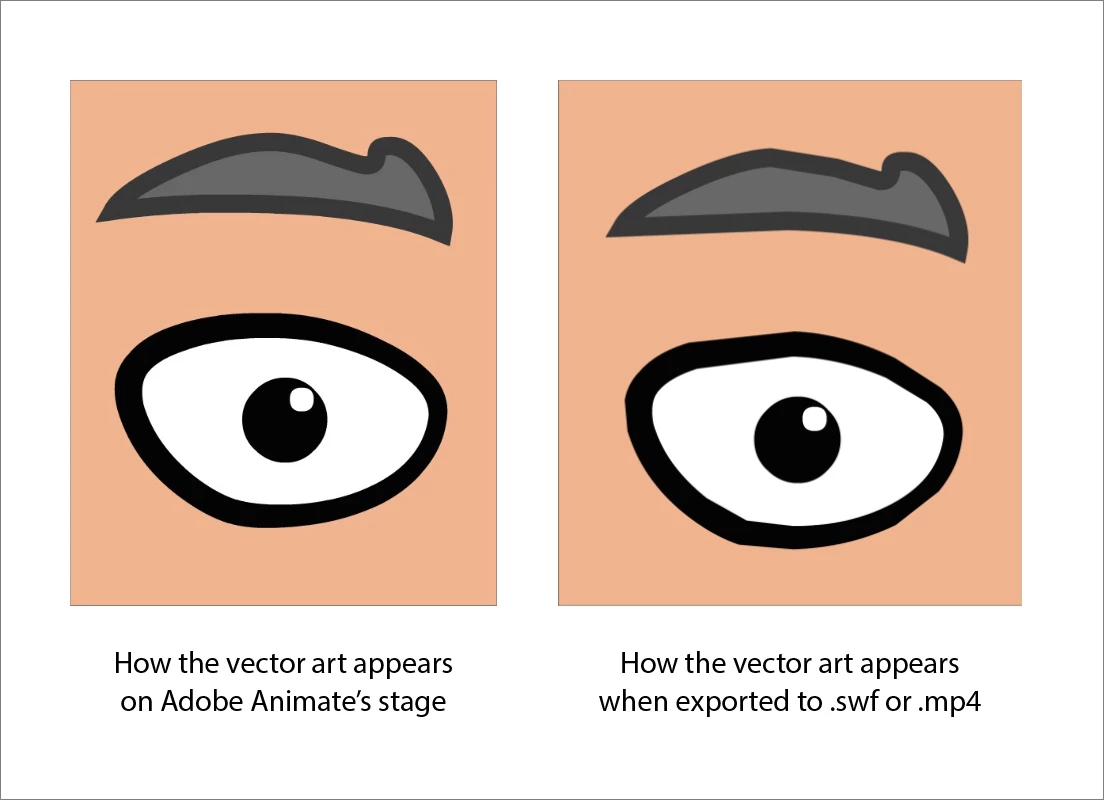
My character's art is very simple as it just uses filled shaped with strokes which I then have defined as graphic symbols in Illustrator before importing to Animate (for rigging purposes). In the above image, the character's eye lid symbol contains a white fill shape with a varying stroke width which gets converted to a fill when imported to Animate, and the eye brow symbol contains a fill shape with the default uniform stroke width and no brush style, yet it too becomes distorted upon export. I'm not using any tweens or animation, just exporting the static art from the stage as swf and mp4 files.
The most success I've had in preventing the misshaped art was to ungroup, outline strokes, and break apart any symbols in Illustrator before importing to Animate, but when I redefine the art as symbols in Animate, they become misshapen when exported again.
I've also tried the following but none have reliably worked every time.
- Breaking and redefining the graphic symbols in Adobe animate
- Slightly adjusting the anchors and anchor handles of the art
- Tried importing the Illustrator File to different versions of Adobe Animate: 2021, 2018, Adobe Flash CS6
Even when I just break the vector art down to just being a fill and paste it into an new document I still get some mishappening when I zoom in on the art.
Is this just something that Adobe Animate does occasionally for compression or optimization reasons, and there's no real way to force graphics to retain their perfect vector art upon export?
I feel this is a hindrance for more simple character designs since the imperfections can really stand out when you do close-ups on the character's face.
 AdChoices