spicy_L
Participant
Dec 27, 2017 10:31 PM UTC
Answered

importing image sequences to Animate CC?

I have about 300 frames of animation that i need distribute to each keyframe. as in each premade frame goes to each keyframe in animate cc. i imported them to the library and selected all, then went to modify>timeline>distribute to keyframes but it was disabled (unclickable.) did i do everything correctly because i searched older forums about flash cc (old version of animate) and everything seemed to be working for other people. please i need help, im still new to the program.

JoãoCésar17023019
JoãoCésar17023019Correct answer
Community Expert
Dec 28, 2017 6:28 AM UTC

Nice! You're welcome!

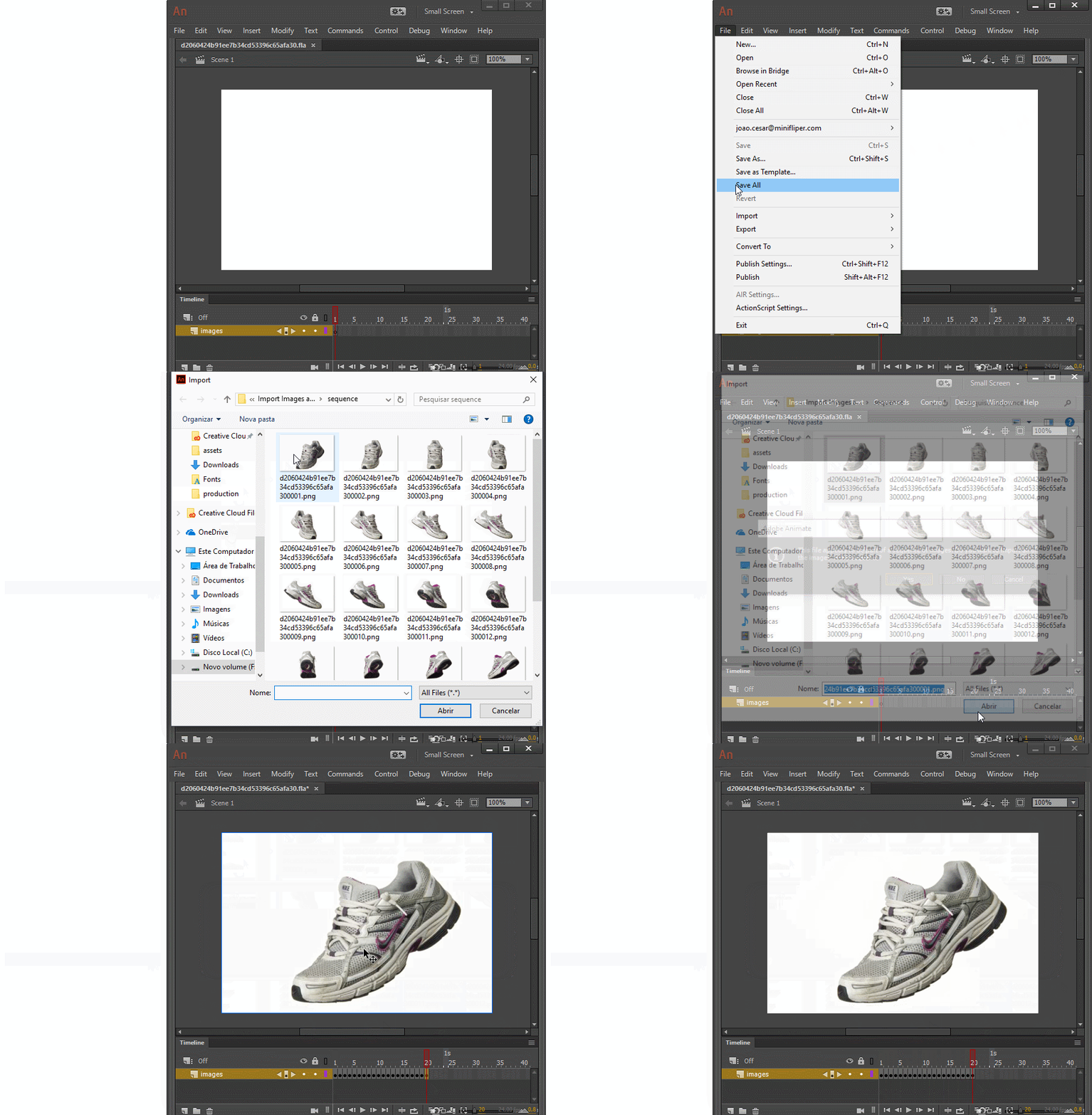
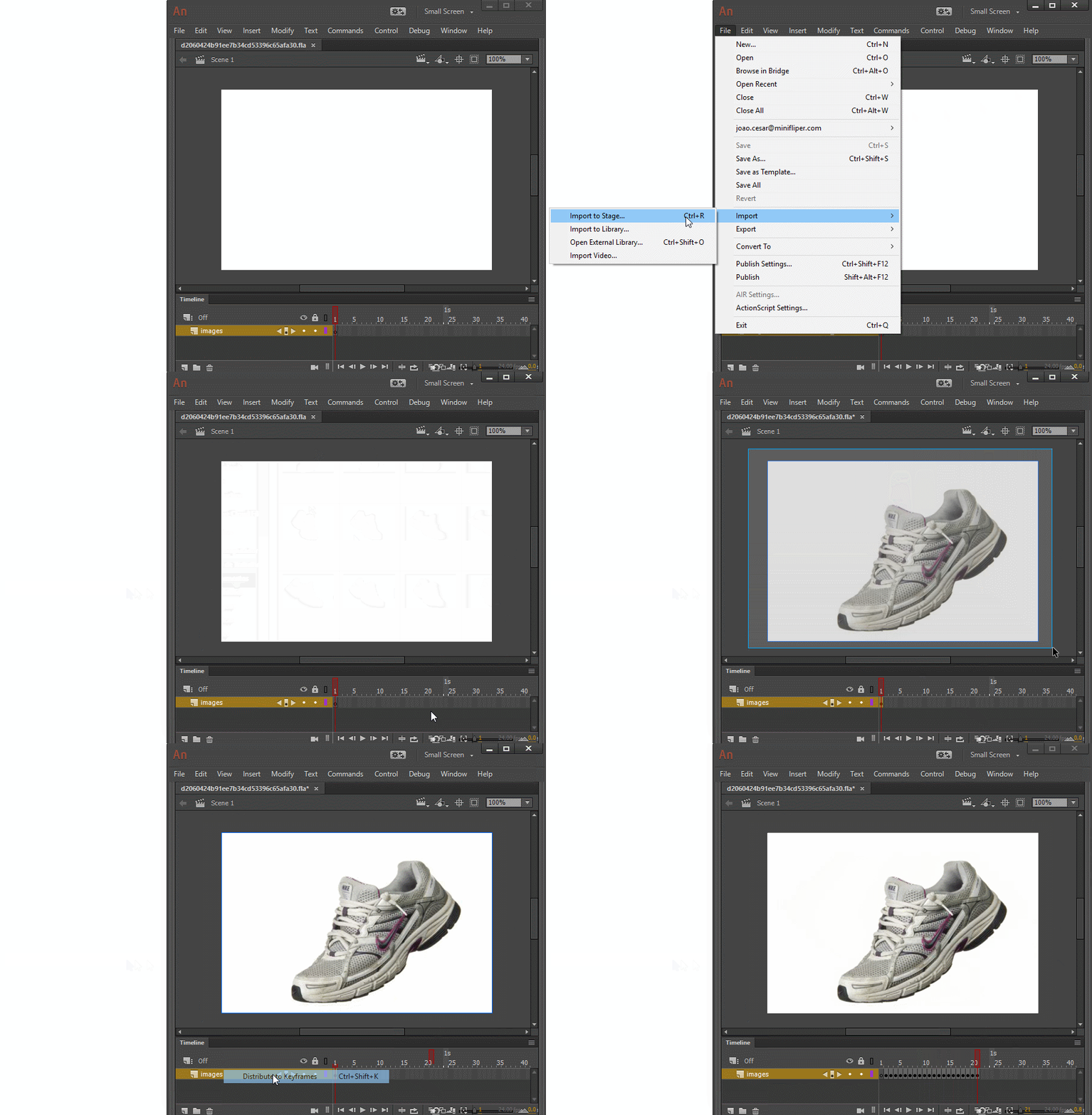
And just for reference, I'll leave this gifs here in case some search engine adventurer drop in this thread with the same doubts.

Images to keyframes

Image sequence

Regards,

JC

12 replies

gabriellaj
Participant
Sep 2, 2020 8:02 AM UTC

Thanks for these! Unfortunately when I try to do either of these methods, exactly as you demonstrate in the gifs, I just get the first png pasted on one keyframe (even after selecting yes to "Do you want to import all images in the sequence?"). Then when I select the image, right click and select "Distribute to keyframes", it just adds one empty keyframe in front of the one with the single image on it. GIF added for demonstration. Anyone know what might be the problem here? 

Translate
JoãoCésar17023019
Community Expert
Community Expert
Sep 2, 2020 4:40 PM UTC

Hi.


I'm really not sure of what's going on.


Does this happen with any images sequence?

Translate
Participant
Apr 10, 2022 11:43 AM UTC

thanks for your active helping. ı am very new at animate cc and when i have used  ctrl + r and selected all pictures these showed up as nested each other in one keyframe. also  i am Windows user.  

Translate
Participant
Dec 17, 2019 7:57 PM UTC

(Im super new to this awesome app) Hello Joao Cesar, one more question about this topic: how to export this animated sequence for online stores website (as exmpl)? and what type of the files should I use/select for it?
Thank you in advanse!  

Translate
Participating Frequently
Nov 28, 2018 7:43 PM UTC

These anwsers with video gifs are amazingathanks

Translate
JoãoCésar17023019
Community Expert
Community Expert
Dec 27, 2017 10:52 PM UTC

Hi.

It's because you have to import the images to the stage first (Ctrl + R) and there you can select them all, right-click them and then choose Distribute to keyframes.

Optionally, if your files are named sequentially (ex.: image001, image002, and so on) you just have to select the first one and Animate will prompt you if you want to import the images as a sequence.

Translate
spicy_L
spicy_LAuthor
Participant
Dec 28, 2017 5:37 AM UTC

EDIT: oh, nevermind! the issue has been fixed. thanks for your help!

if i import them to the stage then they are all pasted onto one keyframe. also, my files are named sequentially, but animate never gave me the option to import them as a sequence. (i select all from my files and click import, and it gives me a progress bar on how much has been loaded to the library. then it loads. nothing else happens.)

Translate
JoãoCésar17023019
Community Expert
JoãoCésar17023019Community ExpertCorrect answer
Community Expert
Dec 28, 2017 6:28 AM UTC

Nice! You're welcome!

And just for reference, I'll leave this gifs here in case some search engine adventurer drop in this thread with the same doubts.

Images to keyframes

Image sequence

Regards,

JC

Translate