
Participant
July 13, 2018
Answered

Importing images greyed out (jpeg, png, etc.)

  • July 13, 2018
  • 2 replies
  • 4092 views

When I go to File-> Import to Stage(or Import to Library) and go to select an image from my computer, all .jpg and .png files are greyed out so I am unable to select them.  I am able to drag and drop them into the Library from my Desktop but I would like to know why the menu Import isn't functioning correctly.

According to the Animate documentation, both .jpg and .png files are supported for import.  If it makes any difference I am trying this on a Mac.

Any help would be most appreciated!
This topic has been closed for replies.
Correct answer _keyframer

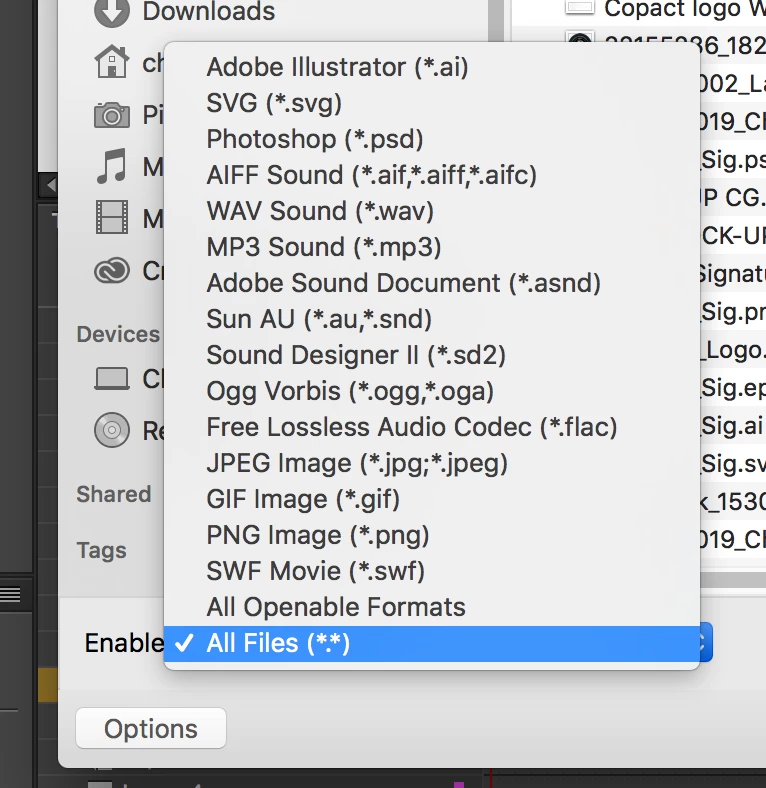
Make sure All files (*.*) is selected in the bottom left of the import window (click Options).

2 replies

_keyframer
Community Expert
_keyframerCommunity ExpertCorrect answer
Community Expert
July 13, 2018

Make sure All files (*.*) is selected in the bottom left of the import window (click Options).

Animator and content creator for Animate CC
Participant
July 13, 2018

Awesome thank you!  This worked!

Community Expert
July 13, 2018

Can you post some screenshots so we can see the problem?

Participant
July 13, 2018

_keyframer's solution worked, thank you for asking and your willingness to help!